How I Automated My Metallurgical Microscope
TL;DR
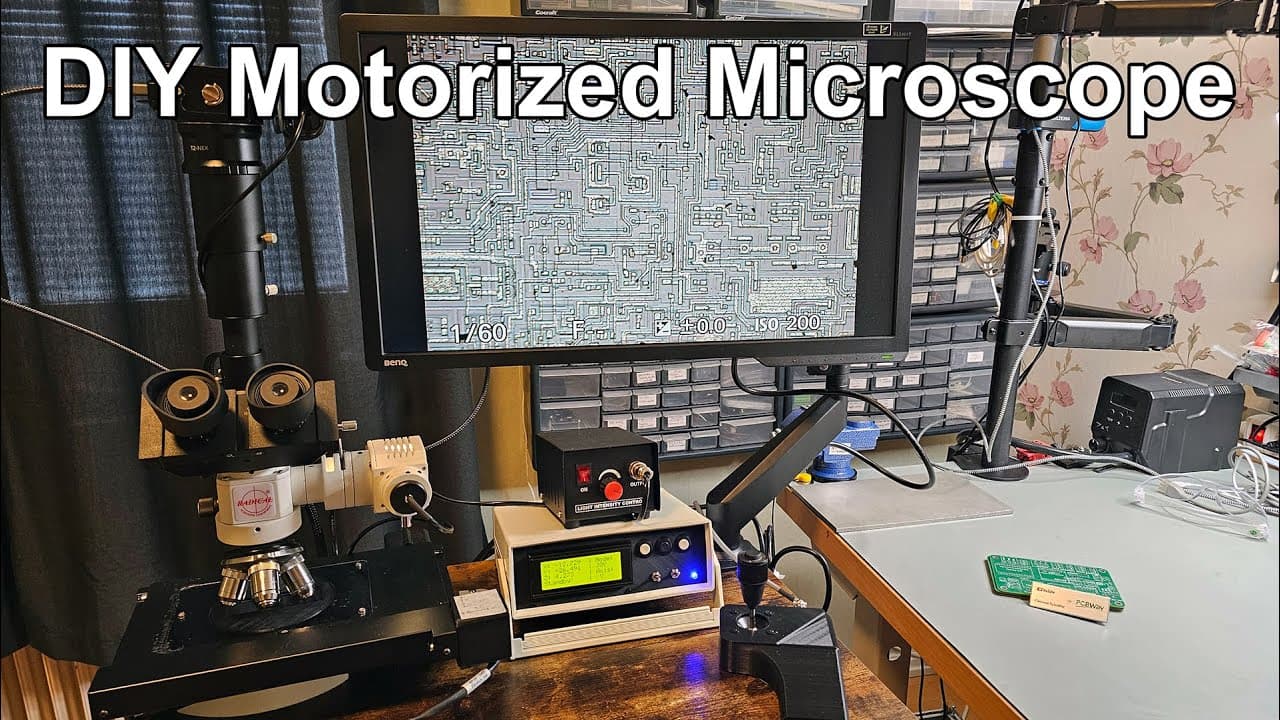
A complete demonstration of a motorized microscope with control features and assembly details.
Transcript
this video is sponsored by pcbway welcome everyone in this video I'm going to show you the final condition of my motorized microscope so in the previous video I showed you that I assembled the circuit to control the microscope and I showed you the basic principles of it and how it operates but not everything was uh finished in a way I wanted to so ... Read More
Key Insights
- 👻 The motorized microscope features a complex control system, allowing precise movements along multiple axes for enhanced specimen observation.
- 🕹️ The implementation includes readily available components such as steppers, joysticks, and standard LCDs, making it an approachable project for hobbyists.
- 👤 By utilizing an RGB LED indicator and a user-friendly interface, the system communicates operational status clearly to users.
- 🚄 The presenter emphasizes the importance of tuning movement speeds for accurate focusing, particularly in visualizing intricate details at high magnifications.
- 🧘 Technical challenges such as rounding errors in position measurements illustrate the importance of calibration and testing in achieving desired accuracy levels.
- 👤 Options for mode switching (joystick, button, USB) enhance operational flexibility, adapting to varying user preferences and needs.
- 🥳 The design approach incorporates 3D printing for custom parts, showcasing the integration of modern fabrication methods in DIY projects.
Install to Summarize YouTube Videos and Get Transcripts
Explore YouTube Video Summarizer or Get YouTube Transcript Extractor
Questions & Answers
Q: What are the main components of the motorized microscope system?
The motorized microscope system primarily consists of an optical microscope, a motorized XY stage, a motorized Z-axis, a controller box with LCD, buttons, and a joystick. The system is built for precise movements and adjustments, making it suitable for detailed inspections and analysis.
Q: How does the joystick control the microscope?
The joystick enables intuitive control over the microscope's movement. By moving the joystick in different directions, users can manipulate the X, Y, and Z axes. A speed modifier can also be activated, allowing for faster or slower navigation depending on the mode selected, facilitating accurate focusing and specimen inspection.
Q: Can the microscope be controlled via USB?
Yes, the motorized microscope offers multiple control modes, including USB control. This functionality enables users to send specific commands directly to the microscope via a computer, making it adaptable for various applications, particularly for automated processes or programming specific movements.
Q: What challenges did the presenter face when calibrating the system?
During calibration, the presenter encountered discrepancies between the expected and actual movement measurements of the microscope's axes. Factors such as rounding errors in calculations and the physical setup of measurement tools contributed to minor inaccuracies, which were ultimately deemed acceptable given the context of microscopy.
Q: What kind of display is used in the controller box?
The controller box utilizes a simple 2004 LCD display, chosen for its ease of programming and visibility. This display provides real-time information about the positions of the X, Y, and Z axes as well as the current operational modes, ensuring that users can monitor the system effectively during use.
Q: How is the motorized Z-axis implemented in the microscope?
The motorized Z-axis is powered by a stepper motor that rotates a knob, adjusting the focus of the microscope. A gear attached to the knob allows for a greater torque and precision, enabling fine adjustments. The stepper motor's performance is crucial for achieving the required focus while observing small specimens.
Q: What recommendation does the presenter give for users wanting to replicate this project?
The presenter recommends visiting the PCBWay website to acquire the associated PCB used in the project. He provides detailed instructions and component lists for assembly while encouraging users to apply their own programming skills to customize the software for personal needs.
Q: How does the presenter ensure the precision of the microscope's movement?
The presenter tests and verifies the stage's movements using a dial gauge, comparing the display output to actual measurements. He demonstrates that the discrepancies in movement precision are minor and acceptable, thus confirming the system’s overall reliability and accuracy during operation.
Summary & Key Takeaways
-
This video provides a comprehensive overview of a fully assembled motorized microscope, highlighting its motorized XY and Z-axis stages, and the integration of various electronic components for control.
-
Key features include a joystick for navigation, an LCD display for information, and the ability to switch between joystick, button, and USB control modes for operating the microscope effortlessly.
-
The presenter emphasizes the precision of the system and discusses the custom electronics involved while also inviting viewers to check the PCB design used for this project.
Read in Other Languages (beta)
Share This Summary 📚
Summarize YouTube Videos and Get Video Transcripts with 1-Click
Try YouTube Summary with ChatGPT & Claude or YouTube Transcript Generator
Explore More Summaries from Curious Scientist 📚


![Building a coil winder [Part 6] - A few improvements thumbnail](/_next/image?url=https%3A%2F%2Fi.ytimg.com%2Fvi%2F3eyxG_g2iUA%2Fhqdefault.jpg&w=750&q=75)
Summarize YouTube Videos and Get Video Transcripts with 1-Click
Try YouTube Summary with ChatGPT & Claude or YouTube Transcript Generator