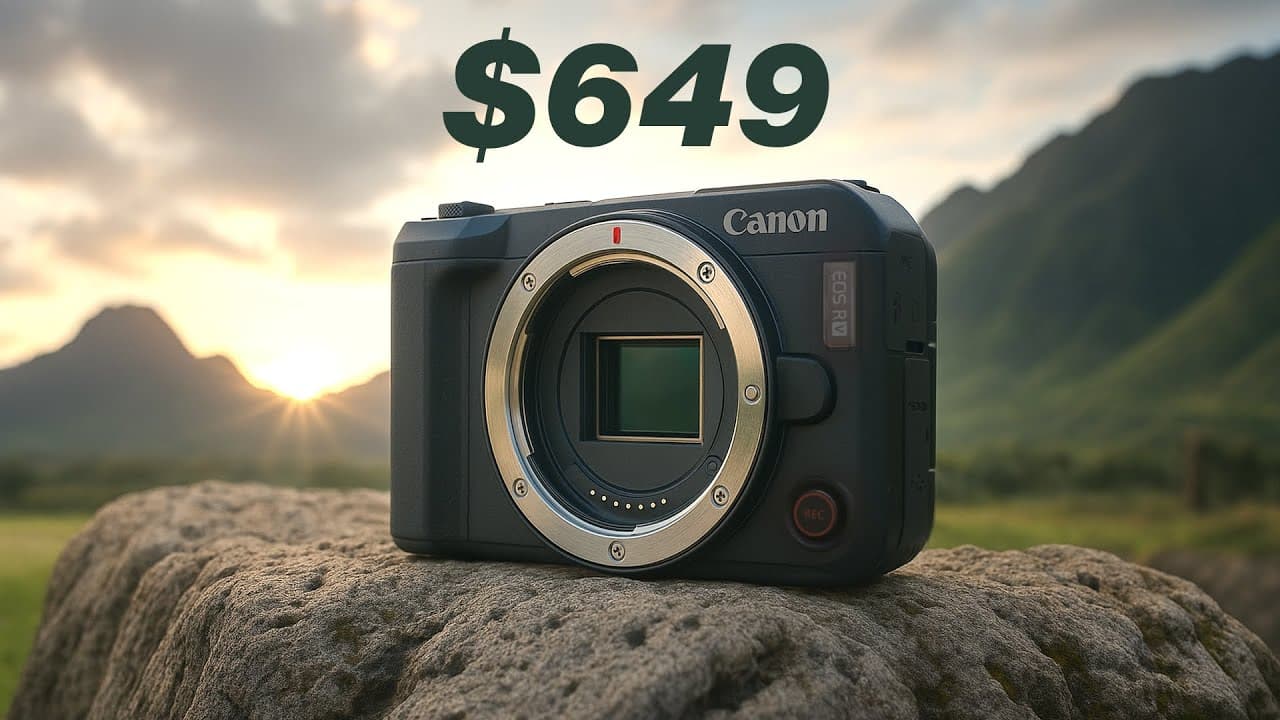
Is the $649 Canon R50V the Best Budget YouTube Camera for Creators?
TL;DR
The Canon R50V is a strong budget YouTube camera, offering oversampled 4K video, reliable creator controls, vertical mounting, and 10-bit Canon Log 3 for $650. Its main tradeoffs are no in-body image stabilization, shakier handheld footage, electronic stabilization that crops the image, and a 1.56x crop when recording 4K at 60 frames per second. Read on to see which creators benefit most.
Transcript
Canon just dropped a $650 mirrorless camera and it might just be the best budget YouTube camera that we've seen in a while. It's packed with a bunch of prolevel features such as vertical shooting, log video, all at a budget friendly price. You got to just press record. Welcome back to Think Media Nate here. Now, Canon flew me out as well as a bunch... Read More
Key Insights
- The Canon R50V is a $650 video-focused mirrorless camera with interchangeable lenses, a compact body, and a lightweight design. Removing features such as an electronic viewfinder helps reduce its size, weight, and price while keeping its physical controls centered on video production.
- The camera records 4K video oversampled from its 6K sensor output, producing a sharper and more detailed image. It can also record 4K at 60 frames per second, but that mode applies a significant 1.56x crop that requires wider framing or additional distance.
- Canon Log 3 is available with 10-bit video quality, giving editors considerable dynamic range for color grading and stylized looks. Creators who prefer finished results without extensive grading can instead use built-in picture profiles, color filters, or LUTs burned directly into recorded footage.
- Vertical production is supported by a quarter-20 side mount that lets the camera attach vertically to a tripod. This orientation is useful for Shorts, Instagram Reels, and vertical livestreams, while the same mounting point may also accommodate compatible accessories.
- The R50V lacks in-body image stabilization, making handheld and walking footage noticeably shaky. Electronic stabilization is available but crops the image, so creators who need steadier footage should pair the body with an image-stabilized lens, such as the included 14–30mm kit lens.
- The 14–30mm F4–6.3 kit lens provides a reasonably wide view, optical stabilization, and smooth power zoom operation. Its relatively dark aperture limits low-light performance, although the interchangeable-lens design allows users to substitute a faster Sigma 16mm F1.4 or 18–50mm F2.8 lens.
- Autofocus performance is reliable and straightforward, allowing the operator to select an object and maintain focus confidently when appearing on camera. During the reviewer’s limited testing, the system consistently kept the presenter sharp and made subject selection clear and easy.
- Battery life is rated at up to two hours, so extended production days may require several batteries. Heat was not a problem during several days of outdoor testing in Hawaii, although the reviewer had not yet conducted an hours-long stress test.
- "Canon just dropped a $650 mirrorless camera and it might just be the best budget YouTube camera that we've seen in a while." (0:00)
- "This camera is also capable of shooting 60 frames per second in 4K, although there is a crop of 1.56x in this mode." (3:08)
- "Now, this camera does not have inbody image stabilization, which may be disappointing for some, but for the price point, it is understandable that it does not have it." (4:48)
- "So, for those needing stable footage, you will want to pair this camera with an image stabilized lens." (5:17)
Install to Summarize YouTube Videos and Get Transcripts
Explore YouTube Video Summarizer or Get YouTube Transcript Extractor
Questions & Answers
Q: Is the Canon R50V a good budget camera for YouTube?
Yes. At $650, the Canon R50V combines interchangeable lenses, oversampled 4K video, 10-bit Canon Log 3, vertical mounting, and dedicated video controls, making it a strong budget option for YouTube creators.
Q: What video quality does the Canon R50V offer?
The Canon R50V records 4K video oversampled from its 6K sensor output, resulting in a slightly sharper and more detailed image. It also supports 4K at 60 frames per second, but that mode applies a significant 1.56x crop.
Q: Does the Canon R50V have image stabilization?
The Canon R50V does not have in-body image stabilization. Electronic image stabilization is available, but it crops the footage, while the included 14 to 30 mm kit lens provides image stabilization.
Q: Is the Canon R50V suitable for vlogging?
The camera is lightweight, compact, and compatible with a 14 to 30 mm kit lens designed as a practical vlogging option. However, handheld and walking footage can appear quite shaky because the body lacks image stabilization, so an image-stabilized lens is recommended.
Q: Can the Canon R50V record vertical videos?
Yes. A quarter-20 mount on the side allows the camera to attach vertically to a tripod for Shorts, Instagram Reels, and vertical livestreams, and the mount can also hold accessories.
Q: What color grading features does the Canon R50V include?
The camera records 10-bit log video using Canon Log 3, providing substantial dynamic range for color grading and stylized looks. It also offers picture profiles, color filters, false color, cinematic aspect ratios, and the ability to burn LUTs into the video file.
Q: What creator-focused controls are built into the Canon R50V?
The Canon R50V has a front record button, a dedicated livestream button, and a color button for picture profiles, filters, custom picture styles, and Canon Log. Its video-focused control dial includes slow-motion, fast-motion, time-lapse, and customizable modes.
Q: What sensor and lens come with the Canon R50V?
The camera uses a 24-megapixel APS-C sensor designed to support low-light shots and shallow depth of field. Its kit includes a new 14 to 30 mm interchangeable lens with image stabilization.
Summary & Key Takeaways
-
The Canon R50V is a compact, lightweight mirrorless camera designed primarily for video creators. Its dedicated recording, livestream, color, slow-motion, fast-motion, and custom controls simplify common production tasks. A side quarter-20 mount also supports native vertical tripod positioning for Shorts, Instagram Reels, and vertically oriented livestreams.
-
Its 24-megapixel APS-C sensor produces 4K footage oversampled from 6K, while 10-bit Canon Log 3 provides substantial flexibility for color grading. Creative tools include false color, cinematic aspect ratios, color filters, and LUT embedding. The camera also offers impressive autofocus that reliably tracks a presenter or selected object.
-
The major compromises involve stabilization, cropping, battery endurance, and the kit lens. There is no in-body image stabilization, and electronic stabilization crops the picture. The 4K 60 fps mode adds a 1.56x crop, while the 14–30mm F4–6.3 kit lens limits low-light performance. Spare batteries and a faster lens may be necessary.
Read in Other Languages (beta)
Share This Summary 📚
Summarize YouTube Videos and Get Video Transcripts with 1-Click
Try YouTube Summary with ChatGPT & Claude or YouTube Transcript Generator
Explore More Summaries from Think Media 📚





Summarize YouTube Videos and Get Video Transcripts with 1-Click
Try YouTube Summary with ChatGPT & Claude or YouTube Transcript Generator