Create Your Own AI Art Model with Open Art's Photobooth! (NO CODE BEST DREAMBOOTH)
TL;DR
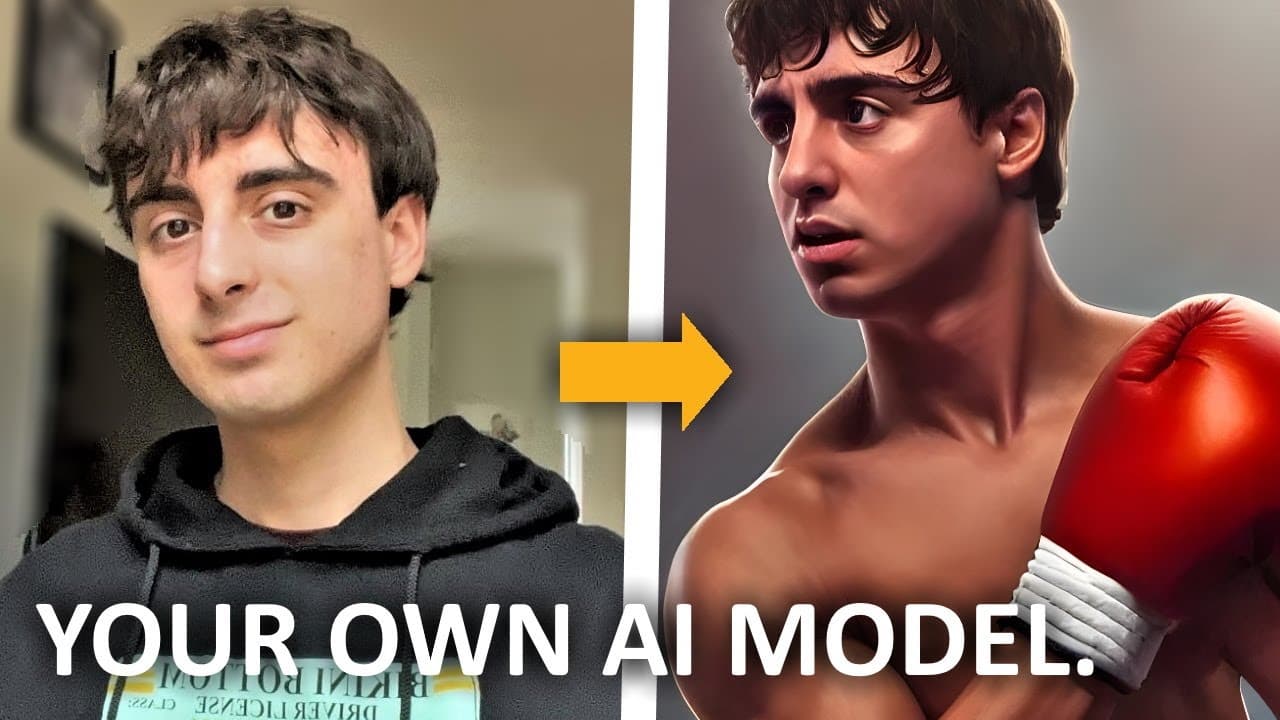
Open Art’s Photobooth lets beginners create a custom, no-code DreamBooth AI model from photos of a person, pet, character, object, or art style. The presenter demonstrates a model trained on his own appearance and explains how category-based setup streamlines training for uses such as personalized portraits, pet scenes, fan art, and consistent pixel art. Read on to understand how Photobooth works and what you can create with it.
Transcript
hello all of you fantastic viewers and welcome back to another video not too long ago on this channel I made a video on Google's dream Booth this is open source research on AI that they did and it's a really great technology for text to image generator AIS such as stable diffusion it essentially allows you to take a series of photos of a person pet... Read More
Key Insights
- 🥰 Open Art's Photo Booth is a user-friendly AI tool for generating customized images based on various prompts, including people, pets, characters, art styles, and objects.
- 🥰 The tool offers distinct capabilities, such as generating images of specific characters, training the AI model on personalized art styles, and even creating images of pets in unique scenarios.
- 💄 Preset packages in Open Art's Photo Booth provide additional options and enhancements for generating images, making it easier to achieve specific themes or styles.
- 🚄 The tool allows for easy uploading of images and provides guidelines for capturing diverse and high-quality input photos for training the AI model.
- 👣 Open Art's Photo Booth also offers upscaling options for improving the resolution and quality of the generated images, making them suitable for various purposes, including animations or print.
- 😑 The AI models trained in Open Art's Photo Booth can produce coherent and visually appealing images, capturing the specific features, poses, and expressions of the input photos.
- 🧡 The tool is ideal for beginners in the AI Art space as it simplifies the process of generating AI art and provides a wide range of options and categories to explore.
Install to Summarize YouTube Videos and Get Transcripts
Explore YouTube Video Summarizer or Get YouTube Transcript Extractor
Questions & Answers
Q: How do you create your own AI art model with Open Art’s Photobooth?
Open the Open Art website, click the large Photobooth button, and choose whether you want to create photos for a person, pet, character, art style, object, or another subject. You then provide a series of relevant photos so Photobooth can train a custom AI model around that subject.
Q: What is Open Art’s Photobooth?
Photobooth is Open Art’s implementation of DreamBooth, designed to make custom AI model training seamless and simple. It can learn from photos of a person, pet, object, character, or style and generate new images based on them.
Q: Does Open Art’s Photobooth require coding experience?
The demonstrated workflow takes place through the Open Art website and begins by clicking the Photobooth button and selecting a category. The presenter describes it as a particularly good starting point for beginners in the AI art space.
Q: What kinds of AI models can you train with Photobooth?
Photobooth provides categories for a person, pet, character, art style, object, and other subjects. These categories streamline the DreamBooth process around the particular type of images you want to generate.
Q: Can Open Art’s Photobooth create AI images of a person?
Yes. The presenter trained a model on himself, and the generated portraits reproduced recognizable details such as his hair, face shape, skin tone, and eye color. Examples portrayed him in a suit, as Napoleon Bonaparte, as an action hero, and as an evil demon clown.
Q: Can Photobooth generate new images of a pet?
Yes. Users can select the pet category and train a model from photos of their pet. The presenter suggests imaginative results such as portraying a pet as a pirate or driving a Mercedes down the highway.
Q: Can Photobooth train a model on a specific fictional character?
Yes. A user can train a DreamBooth model on a specific character that ordinary AI generators struggle to reproduce accurately. That trained character can then appear in different scenes for custom fan art.
Q: Can Open Art’s Photobooth reproduce a consistent art style?
Yes. Photobooth can be taught a particular art style, including the user’s own style, and then generate images that consistently follow it. The presenter highlights pixel art as a useful example for video-game items that need to match one another.
Summary & Key Takeaways
-
Open Art's Photo Booth is an AI tool that utilizes the concept of Google's dream Booth to generate new images based on a series of photos.
-
The tool offers distinct capabilities for generating images of people, pets, characters, art styles, objects, and more.
-
Users can train their own AI models and create customized prompts to generate unique and coherent images.
Read in Other Languages (beta)
Share This Summary 📚
Summarize YouTube Videos and Get Video Transcripts with 1-Click
Try YouTube Summary with ChatGPT & Claude or YouTube Transcript Generator
Explore More Summaries from MattVidPro AI 📚
Summarize YouTube Videos and Get Video Transcripts with 1-Click
Try YouTube Summary with ChatGPT & Claude or YouTube Transcript Generator