How to Maximize Your Notion Daily Planner
TL;DR
Optimize your Notion daily planner by effectively managing tasks and incorporating the Highlight method to prioritize daily activities. Customize your workflow to promote flexibility, allowing you to schedule and adjust tasks based on your preferences for increased productivity.
Transcript
foreign let's get started so kind of embarrassing how excited I am about this small trick I came up with but check it out every Monday morning I change this to a table View and on archive the previous week's achievements by just checking these boxes go back to gallery view and now I can start planning for a new day seamlessly that's kind of cool ri... Read More
Key Insights
- 👻 Notion daily planner allows for seamless task management and planning.
- 👻 Flexibility is prioritized, allowing tasks to be moved and organized based on individual preferences.
- 🥳 The Highlight method ensures that users focus on something meaningful or enjoyable each day.
Install to Summarize YouTube Videos and Get Transcripts
Explore YouTube Video Summarizer or Get YouTube Transcript Extractor
Questions & Answers
Q: How does the daily task section work in the Notion daily planner?
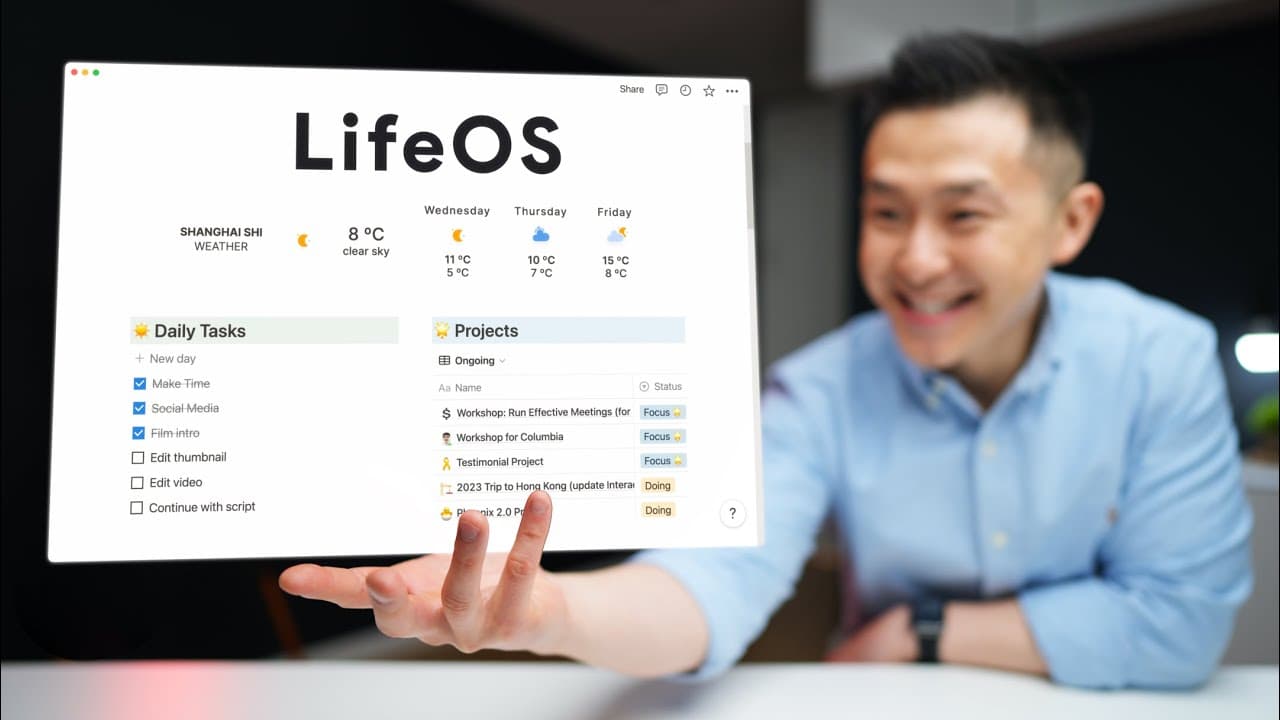
In the daily task section, completed tasks from the previous day are moved to a completed tasks page. By clicking the new day template button, four default tasks are automatically populated, and users can customize them. The daily tasks are complemented by the seven-day view and tasks from ToDoist.
Q: Can tasks be moved around in the Notion daily planner?
Yes, tasks in the Notion daily planner can be easily moved around. The flexibility allows users to prioritize tasks based on personal preferences and needs. ToDoist is used as a quick capture tool, and Notion is used to organize the captured tasks.
Q: What is the purpose of the make time section in the Notion daily planner?
The make time section focuses on the "Highlight" method, which involves selecting something enjoyable or meaningful to do each day. By creating a corresponding calendar event, the planner ensures that time is dedicated to the highlight, even if other tasks are not completed.
Q: How are projects and the seven-day view related in the Notion daily planner?
In the project section, a database view shows completed, ongoing, and focus projects. The seven-day view is connected to the all tasks database and displays tasks related to specific projects. The setup allows for easy tracking of project tasks over a week.
Key Insights:
- Notion daily planner allows for seamless task management and planning.
- Flexibility is prioritized, allowing tasks to be moved and organized based on individual preferences.
- The Highlight method ensures that users focus on something meaningful or enjoyable each day.
- Project management is simplified by connecting projects to a seven-day view of tasks in Notion.
Summary & Key Takeaways
-
The content provides a detailed explanation of a Notion daily planner setup, including a weather widget, make time database, projects, and a seven-day view of upcoming tasks.
-
The daily tasks section is used to plan out the day, with default tasks and the ability to move tasks around based on preferences.
-
The make time section emphasizes the "Highlight" method and the importance of planning around that highlight for a sense of accomplishment.
Read in Other Languages (beta)
Share This Summary 📚
Summarize YouTube Videos and Get Video Transcripts with 1-Click
Try YouTube Summary with ChatGPT & Claude or YouTube Transcript Generator
Explore More Summaries from Jeff Su 📚






Summarize YouTube Videos and Get Video Transcripts with 1-Click
Try YouTube Summary with ChatGPT & Claude or YouTube Transcript Generator