How Do You Build AI Agents Without Coding Using n8n?
TL;DR
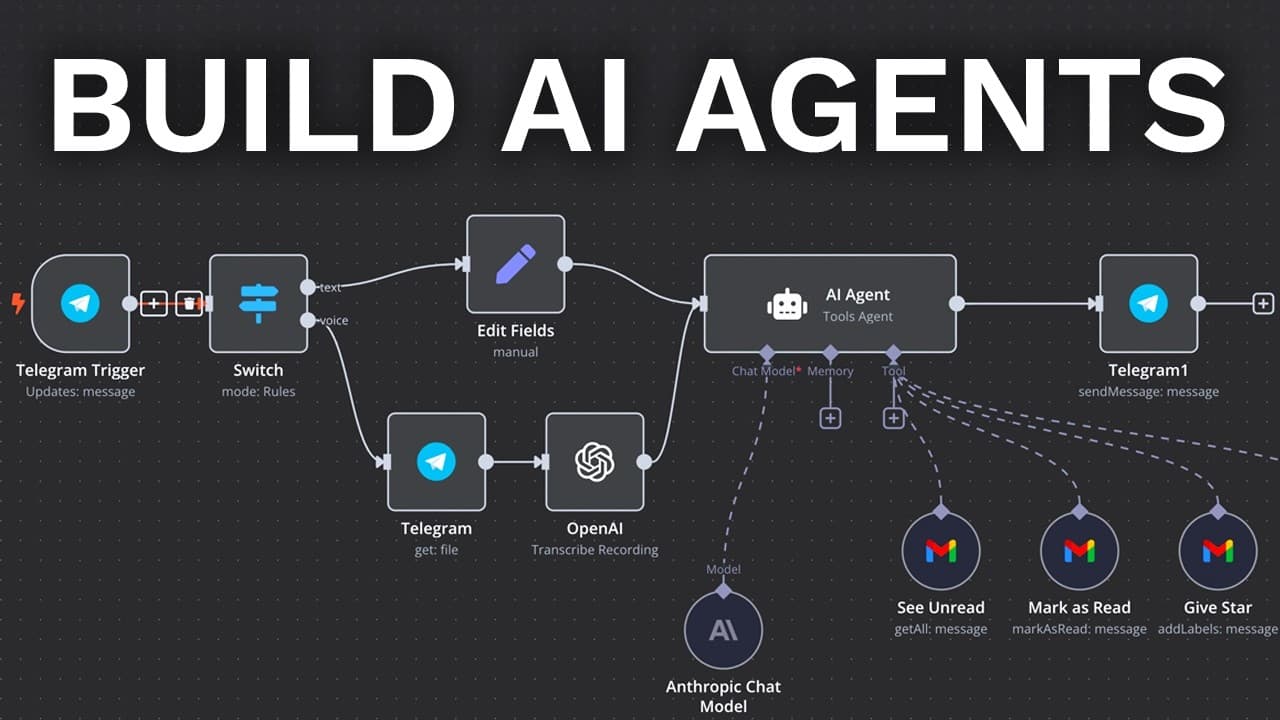
You can build an AI agent without coding by creating an n8n workflow, choosing a trigger, and configuring each block with tested data. The walkthrough connects a Telegram bot, routes text and voice messages through two switch paths, and uses the voice message’s file ID to identify audio input. Read on for the exact setup sequence and practical testing guidance.
Transcript
my name is David Andre and in this video I'm going to teach you how to build AI agents even if you're a complete beginner the popularity of AI agents is absolutely exploding it's clear that 2025 will be the year of AI agents but just like with internet and Bitcoin most people are going to miss out so don't be one of them watch until the end and sta... Read More
Key Insights
- n8n is a no-code tool for building AI agents, making it accessible to non-programmers.
- AI agents can be triggered by various events, such as messages from apps like Telegram.
- n8n supports integration with AI models, including OpenAI and Anthropic, for advanced functionalities.
- The tool allows incorporation of external services like Gmail and Google Calendar for comprehensive automation.
- Testing each step in the automation process is crucial to ensure the AI agent functions correctly.
- AI agents can read, summarize, and respond to emails, enhancing productivity.
- Google Calendar integration enables AI agents to manage and create calendar events efficiently.
- n8n offers a wide range of integrations, allowing AI agents to perform complex tasks across various platforms.
Install to Summarize YouTube Videos and Get Transcripts
Explore YouTube Video Summarizer or Get YouTube Transcript Extractor
Questions & Answers
Q: How do you build an AI agent without coding?
Create a new workflow in n8n, which David Andre describes as a no-code tool that anyone can use without being a programmer. Choose what will trigger the automation, connect the relevant account, configure the workflow blocks, and test each step with real input.
Q: How do you start a new workflow in n8n?
Go to n8n.io, click “Get started for free,” and log in. From the dashboard, click “Open” to view your workflows, then select “Create new workflow.”
Q: What triggers can start an n8n automation?
The demonstrated options include a manual trigger, an app event, a schedule such as every day or every hour, and a webhook call. The transcript also mentions possible inputs from Telegram, WhatsApp, Google Sheets, and Slack messages.
Q: How do you create a Telegram trigger in n8n?
Add Telegram as the trigger and choose “On message.” Create a new credential, obtain an access token by creating and managing a Telegram bot through BotFather, paste the token into n8n, and save it.
Q: How do you verify that the Telegram trigger works?
Click “Test step” so n8n listens for a test event, then send a message to the connected Telegram bot. In the demonstration, sending “hello world” made the text appear in n8n, confirming that the trigger recognized the message.
Q: How can an n8n AI agent accept both text and voice messages?
Add a switch after the Telegram trigger and configure two routes: one for text and one for voice. The text route checks whether the text value exists, while the voice route checks whether the audio file ID exists.
Q: Why should you test every step while building the workflow?
Testing produces sample data that can be used to configure the next block. David recommends dragging the actual field into place because this helps ensure the wiring works, instead of simply copying and pasting code from the demonstration.
Q: How do you pass a Telegram text message into the next n8n step?
Connect the text route to an “Edit Fields” block and add a field named “text.” After running another test message, drag the incoming Telegram text value into that field.
Summary & Key Takeaways
-
Build AI agents without coding using n8n by setting up triggers and connecting AI models. Integrate tools like Gmail and Google Calendar for comprehensive automation. Test each step to ensure proper functionality.
-
n8n provides a no-code solution for creating AI agents, making it accessible to those without programming skills. It supports various integrations, enabling agents to perform tasks like reading emails and managing calendars.
-
Enhance productivity with AI agents built on n8n by leveraging integrations with external services. Thorough testing ensures smooth operation, allowing agents to handle complex tasks efficiently.
Read in Other Languages (beta)
Share This Summary 📚
Summarize YouTube Videos and Get Video Transcripts with 1-Click
Try YouTube Summary with ChatGPT & Claude or YouTube Transcript Generator
Explore More Summaries from David Ondrej 📚

Summarize YouTube Videos and Get Video Transcripts with 1-Click
Try YouTube Summary with ChatGPT & Claude or YouTube Transcript Generator