How to Run AI Coding Agents From One Terminal
TL;DR
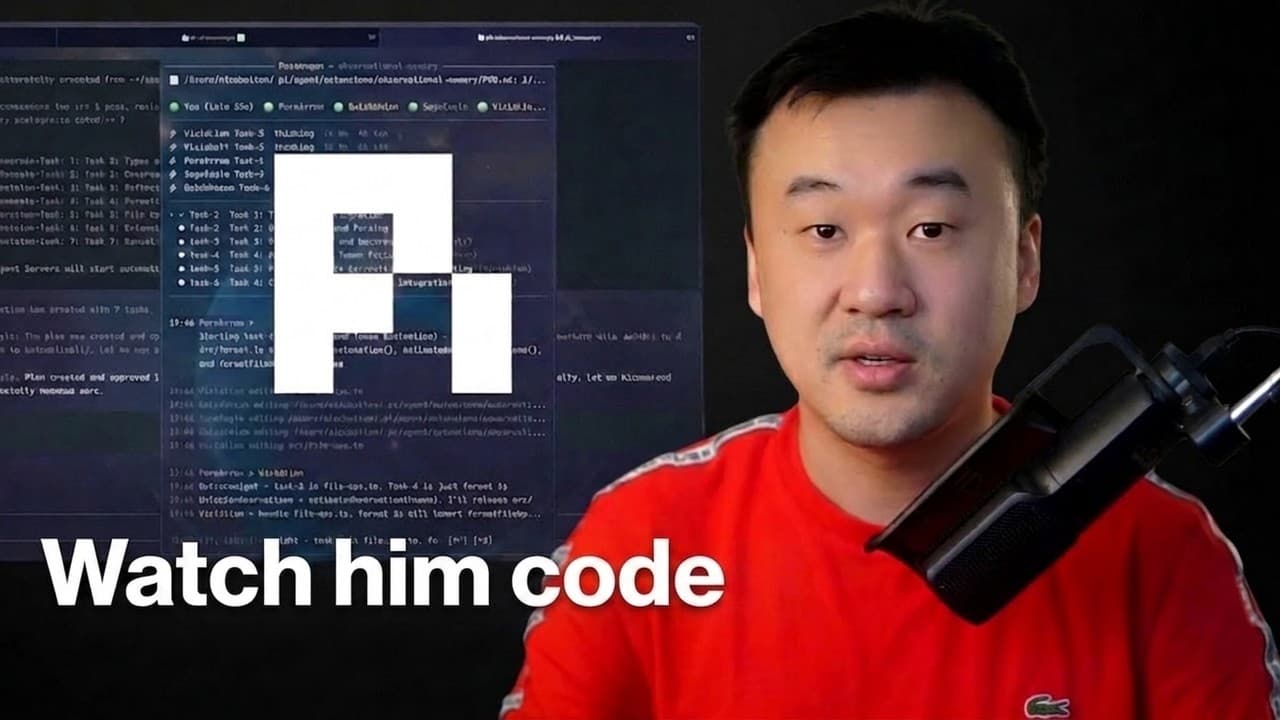
Use one primary agent to coordinate parallel coding agents instead of manually tracking dozens of terminal sessions. Kun Chen’s setup combines a customizable WezTerm window, Herder for agent-aware session management, and First Mate as the main interface, letting him organize projects, monitor agent status, and reconnect to the same Mac Mini session from a phone through SSH.
Transcript
I just have a frameless terminal window here. Uh this is using uh western. I I like western because it's really highly customizable. I can just like change everything about it. Uh what I have here is a herder session. Herder is kind of like a modern version of T-Max. I was using T-Max for like over 10 years and only recently discovered Herder and I... Read More
Key Insights
- Kun Chen’s development workflow is terminal-first, reflecting more than two decades of accumulated keyboard-based coding habits. He believes this approach helps maintain flow after the initial learning curve because navigation and development actions can be performed without repeatedly moving away from the keyboard.
- WezTerm provides the customizable visual foundation for the setup. Chen uses a frameless terminal window with no visible border, adds background blur, and adjusts its appearance to create a development environment that he finds visually pleasing while retaining a fully terminal-based workflow.
- Herder is a terminal session manager that Chen describes as a modern alternative to tmux. Unlike GUI-framed orchestration tools, it runs entirely inside the terminal, allowing the same persistent session on his Mac Mini to be accessed from a phone through an SSH connection.
- Herder recognizes AI agents rather than treating every activity as an ordinary terminal pane or tab. Its status display can show that an agent is still working, which tells Chen that no attention is required and reduces unnecessary checking while tasks run.
- Spaces in Herder function as workspaces for organizing separate projects and activities. Together with the agent list, they give Chen a structured way to navigate multiple ongoing sessions without relying solely on memory to understand what each terminal instance is doing.
- First Mate is the primary agent through which Chen manages his broader collection of sessions. He developed it because manually switching among 20 or 30 parallel agents forced him to remember each task, session, and state, creating an unsustainable coordination burden.
- AI coding assistance evolved for Chen from single-line completion to multi-line and whole-function suggestions, then to agents that could accept tasks and return complete results. He identifies the arrival of Sonnet 3.5 v2 as the point when task-oriented agent behavior became practically useful for his work.
- Code review is presented as a major bottleneck when agents generate thousands of lines of code. The sponsored segment says CodeRabbit combines repository context, linked issues, documentation, more than 40 linters and security scanners, and remembered review preferences to produce specific, actionable feedback.
Install to Summarize YouTube Videos and Get Transcripts
Explore YouTube Video Summarizer or Get YouTube Transcript Extractor
Questions & Answers
Q: How can one agent manage multiple AI coding sessions?
Kun Chen uses First Mate as the primary agent he communicates with, while First Mate manages the other active sessions. This arrangement shifts session tracking away from the developer, who would otherwise need to remember what every agent is doing. Chen says the approach emerged after manually juggling many parallel sessions became mentally difficult, and it now lets him focus mainly on one conversation.
Q: What tools are included in Kun Chen’s AI coding setup?
The demonstrated setup combines a frameless WezTerm window, Herder, First Mate, AI coding agents, a Mac Mini, and SSH access from a phone. WezTerm supplies the customizable terminal interface, Herder organizes spaces and agent sessions, and First Mate coordinates the supporting sessions. Chen presents the terminal as his primary development environment rather than relying on a conventional graphical coding interface.
Q: What is Herder in an AI coding workflow?
Herder is described as a modern terminal-based alternative to tmux for managing multiple sessions. Its distinctive feature is that it understands AI agents and can display whether an agent is working instead of treating everything merely as tabs, panes, or terminal windows. It also provides spaces for organizing projects and supports reconnecting to the same persistent terminal session through SSH.
Q: Why use Herder instead of tmux or a GUI application?
Chen prefers Herder because it runs entirely in the terminal, recognizes agent sessions, and reports their working status. A terminal session running on his Mac Mini can be reached from his phone through SSH while preserving the same environment. He contrasts this with GUI applications, where remote desktop access is possible but does not provide the same terminal-native experience he wants.
Q: How does First Mate reduce AI agent management overhead?
First Mate reduces overhead by serving as the single agent Chen talks to most of the time and by managing other sessions on his behalf. He built it after finding that 20 or 30 parallel agent sessions required constant tab switching and remembering the purpose and state of each one. The goal is to delegate coordination work as agents become more capable.
Q: Why does Kun Chen prefer a terminal-first workflow?
Chen prefers the terminal because he has developed keyboard-centered habits through more than two decades of coding there. He acknowledges an initial learning curve and a temporary productivity loss for unfamiliar users. Once those habits develop, he says keyboard shortcuts keep the hands on the keyboard and help thoughts flow without interruption from switching interaction styles.
Q: When did AI agents become useful for complete coding tasks?
Chen describes a gradual transition that began about three years earlier with GitHub Copilot completing individual lines, then expanded to multiple lines and whole functions. He identifies Sonnet 3.5 v2 as an inflection point because it could accept a task, perform the work, and return a complete set of results. Earlier experiments with GPT-3.5 and GPT-4 were less reliable for file editing.
Q: How can developers review large amounts of AI-generated code?
The discussion identifies reviewing thousands of AI-written lines as a bottleneck because faster generation does not remove the need to catch poor changes. In the sponsored segment, CodeRabbit is presented as a review system that uses repository context, linked issues, documentation, more than 40 linters and security scanners, and remembered preferences to produce specific feedback about changes, impact, and possible fixes.
Summary & Key Takeaways
-
Kun Chen describes a terminal-first development setup built around a frameless, customizable WezTerm window and Herder, a modern terminal session manager. Herder organizes projects into spaces, recognizes active AI agents, displays whether they are working or awaiting input, and preserves sessions that can be reached remotely through SSH.
-
The central workflow uses First Mate as the main agent that coordinates other agent sessions. Chen created it after finding that manually managing 20 or 30 parallel sessions required too much attention and memory. He now communicates mainly with First Mate and lets it track and manage the supporting agents.
-
Chen says his shift toward AI-written software happened gradually, beginning with GitHub Copilot suggestions and advancing to agents capable of completing whole tasks. He now rarely writes code manually. The discussion also stresses that reviewing large quantities of AI-generated code has become an important bottleneck alongside producing the code itself.
Read in Other Languages (beta)
Share This Summary 📚
Summarize YouTube Videos and Get Video Transcripts with 1-Click
Try YouTube Summary with ChatGPT & Claude or YouTube Transcript Generator
Explore More Summaries from David Ondrej 📚

Summarize YouTube Videos and Get Video Transcripts with 1-Click
Try YouTube Summary with ChatGPT & Claude or YouTube Transcript Generator