How to Insert Citations and Manage References in Word with EndNote X7
TL;DR
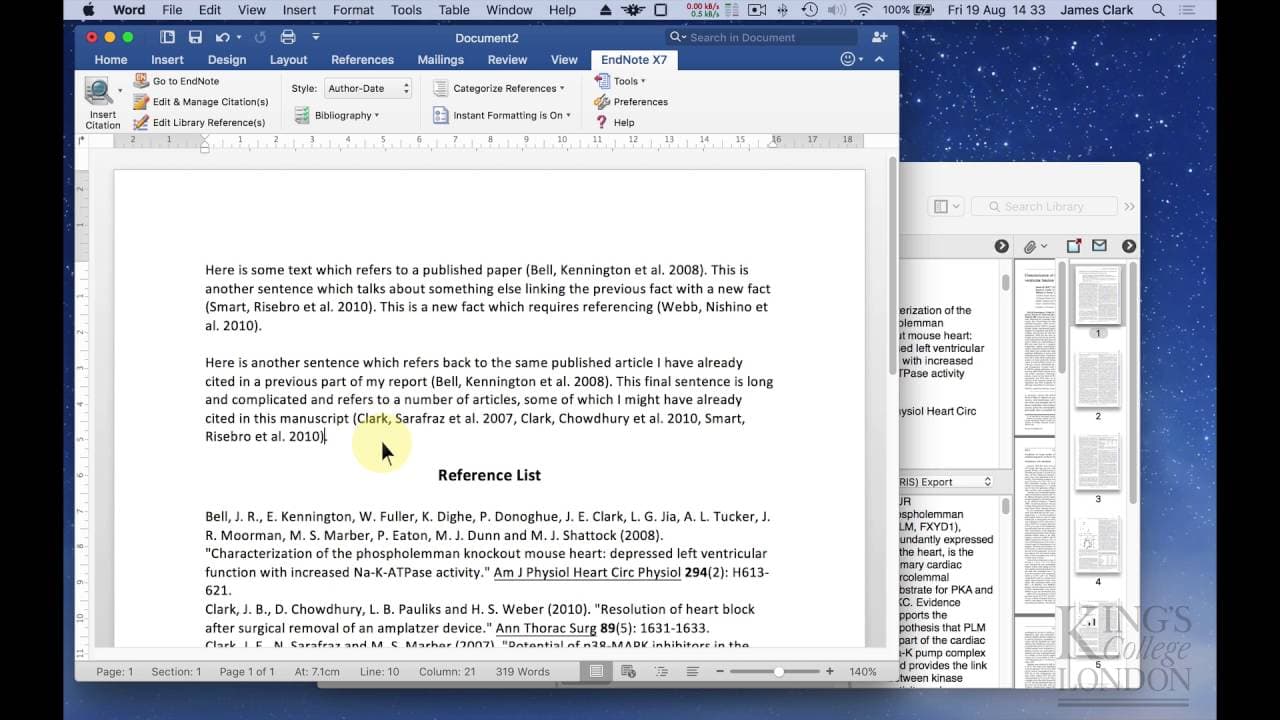
To insert citations and manage references in Microsoft Word using EndNote X7, utilize the EndNote menu in Word to insert citations directly from your database or search for references. You can easily change formatting styles and update your bibliography automatically or manually, depending on your computer's performance preferences.
Transcript
in this tutorial we're going to demonstrate how to insert citations and manage a bibliography or reference list in Microsoft Word using endnote X7 on the screen I have Microsoft Word 2016 loaded and in the background here I've Got endnote Loaded in endnote we've got the demonstration end note database that we created in a previous tutorial containi... Read More
Key Insights
- ❓ Endnote X7 simplifies the process of inserting citations and managing references in Microsoft Word.
- 🪜 The plugin adds a menu item in Microsoft Word for easy access to citation-related functions.
- 👨🔬 Citations can be inserted by selecting references from the Endnote database or by searching within it directly from within Microsoft Word.
- 💱 The formatting of references can be easily changed using different styles, including popular journal styles.
- 💻 Instant formatting can be turned on or off depending on computer performance.
- ❤️🩹 When instant formatting is turned off, citations and the reference list can be manually updated at the end of the document.
- ❓ Citations can be easily deleted and replaced using Endnote X7.
Install to Summarize YouTube Videos and Get Transcripts
Explore YouTube Video Summarizer or Get YouTube Transcript Extractor
Questions & Answers
Q: How does Endnote X7 simplify the process of inserting citations in Microsoft Word?
Endnote X7 simplifies the process by automatically adding a menu item in Microsoft Word, making it easy to insert citations, open Endnote, edit and manage citations, and change formatting styles.
Q: Can the formatting of the references be easily changed in Microsoft Word using Endnote X7?
Yes, the formatting style of references can be easily changed using the Endnote X7 plugin in Microsoft Word. It provides a list of popular journal styles, and additional styles can be downloaded from journal websites.
Q: How does Endnote X7 handle citations when instant formatting is turned off?
When instant formatting is turned off, Endnote X7 will insert the citation but it won't automatically update the reference list. However, you can manually update the citations and bibliography at the end of the document.
Q: Can citations be easily deleted and replaced in Microsoft Word using Endnote X7?
Yes, citations can be easily deleted and replaced in Microsoft Word using Endnote X7. Simply click on the citation and delete it, and then replace it with the correct reference. The reference list will automatically update.
Summary & Key Takeaways
-
This tutorial demonstrates how to insert citations and manage a bibliography or reference list in Microsoft Word using Endnote X7.
-
Endnote automatically adds a menu item in Microsoft Word for referencing purposes, with buttons for inserting citations, opening Endnote, editing and managing citations, and changing formatting styles.
-
Endnote allows for easy insertion of citations, with the ability to select references from the Endnote database or search within it directly from within Microsoft Word.
Read in Other Languages (beta)
Share This Summary 📚
Summarize YouTube Videos and Get Video Transcripts with 1-Click
Try YouTube Summary with ChatGPT & Claude or YouTube Transcript Generator
Explore More Summaries from Dory Video 📚






Summarize YouTube Videos and Get Video Transcripts with 1-Click
Try YouTube Summary with ChatGPT & Claude or YouTube Transcript Generator