How to Use DynamoDB Streams for Elasticsearch Data Replication
TL;DR
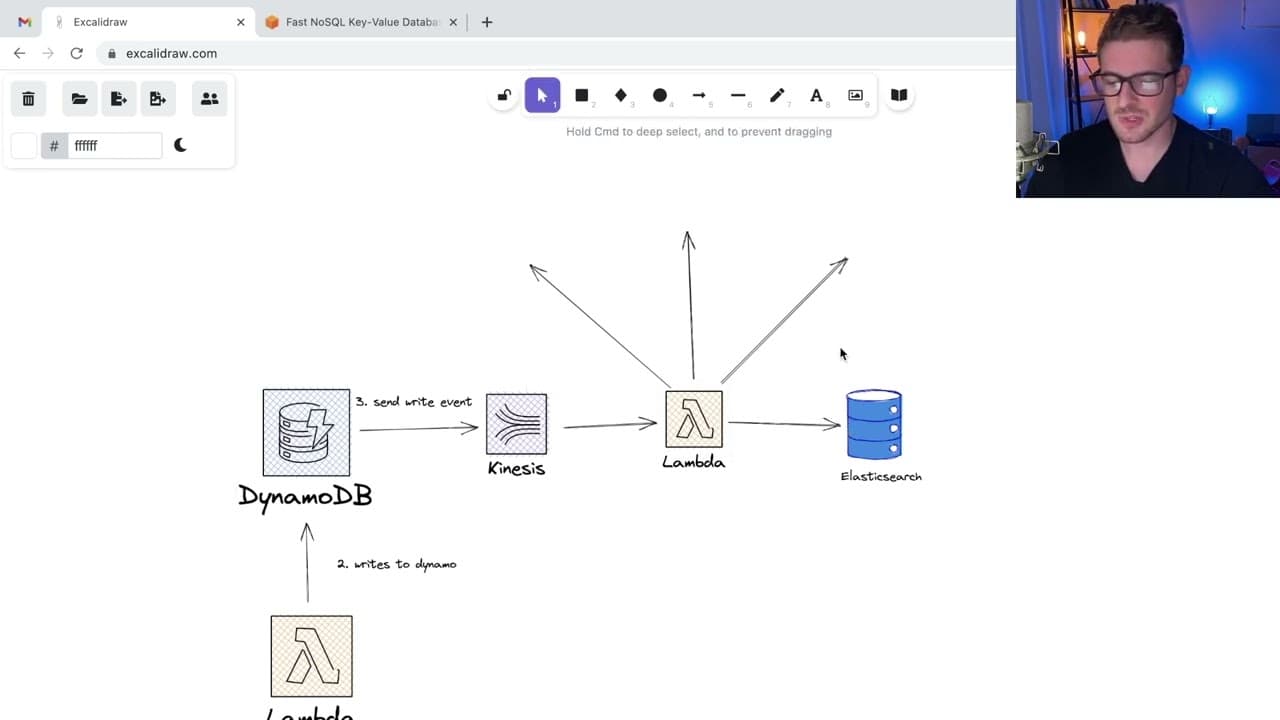
DynamoDB Streams enable real-time data replication to Elasticsearch, addressing the limitations of DynamoDB's querying capabilities. By integrating AWS Lambda and Kinesis, data is efficiently migrated to Elasticsearch, enhancing search performance despite potential processing delays.
Transcript
all right so i want to have a little talk about how we use dynamo streams on our project that work and basically dynamodb is an amazon database you can use to kind of infinitely store and scale up your data the key value store so it's very different from it's very different from sql where you can't easily query for data based on any field you can o... Read More
Key Insights
- 🤩 DynamoDB is a key-value store but has limits on flexible querying capabilities, which can hinder complex data retrieval.
- 👻 DynamoDB Streams can play a pivotal role in real-time data synchronization, allowing for enhanced data processing capabilities.
- 👨🔬 Using Elasticsearch alongside DynamoDB addresses the need for quick, full-text searches, which are not supported natively by DynamoDB.
- ❓ The architecture involves using AWS Lambda and Kinesis, creating a streamlined approach for data movement and transformation.
- 🎏 Potential latency issues may arise due to processing limits within the Kinesis stream, affecting the timeliness of query results.
- 🎨 Developers should carefully design their data access patterns to mitigate performance drawbacks inherent to DynamoDB's querying model.
- 🐕🦺 Real-time capabilities can be achieved through careful configuration of AWS services when implementing a data pipeline.
Install to Summarize YouTube Videos and Get Transcripts
Explore YouTube Video Summarizer or Get YouTube Transcript Extractor
Questions & Answers
Q: What are the main limitations of using DynamoDB for data queries?
DynamoDB primarily operates as a key-value store, making it difficult to perform queries based on fields other than the primary or sort key. To fetch additional data, users must set up complex workarounds like global secondary indexes, which can complicate database architecture and slow down development.
Q: How do DynamoDB Streams work in real-time data processing?
DynamoDB Streams capture and store changes made to items in a DynamoDB table. When a write or delete event occurs, streams can trigger AWS Lambda functions to process this data, enabling users to push updated information to other storage solutions like Elasticsearch for searching and querying.
Q: Why did the team choose to implement Elasticsearch alongside DynamoDB?
The team opted for Elasticsearch to provide better querying capabilities that DynamoDB lacks, especially for complex searches. By indexing data from DynamoDB into Elasticsearch, they can perform faster and more flexible queries, significantly enhancing user experience.
Q: What role does AWS Lambda play in this architecture?
AWS Lambda acts as a bridge between DynamoDB Streams and Elasticsearch. It processes events captured by the streams and facilitates data migration to Elasticsearch, allowing for real-time updates to the search index and improving overall query performance.
Q: What are the potential downsides of using this setup with DynamoDB Streams?
One downside is the delay in data syncing between DynamoDB and Elasticsearch. High traffic can create a backlog in the Kinesis stream, resulting in delays where users might not immediately see their latest data in search results, which could impact real-time user experiences.
Q: How does Kinesis fit into the DynamoDB Streams architecture?
Kinesis is leveraged to handle the streaming data from DynamoDB. It facilitates the processing of multiple events by enabling Lambda functions to consume streams, though it may introduce some delay if there is high traffic, affecting the speed of data appearing in Elasticsearch.
Summary & Key Takeaways
-
The content discusses the limitations of DynamoDB in executing flexible queries due to its key-value structure and primary key constraints.
-
It introduces the concept of DynamoDB Streams, which allows real-time data migration to Elasticsearch for enhanced query performance.
-
The process involves using AWS Lambda and Kinesis to handle data written to DynamoDB before indexing it into Elasticsearch for better search capabilities.
Read in Other Languages (beta)
Share This Summary 📚
Summarize YouTube Videos and Get Video Transcripts with 1-Click
Try YouTube Summary with ChatGPT & Claude or YouTube Transcript Generator
Explore More Summaries from Web Dev Cody 📚





Summarize YouTube Videos and Get Video Transcripts with 1-Click
Try YouTube Summary with ChatGPT & Claude or YouTube Transcript Generator