Can I Call Myself an Artist Using MidJourney?
TL;DR
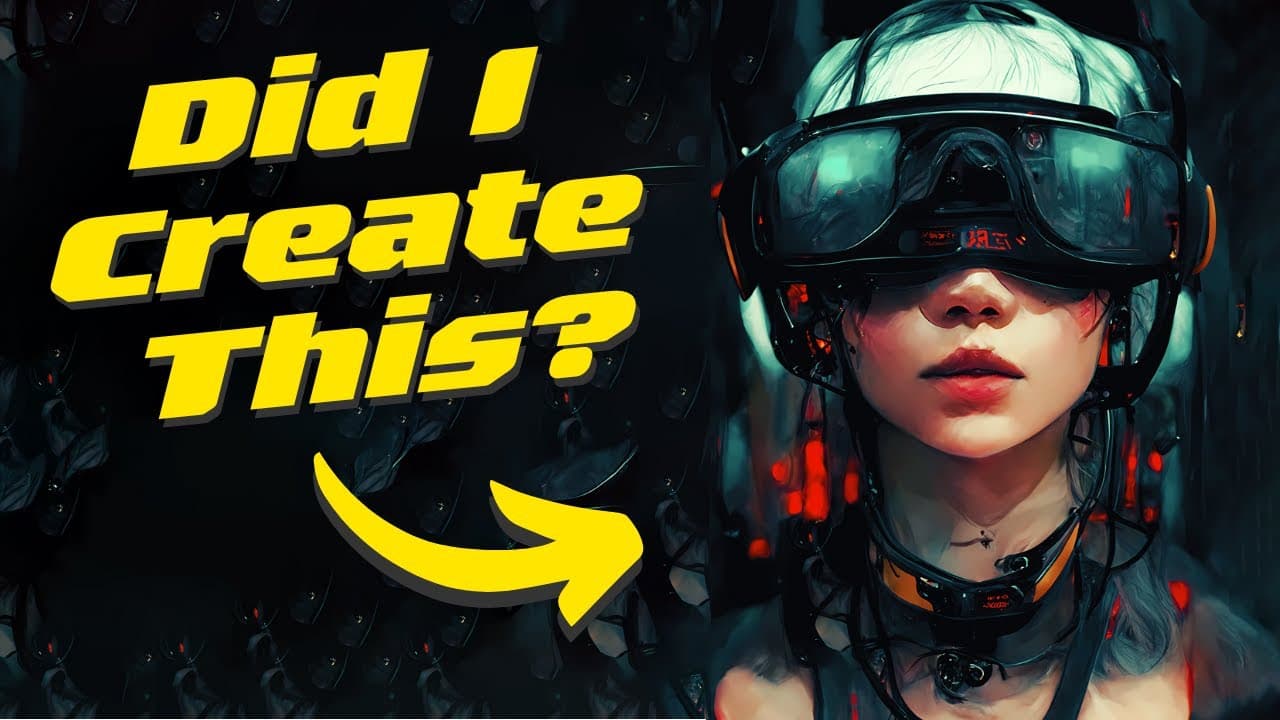
Yes, you can call yourself an artist using MidJourney if you actively create and refine your images. The process involves selecting a compelling prompt, generating variations, and using Photoshop to enhance and finalize your artwork. The key is experimentation and personal expression, which are integral to the creative journey.
Transcript
so i've been playing around with mid journey now for about a week so can i call myself an artist yet well i don't know but today i will try to create my perfect image going step by step let's go okay so the first thing we need to do is start our initial prompt so we need like a prompt that we can work with so i have decided in this video to go with... Read More
Key Insights
- 👻 Mid-Journey allows artists to explore different prompts and image variations to find the perfect concept for their artwork.
- 💻 The artist focuses on creating a cute and cyberpunk-style image, incorporating elements like VR goggles and a 4K screen.
- 🧘 Photoshop is used to further enhance and edit the selected images, adjusting colors and tones to achieve the desired aesthetic.
- 🖐️ Attention to detail plays an important role in the artist's decision-making process, with factors such as colors, details, and overall composition influencing the final selection.
- 😀 The Mid-Journey app offers a range of creative possibilities for artists to experiment and bring their visions to life.
- 👶 The artist showcases an appreciation for the intricacies and capabilities of the Mid-Journey platform, highlighting the excitement of discovering new and unexpected results.
- 😷 The artist invites audience participation by asking viewers to share their opinions on the selected image, promoting engagement and discussion within the creative community.
Install to Summarize YouTube Videos and Get Transcripts
Explore YouTube Video Summarizer or Get YouTube Transcript Extractor
Questions & Answers
Q: How does the artist begin the image creation process in Mid-Journey?
The artist starts by selecting a prompt, in this case, choosing to create an image of a girl trapped in VR with a VR headset.
Q: What does the artist do to improve the images in Mid-Journey?
The artist explores different image results, adding the VR goggles, opting for a cute, cyberpunk style, and incorporating additional elements like a 4K screen.
Q: How does the artist finalize the image selection?
After multiple rerolls and variations, the artist narrows down to two favorite images. They then proceed to edit and enhance the colors in Photoshop before making the final decision.
Q: What technique does the artist use to enhance the images in Photoshop?
The artist uses a color layer technique, adjusting and enhancing the existing colors in the image to achieve the desired effect.
Summary & Key Takeaways
-
The artist starts by selecting a prompt, choosing to create an image of a girl trapped in VR.
-
The artist explores different image results, adding the VR goggles and opting for a cute, cyberpunk style with additional elements.
-
After multiple rerolls and variations, the artist narrows down to two favorite images to edit further in Photoshop, ultimately choosing one as the final result.
Read in Other Languages (beta)
Share This Summary 📚
Summarize YouTube Videos and Get Video Transcripts with 1-Click
Try YouTube Summary with ChatGPT & Claude or YouTube Transcript Generator
Explore More Summaries from All About AI 📚
Summarize YouTube Videos and Get Video Transcripts with 1-Click
Try YouTube Summary with ChatGPT & Claude or YouTube Transcript Generator