How to Create a PCB-based Enclosure for DAQ Modules
TL;DR
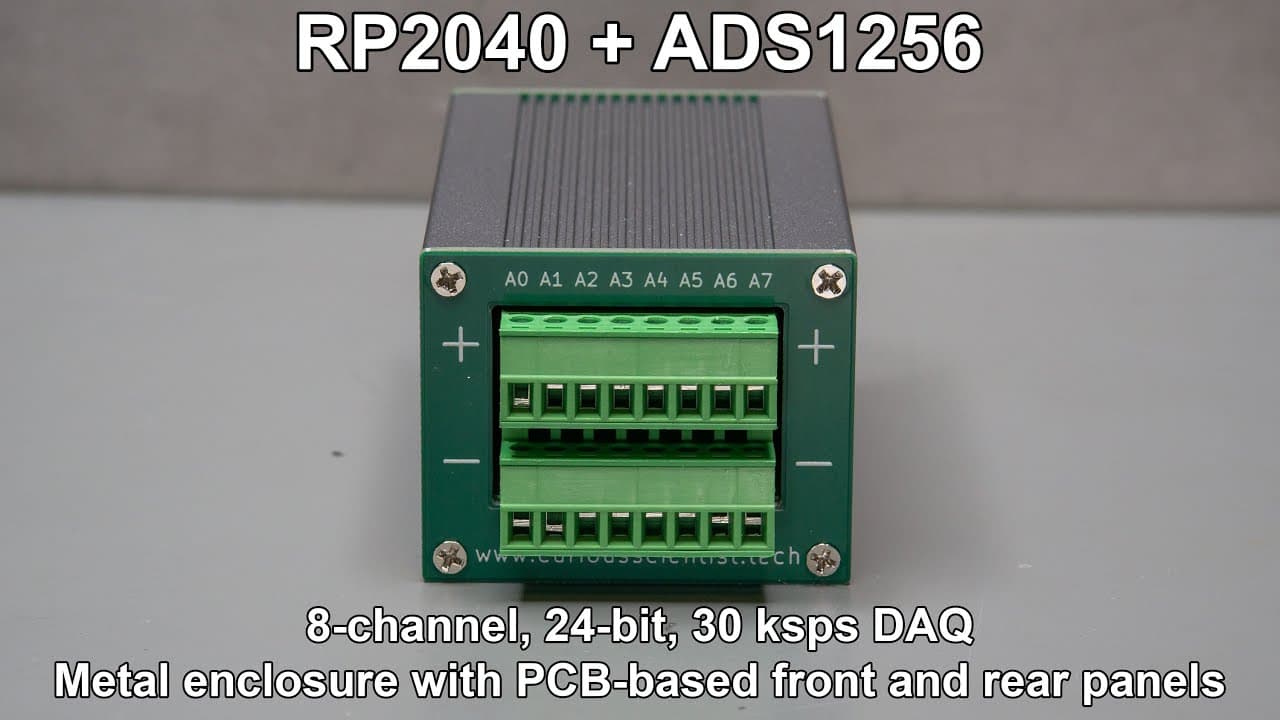
To create a PCB-based enclosure for data acquisition modules, integrate a high-performance microcontroller like the RP240 and use screw terminal connectors for easy wiring. Utilize a design that fits well within the enclosure for protection and consider PCB panels for a professional finish, as they are cost-effective and time-efficient compared to handmade alternatives.
Transcript
this video is sponsored by pcbway welcome everyone in this video I'm going to continue the journey with this ads 1256 based data acquisition module so in my most recent video related to this project I showed you how I built uh this device and how the almost uh final product looks like and in this video I'm going to show you probably the very last i... Read More
Key Insights
- 🎨 The ADS1256 data acquisition module showcases advanced PCB design, enhancing the project's overall maturity and functionality.
- ✋ By integrating a USB connector and high-performance microcontroller, the module remains relevant and adaptable to modern engineering practices.
- 😒 The use of screw terminals simplifies the wiring process, making the module more accessible for experimental setups in academic labs or DIY projects.
- 👀 Small visual improvements, such as text placement and curving, contribute to a more professional look without compromising functionality.
- 👶 The final design maintains continuity with previous versions, ensuring that users can transition smoothly without learning new components or configurations.
- 🐕🦺 Manufacturing PCBs through specialized services like PCBWay offers significant time savings and professional results, encouraging broader adoption of similar practices in electronics projects.
- 🎮 The creator addresses potential manufacturing concerns, emphasizing the precision and reliability of PCBWay through the video and encouraging feedback from the community for future iterations.
Install to Summarize YouTube Videos and Get Transcripts
Explore YouTube Video Summarizer or Get YouTube Transcript Extractor
Questions & Answers
Q: What is the significance of the RP240 microcontroller in this project?
The RP240 microcontroller is chosen for its high performance, enabling it to drive the ADS1256 data acquisition module effectively. Its capabilities allow for efficient data processing and handling, which is crucial for any project requiring accurate signal acquisition and conversion. The inclusion of such a robust microcontroller enhances the overall functionality of the circuit.
Q: How does the video address the usability of the device in a lab environment?
The video highlights the incorporation of screw terminal connectors that simplify the connection process by allowing easy attachment of wires. This design is particularly beneficial in lab settings where users often deal with loosely hanging wires. Such connectors ensure stable and reliable connections, making it easier for users to interact with the device in a practical setting.
Q: Why did the creator choose PCBWay for manufacturing the boards?
PCBWay was selected for its efficient manufacturing services, including options for assembly and quick delivery. The creator encourages viewers to utilize PCB-based solutions for custom projects because it provides a better effort-to-price ratio compared to manual production. PCBWay can handle complex geometries and offer competitive pricing, making it a wise choice for electronic developers.
Q: What changes were made to the PCB design in this final version?
The final PCB version features slight adjustments in curve design and component placement compared to the previous iteration. Specific modifications included the adjustment of trace curving and the relocation of text labels for improved aesthetics. These changes enhance the visual appeal while maintaining full compatibility with existing designs.
Q: What are the benefits of using PCB-based panels as mentioned in the video?
The video outlines several benefits of using PCB-based panels, including reduced production time, cost-effectiveness, and enhanced design flexibility. PCB manufacturing allows for precise geometries without the tedious labor of filing and drilling, thus saving time and effort. Such panels can also be customized for various projects, offering both functionality and professional appearance.
Q: In what way does the creator plan to continue on this project?
The creator indicates interest in making more of these modules and encourages viewers needing custom designs to reach out for further discussion. By providing a platform for project inquiries and collaboration, the creator is keen on fostering community engagement and possibly broadening the accessibility of the data acquisition modules.
Q: How does the enclosure design contribute to the circuit's protection?
The enclosure design, while not fully sealed to specific IP standards, offers a protective environment for the circuit. It ensures that the components are housed securely, reducing the risk of damage from environmental factors. This design facilitates proper operation while maintaining accessibility for users during experimentation or data collection.
Summary & Key Takeaways
-
The video discusses the final modifications made to the ADS1256-based data acquisition module, focusing on PCB design and usability features.
-
Key features include a high-performance RP240 microcontroller, screw terminal connectors for easy wiring, and a well-fitting design with an enclosure for protection.
-
The presenter emphasizes the advantages of using PCB panels over handmade alternatives for front and rear panel designs, highlighting cost and efficiency benefits.
Read in Other Languages (beta)
Share This Summary 📚
Summarize YouTube Videos and Get Video Transcripts with 1-Click
Try YouTube Summary with ChatGPT & Claude or YouTube Transcript Generator
Explore More Summaries from Curious Scientist 📚




Summarize YouTube Videos and Get Video Transcripts with 1-Click
Try YouTube Summary with ChatGPT & Claude or YouTube Transcript Generator