An overview of recursion in JavaScript using a file system example
TL;DR
Demonstrates how to use recursion to display nested file structures.
Transcript
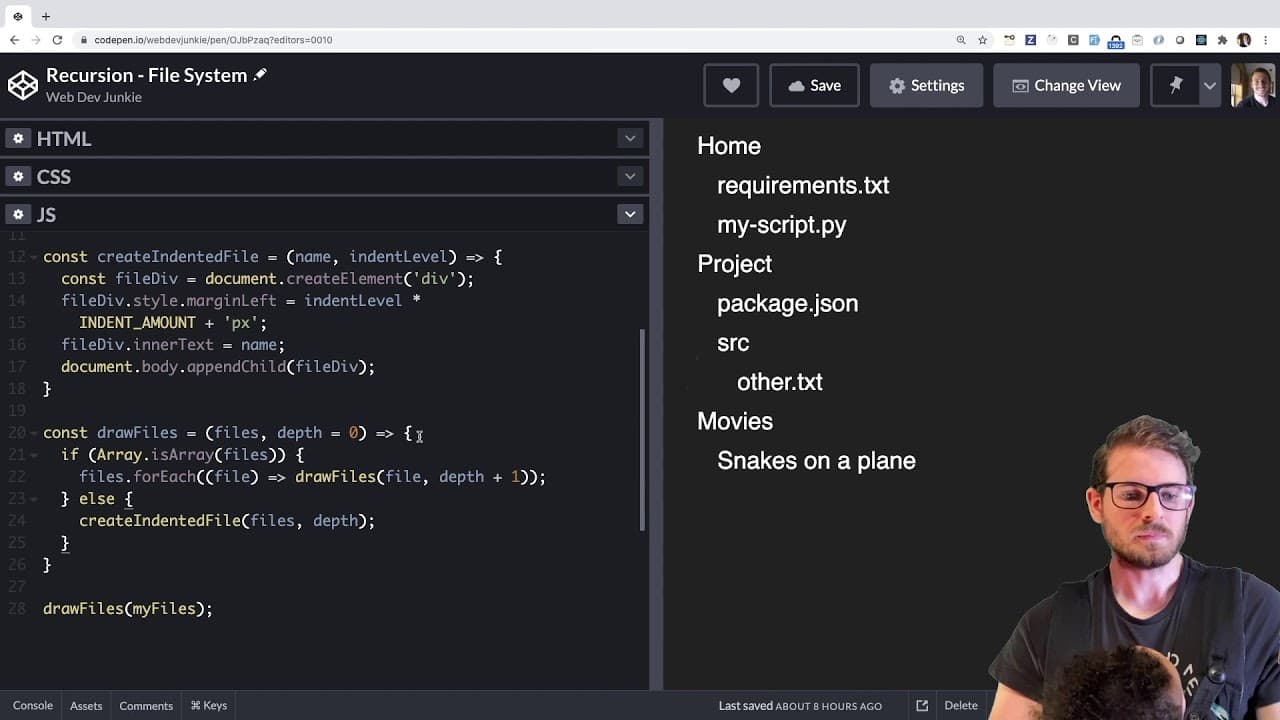
how is it going you all welcome back to another web dev junkie video in this video i'm going to basically just show you a quick overview of how you could do recursion to build out something like this so this is kind of a real life example like you know how if you look at your tree browser in your file system like if you're on windows you go to my c... Read More
Key Insights
- 🌲 Recursion is a fundamental programming technique for navigating tree-like structures, making it particularly useful in rendering file systems.
- 🤙 A well-defined base case is essential for recursive functions to prevent infinite loops and ensure a controlled termination of the recursive calls.
- 💁 The structure of the input data (like arrays of strings and further nested arrays) directly impacts how recursive functions process and render information.
- ❓ Indentation in the output can be managed dynamically using an incrementing depth variable, enhancing the visual representation of data hierarchies.
- 🏃 This video serves as an intermediate to advanced tutorial, positioning recursion as not just an academic exercise, but a practical tool that programmers can employ in real-world scenarios.
- ❓ Comparing recursion against iterative methods highlights a preference for recursion for its cleaner syntax and better alignment with the natural structure of the data.
- 👤 The presentation focuses on creating dynamically generated HTML elements, pulling together recursion, data manipulation, and user interface design.
Install to Summarize YouTube Videos and Get Transcripts
Explore YouTube Video Summarizer or Get YouTube Transcript Extractor
Questions & Answers
Q: What is the primary purpose of the drawFiles function?
The drawFiles function is a recursive function designed to traverse and visualize a nested array structure that represents files and folders. It iterates through the elements, checking if each element is a string or another array. When it encounters a string, it renders it, while nested arrays invoke further recursive calls, effectively displaying the hierarchical structure.
Q: How does the base case work in the recursive function?
The base case in the drawFiles function serves as a stopping point for recursion. When a string is encountered, the function understands it has reached a leaf node. Instead of continuing with further recursive calls, it creates a visual representation of that file or folder. This ensures that the function doesn’t run indefinitely and provides a clear stopping condition for recursion.
Q: What is the significance of the depth variable in the recursion?
The depth variable is crucial for creating proper indentation within the rendered file structure. Each time a recursive call is made, depth is incremented, allowing the function to visually represent the hierarchy by adjusting the margin of the output divs. This way, users can easily identify which files or folders are nested inside others based on their indentation level.
Q: How does recursion enhance tree structure navigation compared to iterative methods?
Recursion simplifies tree structure navigation by allowing functions to call themselves, which naturally aligns with the hierarchical nature of trees. While iterative methods require explicit stack management and often lead to more complex code, recursion offers a more elegant solution. It streamlines the process of traversing and rendering complex nested structures, making the code easier to understand and maintain.
Summary & Key Takeaways
-
The video explains how recursion can effectively display nested tree structures similar to a file system. It uses an array representation containing strings or nested arrays to demonstrate this concept.
-
A recursive function,
drawFiles, is introduced, which calls itself to navigate through the nested arrays. The function also implements a base case to terminate the recursion when encountering a string. -
The tutorial aims to provide a practical understanding of recursion beyond standard examples like Fibonacci sequences, emphasizing its application in everyday programming tasks such as tree traversal.
Read in Other Languages (beta)
Share This Summary 📚
Summarize YouTube Videos and Get Video Transcripts with 1-Click
Try YouTube Summary with ChatGPT & Claude or YouTube Transcript Generator
Explore More Summaries from Web Dev Cody 📚





Summarize YouTube Videos and Get Video Transcripts with 1-Click
Try YouTube Summary with ChatGPT & Claude or YouTube Transcript Generator