What Is the Best Productivity Desk Setup for 2023?
TL;DR
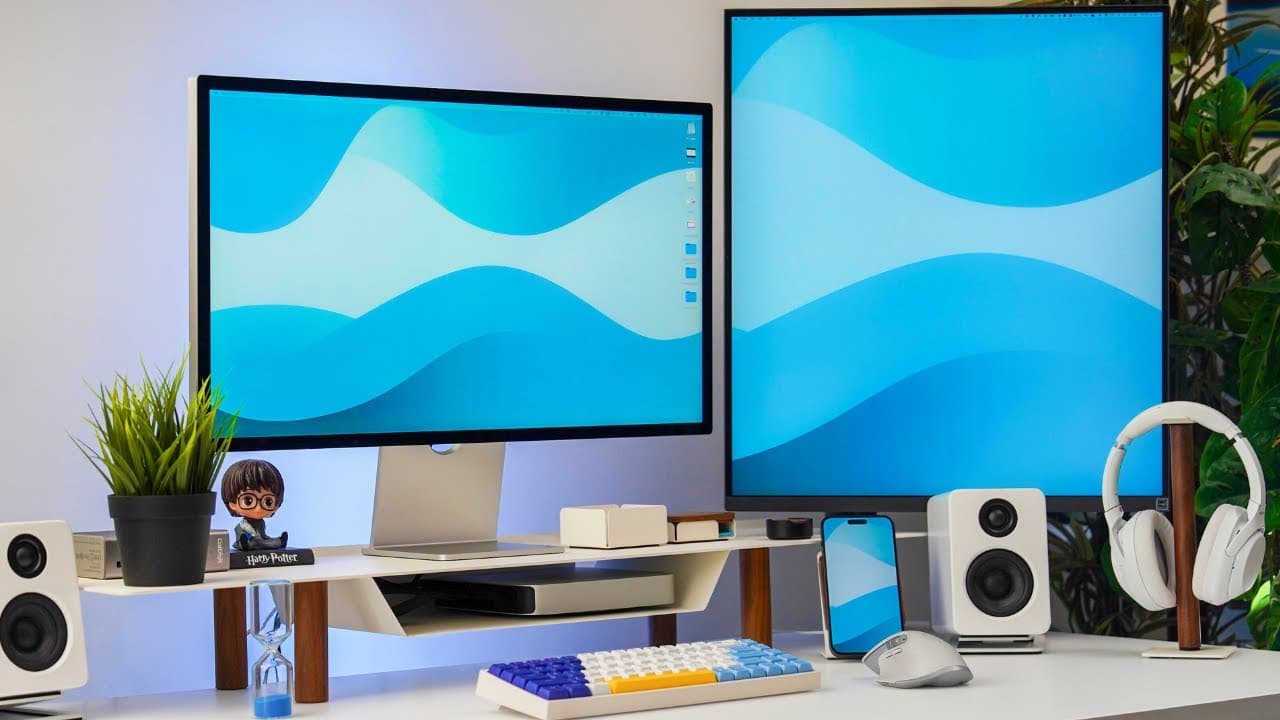
The best productivity desk setup for 2023 includes a standing desk, ergonomic chair, high-performance M2 Pro Mac Mini, and an organized arrangement of tech accessories. Adding a second gaming desk with a walking treadmill enhances health, allowing users to stay active while working or gaming. This setup prioritizes ergonomics, productivity, and efficient workspace management.
Transcript
foreign welcome back to the channel and to my annual productivity desk setup walkthrough so in this video as usual I'm going to break down everything that's on my main productivity desk but also everything that's on my secondary gaming desk so let's get started with the desks themselves what desk is this I actually have no idea and this is actually... Read More
Key Insights
- 🖐️ Ergonomics and comfort play a significant role in workspace design for optimal productivity and focus.
- 🙂 Tech tools and accessories like cameras, microphones, and lighting enhance content creation and virtual communication.
- 🦻 Integration of multiple monitors and peripherals aids in multitasking and efficient workflow management.
- 💦 Strategic placement of plants and greenery promotes a calming and creative environment for work.
- 🧑⚕️ Incorporating health-conscious elements like a walking treadmill adds physical activity and balance to a primarily sedentary work routine.
- 🧑💻 Customizing tech tools like keyboards and accessories for personal preferences enhances user experience and performance.
- 💦 Utilizing versatile setups with multi-functional desks for different modes of work and play provides flexibility and a change of scenery for increased productivity.
Install to Summarize YouTube Videos and Get Transcripts
Explore YouTube Video Summarizer or Get YouTube Transcript Extractor
Questions & Answers
Q: What are the key components of the main productivity desk setup?
The main productivity desk features a Charcoal standing desk, Herman Miller chair, M2 Pro Mac Mini, Gather 2.0 shelving unit, Kanto U2 speakers, Logitech MX Master 3s Mouse, Apple trackpad, and custom keyboard from the light mode.
Q: How does the secondary gaming desk setup differ from the main productivity desk setup?
The secondary gaming desk setup includes an Alienware gaming PC, Dell Spectrum monitor, PlayStation 5, and a walking treadmill for added health benefits, offering a separate environment for gaming and occasional work.
Q: What role does the tech setup play in enhancing productivity?
The tech setup integrates various peripherals, accessories, and gadgets such as lights, cameras, microphones, and monitors to streamline workflow, improve efficiency, and create an immersive experience for content creation and online sessions.
Q: How does the walking treadmill under the gaming desk contribute to overall productivity?
The walking treadmill provides an innovative solution to incorporate physical activity into daily routines, allowing for increased steps, reduced sedentary behavior, and improved health while engaging in video gaming or work tasks.
Summary & Key Takeaways
-
Detailed walkthrough of the main productivity desk setup with the Charcoal standing desk, Herman Miller chair, M2 Pro Mac Mini, Gather 2.0 shelving unit, accessories, and peripherals.
-
Overview of the secondary gaming desk setup with Alienware gaming PC, Dell Spectrum monitor, PlayStation 5, and walking treadmill for added health benefits.
-
Emphasis on optimizing workspace for productivity, tech tools integration, ergonomic setup, and health-conscious choices for a balanced work environment.
Read in Other Languages (beta)
Share This Summary 📚
Summarize YouTube Videos and Get Video Transcripts with 1-Click
Try YouTube Summary with ChatGPT & Claude or YouTube Transcript Generator
Explore More Summaries from Ali Abdaal 📚



Summarize YouTube Videos and Get Video Transcripts with 1-Click
Try YouTube Summary with ChatGPT & Claude or YouTube Transcript Generator