How to Build a Thermometer with MAX6675 and Arduino
TL;DR
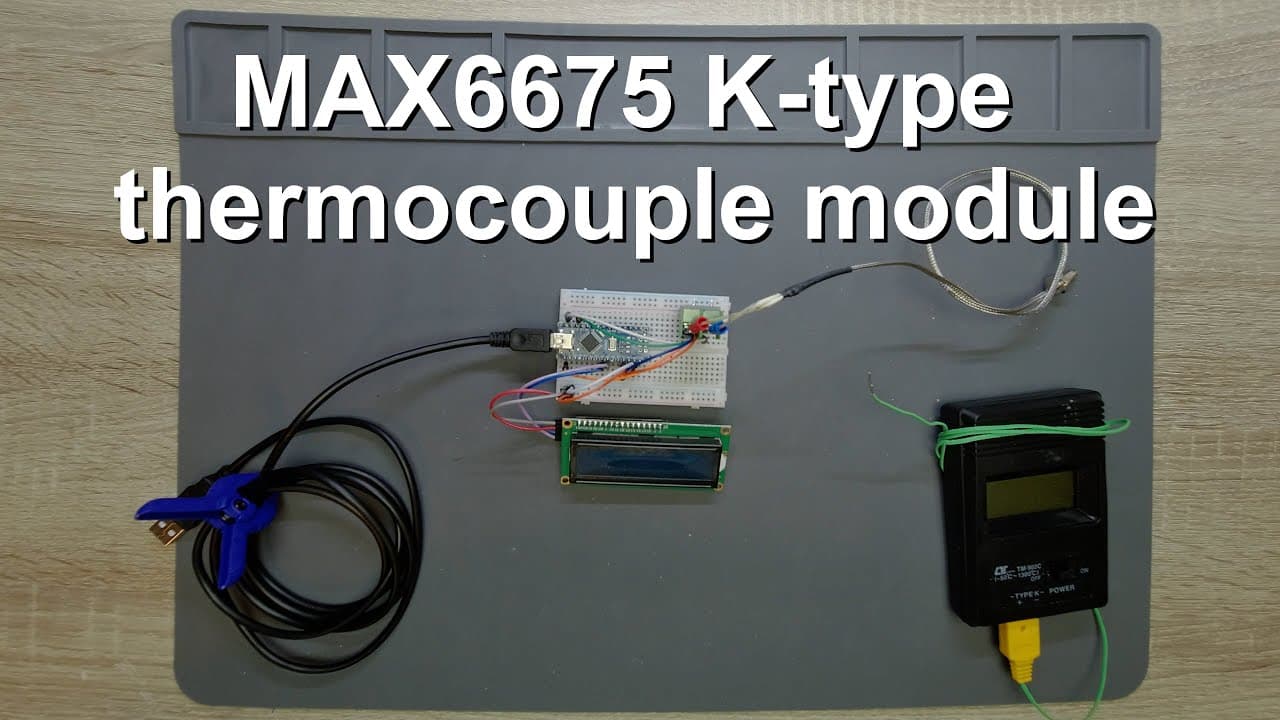
To build a thermometer using the MAX6675 chip with an Arduino, connect the chip via SPI and use a 16x2 LCD to display temperature readings. The MAX6675 provides accurate measurements from 0 to 1023.75 degrees Celsius with a resolution of 0.25 degrees Celsius. The setup includes averaging ten readings to reduce fluctuations for more reliable results.
Transcript
welcome everyone in this video i'm going to talk about a very simple but quite nice thermocouple based thermometer so this is the max 6675 circuit which is a very nice circuit because it has a 12 bit adc which provides us 0.25 degrees celsius resolution it can communicate via spi so you can wire it up with any kind of microcontroller in this demo i... Read More
Key Insights
- 🐿️ The MAX6675 chip communicates with microcontrollers using SPI, simplifying integration into projects involving temperature measurement.
- 🤒 The video tutorial provides a step-by-step demonstration of how to build and program the thermometer, making it accessible for beginners in electronics.
- ⌛ Real-time temperature data is averaged over ten readings to reduce fluctuations, improving the reliability of the displayed values.
- 🤗 The internal circuitry of the MAX6675 has built-in fault detection for open thermocouple wires, enhancing the reliability of the measurements.
- ✋ This setup is optimal for high-temperature environments, like ovens or furnaces, operating safely below 1000 degrees Celsius.
- 🙏 The source code and circuit diagram are available in the video description, promoting ease of access for viewers wishing to replicate the project.
- 😒 The use of a thermocouple requires understanding its differential voltage outputs and compensating for any junction temperature variations.
Install to Summarize YouTube Videos and Get Transcripts
Explore YouTube Video Summarizer or Get YouTube Transcript Extractor
Questions & Answers
Q: What is the resolution of the thermometer designed with the MAX6675 chip?
The MAX6675 chip offers a temperature resolution of 0.25 degrees Celsius. This high resolution allows for precise temperature measurements, making it suitable for various applications within its operational range.
Q: Can the MAX6675 thermocouple measure temperatures below zero degrees Celsius?
No, the MAX6675 is limited to measuring temperatures above zero degrees Celsius, specifically from 0 to 1023.75 degrees Celsius. For negative temperature measurement, another chip, such as the MAX31855, must be used, which accommodates K-type thermocouples.
Q: How does the circuit display temperature readings?
The circuit uses a 16x2 LCD display that communicates via I²C. It shows real-time temperature and average values by refreshing the display based on readings from the thermocouple and code logic in the Arduino's programming.
Q: What is the importance of the cold junction compensation in thermocouple measurements?
Cold junction compensation adjusts for the temperature at the connection point of the thermocouple wires and the measuring device. This correction is critical for obtaining accurate temperature readings, especially since the thermocouple measures temperature differentials rather than absolute values.
Summary & Key Takeaways
-
The video demonstrates how to set up a thermocouple-based thermometer using the MAX6675 chip with a 12-bit ADC, which offers 0.25 degrees Celsius resolution for temperature measurements.
-
Key components include an Arduino Nano, a MAX6675 chip for signal processing, and an LCD display that shows real-time temperature readings and averages.
-
The tutorial covers circuit setup, SPI communication, data reading, averaging techniques, and potential temperature limitations of the designed system.
Read in Other Languages (beta)
Share This Summary 📚
Summarize YouTube Videos and Get Video Transcripts with 1-Click
Try YouTube Summary with ChatGPT & Claude or YouTube Transcript Generator
Explore More Summaries from Curious Scientist 📚

![Building a Peltier cooler-based cooling box - First iteration, improvements [Part 2/6] thumbnail](/_next/image?url=https%3A%2F%2Fi.ytimg.com%2Fvi%2F0YlNw0EGnzI%2Fhqdefault.jpg&w=750&q=75)



Summarize YouTube Videos and Get Video Transcripts with 1-Click
Try YouTube Summary with ChatGPT & Claude or YouTube Transcript Generator