How to Make a Pull Chain Fan Smarter with a Switch
TL;DR
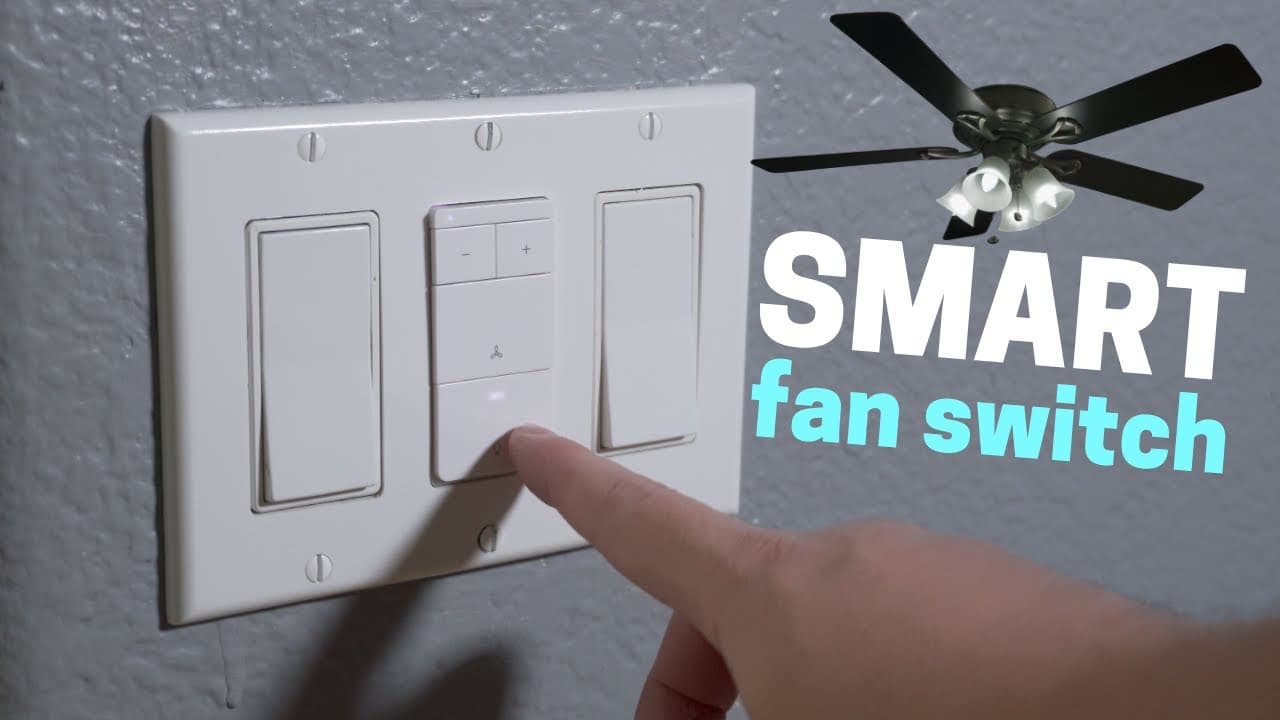
You can automate a pull chain fan by using a smart switch that controls both the fan speed and light brightness. Make sure to install it with a neutral wire, and the switch integrates with voice assistants like Amazon Alexa and Google Assistant for convenient control. Additionally, it allows for customization through the Smart Life app and can be paired with motion sensors for automatic operation.
Transcript
hey what's up this is reed a lot of people have been asking me recently about automating a fan with pull chains i thought i'd make a quick tip video on how to do that with a smart switch that came out recently i bought this smart light switch on amazon while researching for the light switch comparison video that i'm working on this is from treat li... Read More
Key Insights
- 🙂 Treatlife smart switch combines fan and light control for convenience.
- ❓ Integration with voice assistants like Amazon and Google enhances usability.
- 👻 Motion sensor integration allows for automatic fan control based on room occupancy.
- 😀 Customization options through the Smart Life app provide flexibility in controlling settings.
- 😐 Considerations for installation include the presence of a neutral wire and proper linking procedures.
- 🙂 Price of the smart switch may be slightly higher due to its dual functionality.
- 👤 Users may need to familiarize themselves with button functions for precise control.
Install to Summarize YouTube Videos and Get Transcripts
Explore YouTube Video Summarizer or Get YouTube Transcript Extractor
Questions & Answers
Q: How does the Treatlife smart switch simplify fan and light control?
The Treatlife smart switch combines fan speed and light brightness control into one switch, eliminating the need for pull chains and streamlining the operation via voice commands and apps.
Q: Can the Treatlife smart switch be integrated with other smart home devices?
Yes, the smart switch can work with Amazon and Google assistants, as well as potential integration with SmartThings in the future, providing a seamless smart home experience.
Q: What are the considerations when installing the Treatlife smart switch?
Before installation, ensure that your house has a neutral wire and remember to turn off the breaker. It's also crucial to link the switch properly to avoid accidentally resetting it or entering pairing mode.
Q: How can the motion sensor feature enhance the usability of the smart switch?
By utilizing an Amazon-compatible motion sensor, users can automate the fan's operation based on room occupancy, adjusting settings to optimize comfort and energy efficiency.
Summary & Key Takeaways
-
Reed demonstrates how to automate a fan with pull chains using a smart switch that controls both fan speed and light brightness.
-
The smart switch from Treatlife requires a neutral wire and allows control through the Smart Life app, Google, and Amazon assistants.
-
Additional features include motion sensor integration for automatic fan control based on room occupancy and customization options via the Smart Life app.
Read in Other Languages (beta)
Share This Summary 📚
Summarize YouTube Videos and Get Video Transcripts with 1-Click
Try YouTube Summary with ChatGPT & Claude or YouTube Transcript Generator
Explore More Summaries from Smart Home Solver 📚



Summarize YouTube Videos and Get Video Transcripts with 1-Click
Try YouTube Summary with ChatGPT & Claude or YouTube Transcript Generator