The iPhone's Most Powerful New Productivity Feature
TL;DR
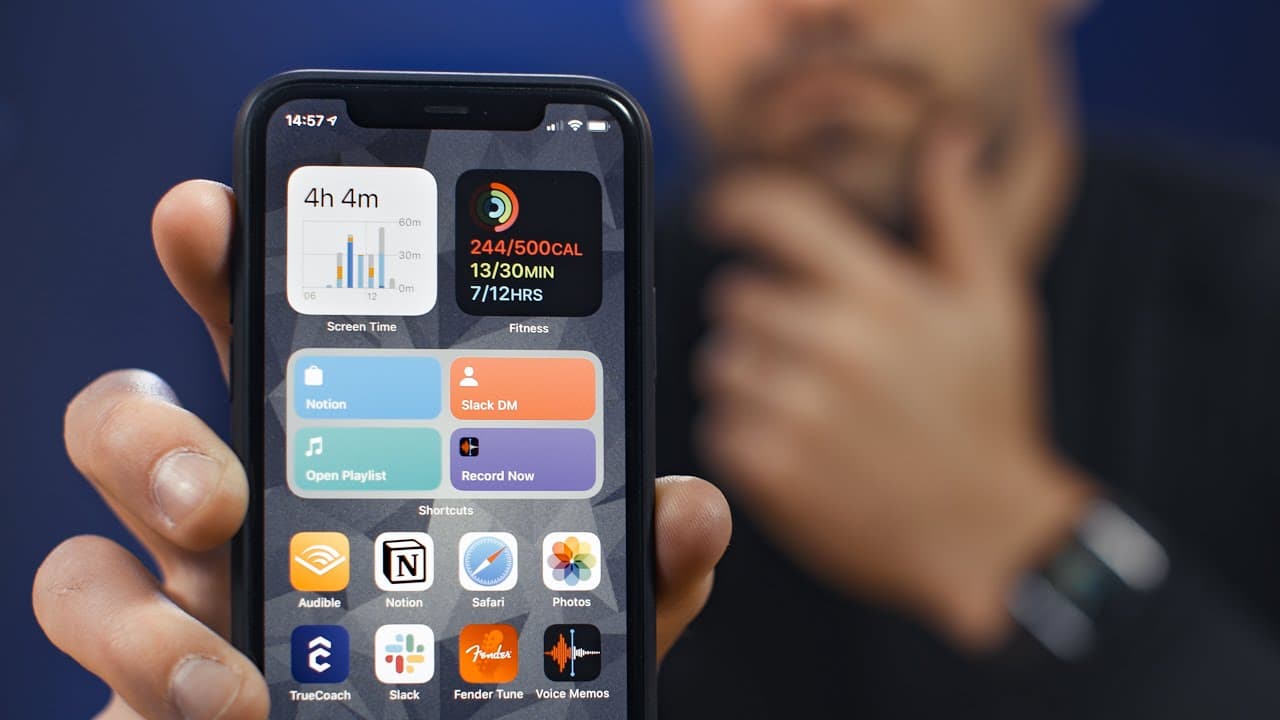
iOS 14's most useful productivity feature is the Shortcuts Widget, which allows users to create custom shortcuts for various tasks.
Transcript
- Thanks to Hover for sponsoring this video and supporting my channel. Two weeks ago Apple released the long awaited iOS 14. And while it's got lots of new bells and whistles we could talk about, today, I we're going to explore what I think is hands down the most useful productivity feature it has. So iOS 14 came out of beta just about a week or tw... Read More
Key Insights
- ❓ The ability to customize the Home Screen with widgets is a highly anticipated feature of iOS 14.
- 👻 The Shortcuts Widget allows for greater productivity by providing quick access to custom shortcuts.
- 😀 The Shortcuts app offers extensive functionality, including scripting and automation.
- 😀 Notion, Spotify, Slack, and Voice Memos are some examples of apps that can be integrated with the Shortcuts Widget.
- 😫 The Shortcuts Widget can be set up by creating a custom folder and populating it with the desired shortcuts.
- 👻 Menu scripting in Shortcuts allows for more advanced customization, providing users with choices within the widget.
- 🚀 Siri can be utilized to launch shortcuts, even if they are not included in the Shortcuts Widget.
Install to Summarize YouTube Videos and Get Transcripts
Explore YouTube Video Summarizer or Get YouTube Transcript Extractor
Questions & Answers
Q: What is the most useful feature in iOS 14?
The Shortcuts Widget is considered the most useful feature as it allows for customized shortcuts for various tasks.
Q: What can the Shortcuts app do?
The Shortcuts app allows users to create custom shortcuts to perform a wide range of tasks, including scripting and automation.
Q: Can you use the Shortcuts Widget to open specific pages in Notion?
Yes, by creating a shortcut with the "Open URLs" action and pasting the link to the desired page in Notion, you can quickly access specific pages.
Q: Is it possible to use Siri to launch shortcuts not included in the Shortcuts Widget?
Yes, by assigning names to shortcuts that are easy to remember and say, you can use Siri to launch those shortcuts.
Summary & Key Takeaways
-
iOS 14 introduced the ability to customize the Home Screen with widgets, with the Shortcuts Widget being a standout feature.
-
The Shortcuts app, integrated into iOS, allows users to create custom shortcuts for a wide range of tasks.
-
The video demonstrates setting up the Shortcuts Widget and creating shortcuts for apps like Notion, Spotify, and Slack.
Read in Other Languages (beta)
Share This Summary 📚
Summarize YouTube Videos and Get Video Transcripts with 1-Click
Try YouTube Summary with ChatGPT & Claude or YouTube Transcript Generator
Explore More Summaries from Thomas Frank 📚




Summarize YouTube Videos and Get Video Transcripts with 1-Click
Try YouTube Summary with ChatGPT & Claude or YouTube Transcript Generator