How to Replicate a Web Page Design Using HTML and CSS?
TL;DR
To replicate a web page design using HTML and CSS, start by creating a basic HTML structure and utilize CSS Grid for layout organization. Incorporate Flexbox for alignment, adjust margins and padding for styling, and ensure accessibility by using proper HTML elements like <a> tags for buttons. Testing live in the browser is essential for fine-tuning design details.
Transcript
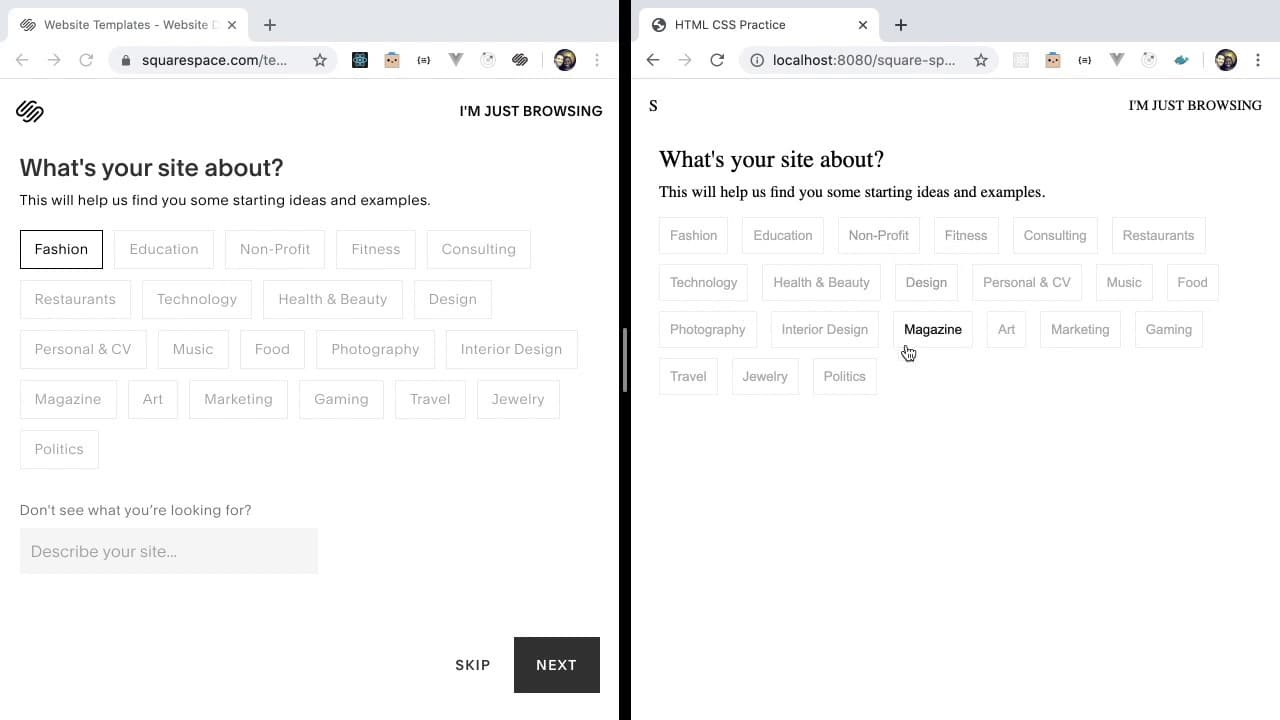
how's it going everyone welcome back to another web dev junkie video my name is Cody Seibert and in this video I'm gonna be showing you how to build a replicate a site that I found on the Squarespace site so if you go to Squarespace then go to slash template there's like this little site where you can help like search through templates I guess and ... Read More
Key Insights
- 🎨 Practicing replication of existing designs can substantially improve one's understanding of HTML and CSS fundamentals.
- 👻 Using modern layout techniques like CSS Grid allows for cleaner and more maintainable code.
- ❓ Flexibility in styling, such as adjusting margins, padding, and display properties, contributes to achieving desired UI elements.
- 🉐 The importance of accessibility is underscored via choice of HTML elements, such as using <a> tags for buttons with proper styling.
- 💦 Continuous testing and tweaking within the browser are vital practices in web development, underscoring the iterative nature of design work.
- 👨💻 Maintaining consistent styling through class naming conventions helps avoid conflicts and enhances code readability.
- 🅰️ Attention to detail is crucial, as even minor typing errors can result in significant issues during development.
Install to Summarize YouTube Videos and Get Transcripts
Explore YouTube Video Summarizer or Get YouTube Transcript Extractor
Questions & Answers
Q: What is the main purpose of the video?
The video is designed to help viewers practice their HTML and CSS skills by replicating a Squarespace website template. By working through the tutorial, viewers can enhance their understanding of web development concepts and improve their ability to manipulate layout and style using these technologies.
Q: Why does Cody choose CSS Grid for layout?
Cody opts for CSS Grid to create a structured layout for the header section, allowing multiple elements to align properly in columns. CSS Grid provides a flexible and efficient way to manage spacing and alignment compared to older methods like floats or inline-blocks, making the coding process more straightforward.
Q: How does Cody simplify button styling in his example?
To streamline button styling, Cody creates a consistent style for all buttons using CSS classes. He adjusts properties like color, padding, border, and hover effects systematically, which helps ensure a cohesive look across all buttons and minimizes repetitive code.
Q: What challenges does Cody encounter during the replication process?
Cody faces challenges such as aligning elements correctly and achieving the same visual styles as the original template. He addresses these issues iteratively, testing changes in the browser and adjusting styles based on observations. This process highlights the trial and error typical in web development.
Summary & Key Takeaways
-
The video features web developer Cody Seibert demonstrating how to replicate a Squarespace template using only HTML and CSS to improve foundational skills.
-
Starting from a basic HTML structure, the tutorial focuses on organizing elements using CSS Grid, Flexbox, and styling techniques to achieve a clean layout.
-
Throughout the video, Cody addresses minor discrepancies between their template recreation and the original site, offering insight into web design principles and best practices.
Read in Other Languages (beta)
Share This Summary 📚
Summarize YouTube Videos and Get Video Transcripts with 1-Click
Try YouTube Summary with ChatGPT & Claude or YouTube Transcript Generator
Explore More Summaries from Web Dev Cody 📚





Summarize YouTube Videos and Get Video Transcripts with 1-Click
Try YouTube Summary with ChatGPT & Claude or YouTube Transcript Generator