How to Use the Filter Method in JavaScript Arrays
TL;DR
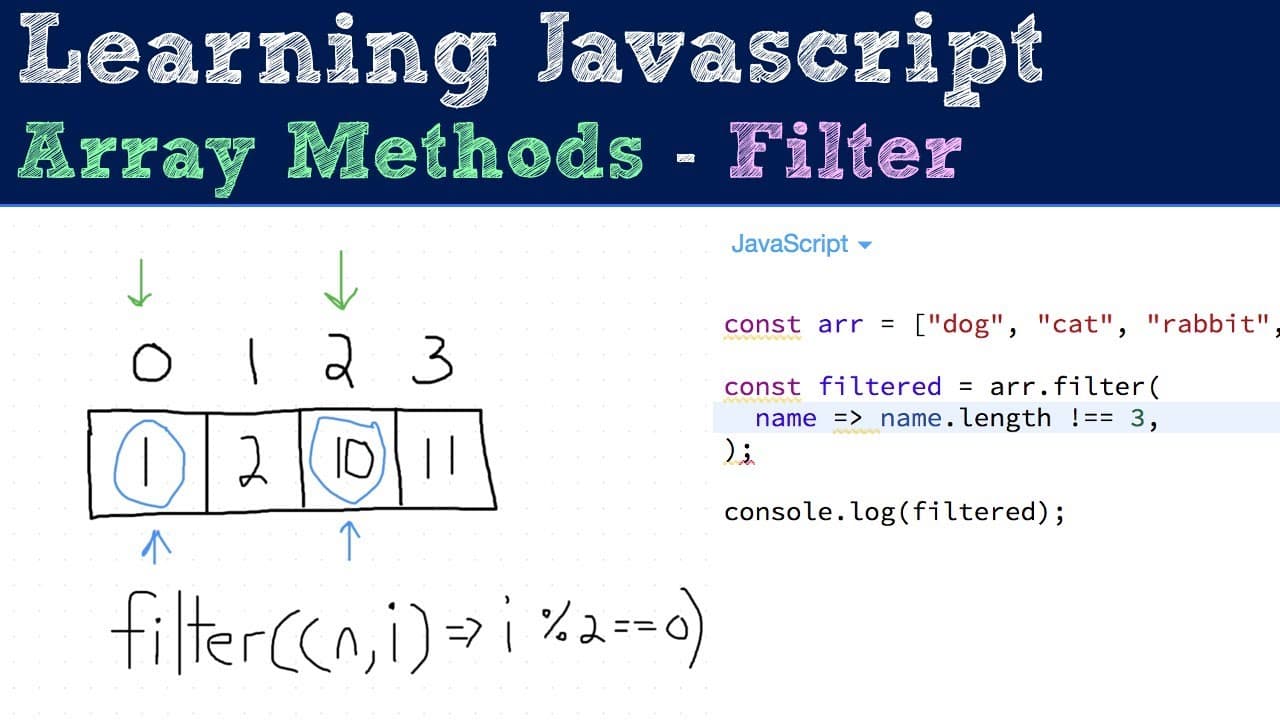
The filter method in JavaScript creates a new array with elements that meet specified conditions, as defined by a callback function that returns true or false. It does not modify the original array and can pass additional arguments, such as index or original array reference, to enhance functionality.
Transcript
all right next up is the filter method and this is a method that I use quite a lot in my day to day work it's really useful and is really simple to use so let's just go ahead and talk about it basically it's a function that you can call to filter out specific things right so what it's going to do is you pass it a callback function and that callback... Read More
Key Insights
- 👶 The filter method provides a straightforward approach to create new arrays without altering the original, ensuring data consistency.
- 👻 Using a callback function allows for custom logic when determining which elements to include in the new array.
- 👻 Incorporating additional arguments in the callback increases the method's versatility, allowing the context or position of elements to affect filtering.
- 😒 Practical filtering examples, such as searching for numbers above a threshold or elements at specific indices, showcase everyday uses of the filter method.
- 💘 Familiarity with ES6 syntax, like arrow functions, is beneficial for more concise coding styles in defining the filter method’s callback.
- 👨💻 The filter method contributes to cleaner code and improved readability by separating filtering logic into dedicated functions.
- 🈸 By leveraging the filter method, developers can efficiently manage arrays and simplify data manipulation within their applications.
Install to Summarize YouTube Videos and Get Transcripts
Explore YouTube Video Summarizer or Get YouTube Transcript Extractor
Questions & Answers
Q: What is the purpose of the filter method in JavaScript?
The filter method is used to create a new array containing only those elements from an original array that satisfy a specified condition defined by a callback function. This function returns true for elements to be included in the new array and false for those to be excluded, enabling efficient data processing without altering the original array.
Q: How does the callback function work in the filter method?
The callback function takes each element of the original array as input and evaluates it against a condition. If the condition is met (i.e., the callback returns true), that element becomes part of the new filtered array. The callback can also take additional arguments, such as the index of the element being evaluated, providing flexibility in how filtering is performed.
Q: Can the original array be modified when using the filter method?
No, the filter method does not modify the original array; instead, it creates and returns a new array based on the filtering condition applied in the callback function. This non-mutating behavior helps maintain data integrity within the program.
Q: How can you filter an array to only include elements at even indices?
To filter an array for even indices, you can define a callback function that checks if the index of each element is even. This can be achieved using the modulo operator: if the index mod 2 equals zero, the index is even, and the element is included in the new array.
Q: What type of arguments can the callback function in the filter method accept?
The callback function can accept one to three arguments: the current element being processed, the index of that element in the array, and the original array itself. These additional arguments enable more complex filtering conditions and manipulations based on the context of the elements.
Summary & Key Takeaways
-
The filter method allows users to create a new array of elements that meet specific criteria, identified via a callback function which returns true or false for each element.
-
Additional arguments can be passed to the callback function, allowing developers to access the index of current elements or refer back to the original array, enhancing functionality.
-
The examples demonstrate filtering arrays for particular values, such as numbers greater than five and elements at even indices, showing practical applications of this method.
Read in Other Languages (beta)
Share This Summary 📚
Summarize YouTube Videos and Get Video Transcripts with 1-Click
Try YouTube Summary with ChatGPT & Claude or YouTube Transcript Generator
Explore More Summaries from Web Dev Cody 📚





Summarize YouTube Videos and Get Video Transcripts with 1-Click
Try YouTube Summary with ChatGPT & Claude or YouTube Transcript Generator