How to Create a Photo Album App with Next.js and Cloudinary?
TL;DR
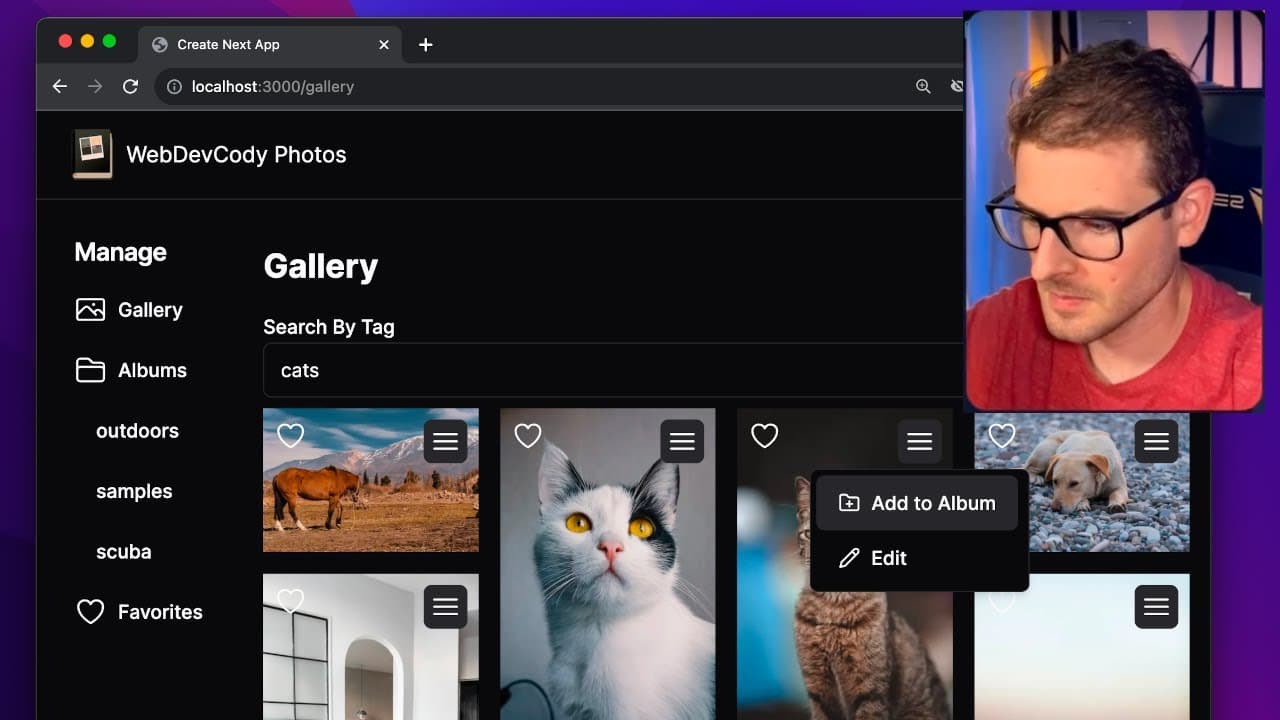
To create a photo album app with Next.js and Cloudinary, utilize Cloudinary's upload widget for seamless image uploads and AI tagging. Implement features for managing albums, searching images by tags, and applying enhancements like background removal without needing a traditional database. This tutorial showcases extensive use of Cloudinary's API to build a fully functional photo management application.
Transcript
all right everyone I have a really cool video tutorial for you all where we're going to be trying to build out this photo album using next.js and Cloud Nary so I'm going to walk you through everything that we're going to build in this tutorial I do think there's a lot of good information here that you can learn if you watch this video first thing i... Read More
Key Insights
- 👻 The image upload process is simplified by using Cloudinary's upload widget, allowing users to drag and drop files easily.
- 👨🔬 Cloudinary's tagging capabilities streamline the organization of images, enabling users to search and filter by tags effectively.
- 👻 The integration of AI features enhances user interaction, allowing for automated tagging and intelligent image editing.
- 😀 The app's architecture does not rely on a traditional database, utilizing Cloudinary's API for media management.
- 👤 The use of server and client components in Next.js enables responsive data handling and dynamic user interfaces.
- 😑 User authentication and individual media access can be enhanced using pre-signed URLs in Cloudinary to secure private images.
- 😀 Optimistic updates are essential for improving app responsiveness, allowing instant feedback for user actions such as favoriting images.
Install to Summarize YouTube Videos and Get Transcripts
Explore YouTube Video Summarizer or Get YouTube Transcript Extractor
Questions & Answers
Q: What technologies are utilized in creating the photo album app?
The app is built using Next.js, a React framework, alongside Cloudinary, which provides features for media storage, auto-tagging, transformations, and image management. The integration allows users to upload images seamlessly and manage them without needing a database.
Q: How does Cloudinary's AI feature enhance the application?
Cloudinary's AI feature automatically tags images based on their content during upload, simplifying the organization and searchability of media. This helps users to quickly filter images and enhances user experience by allowing searches based on common tags.
Q: What are some image editing features included in the app?
The application offers various image editing capabilities such as generative fill, blurring, pixelation, grayscale effects, and background removal. These features leverage Cloudinary's AI-powered transformations to modify images directly from the app.
Q: How can users manage their photos and albums within the app?
Users can upload images to the gallery, create album folders for organizing images, and filter them by tags. The app allows users to add images to albums and view images based on their album categorization, providing an organized view of their media.
Summary & Key Takeaways
-
The tutorial guides users through building a photo album application using Next.js and Cloudinary, focusing on seamless image uploads and management without a traditional database.
-
Key features include the ability to auto-tag uploaded images with AI, create and manage albums, and apply various image enhancements such as generative fill and background removal.
-
Users learn to implement functionality for searching images by tags, adding images to albums, and editing images with AI-powered features, showcasing Cloudinary's extensive API capabilities.
Read in Other Languages (beta)
Share This Summary 📚
Summarize YouTube Videos and Get Video Transcripts with 1-Click
Try YouTube Summary with ChatGPT & Claude or YouTube Transcript Generator
Explore More Summaries from Web Dev Cody 📚





Summarize YouTube Videos and Get Video Transcripts with 1-Click
Try YouTube Summary with ChatGPT & Claude or YouTube Transcript Generator