How to Build an AI Resume Screening System in n8n
TL;DR
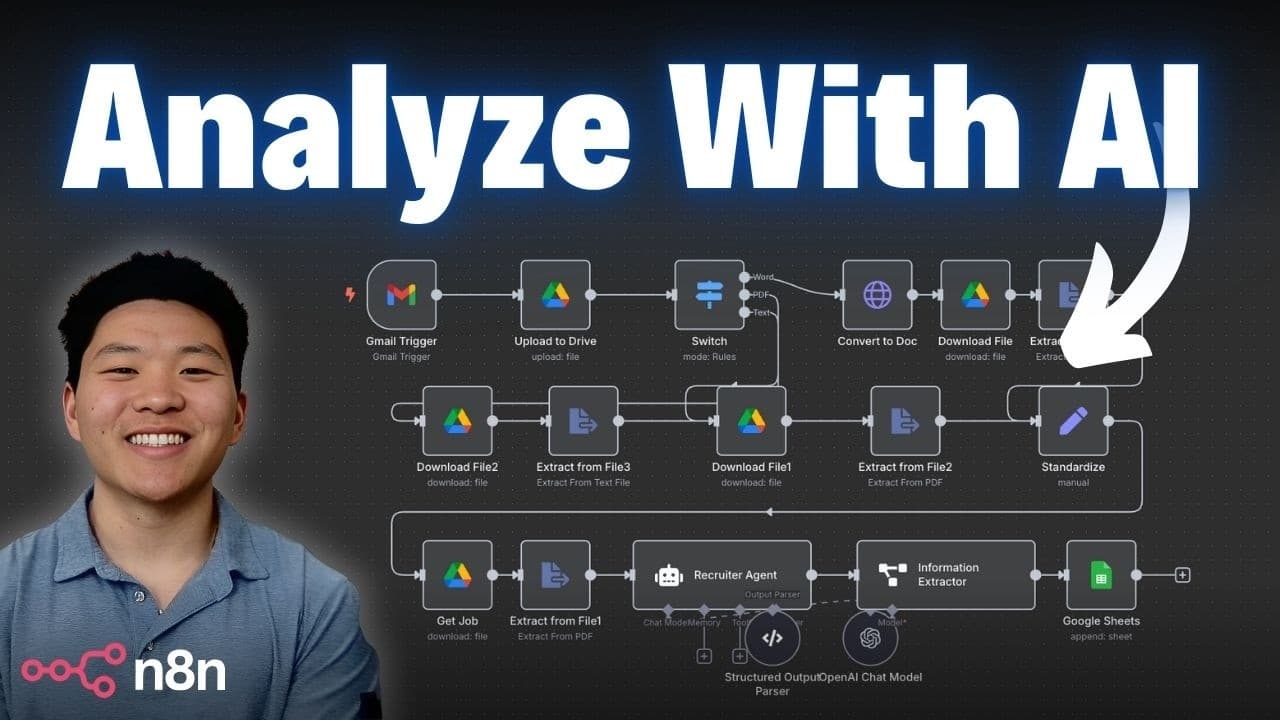
A no-code resume screening workflow in n8n starts with a Gmail trigger on message received, saves the attachment to a Google Drive folder, then uses a Switch node on MIME type to route Word, PDF, and text files down separate extraction paths. The extracted resume text and a job description Google Doc feed an AI agent that returns strengths, weaknesses, risk, reward, overall fit, and justification into a Google Sheet.
Transcript
What we're looking at today is the smart AI ré collection system that not only analyzes the candidate for strengths and weaknesses, but it will also look at the job description that they're applying for and it will tell you what's the risk here, what's the reward, what's the overall fit, and then it will give you some justification for it. This is ... Read More
Key Insights
- The system evaluates a candidate against a specific job description rather than in isolation, returning strengths and weaknesses, risk versus reward, an overall fit rating, and written justification so a recruiter can see why a candidate received that rating.
- The recommended automation mindset is to first list out the steps you would perform manually, written in a Google Doc or Google Sheets, before touching any automation tool. That manual step list becomes the raw material for the wireframe.
- Wireframing in Excalidraw converts the step list into a diagram showing the trigger, the data sources, any data transformation, and where AI comes into play, which makes the required nodes obvious before the build begins.
- The choice between an agent and a plain workflow depends on whether decisions need AI. Here the only decision is what file type the resume is, and that can be determined without AI, so no agent is used and the workflow stays simple.
- Building in n8n without a wireframe is compared to assembling a Lego tractor without opening the instruction manual. A general idea of the target build, even an imperfect one, saves significant time once you are in the editor.
- The Gmail trigger checks the inbox every minute for new email, but the attachment stays hidden until simplify is turned off and the download attachments option is checked, at which point the binary file appears as attachment_0.
- Word documents are the hardest file type to handle because n8n has no good direct text extraction path for them, so the workflow makes an HTTP request to convert the Word file into a Google Doc before extracting the text.
- Branched data must be standardized before continuing, so all extraction paths route into a single node that sets one field called resume or text, letting the rest of the flow operate on consistent input regardless of the original file format.
Install to Summarize YouTube Videos and Get Transcripts
Explore YouTube Video Summarizer or Get YouTube Transcript Extractor
Questions & Answers
Q: How do you build an AI resume screening system without code?
The build uses n8n with no code. A Gmail trigger fires on message received and downloads the attached resume, a Google Drive node uploads it to a folder called resumes, a Switch node routes on file type, Word docs are converted to Google Docs via an HTTP request while PDFs and text files are downloaded and extracted directly, all paths merge into one text field, the job description is pulled from a separate Google Doc, and an AI agent analyzes both before writing results to a Google Sheet.
Q: What should you do before building an automation?
List out the steps you would take manually to complete the process, captured in a Google Doc or Google Sheets. Then move that process map into Excalidraw and turn it into a wireframe. The wireframe should identify the trigger, the different data sources, whether any data transformation is needed, and where AI comes into play. This makes clear which nodes are required and whether the job needs an agent or just a workflow.
Q: When do you need an AI agent instead of a plain workflow?
You need an agent when a decision in the process genuinely requires AI judgment. In this resume system, the only branching decision is what type of file the resume is, which can be determined from file metadata without any AI. Because that decision can be made without AI, no agent is used for routing and the workflow stays simple. The AI agent appears only later, where the resume and job description are analyzed together.
Q: Why does the Gmail trigger not show the resume attachment?
By default the Gmail trigger returns a simplified output showing fields like the email body and subject, but not the attached file. To get the attachment you turn off simplify and add the download attachments option, checking it on. After re-running the node, the binary file appears in the output, named attachment_0 by default. There is also an option to change that prefix to something like resume if you prefer a different field name.
Q: How do you extract text from a Word document in n8n?
Word documents are described as the toughest file type because there is no great way to extract text from a Word doc directly in n8n, even though several extraction methods exist for other formats. The workaround is to add an HTTP request node that converts the Word document into a Google Doc. Once it is a Google Doc, the text can be extracted normally and passed down the rest of the workflow.
Q: How does the Switch node route different resume file types?
The Switch node reads the MIME type from the metadata of the file that was just uploaded to Google Drive. For a Word doc, the metadata shows an application type containing xml office document word, so the rule checks whether the MIME type variable equals that value and sends matching items down a branch renamed word. Two more routing rules are added for PDF and text file, giving three branches, and each execution follows the branch matching the file.
Q: How do you configure the Google Drive upload node for the resume?
Two settings matter. The input data field name must match the name of the input field holding the binary file, which is attachment_0 coming from the Gmail trigger, so that value is copied in to link the two nodes. The file name in Google Drive is set as an expression: assuming applicants were told to put their full name in the email subject, the subject field is pulled from the JSON and the word resume is appended. After execution, Drive returns a file ID used later in the flow.
Q: What does the AI agent output and where does it go?
The agent receives both the candidate's resume text and the extracted job description text, which includes requirements, criteria, and responsibilities. It returns the candidate's strengths and weaknesses, the risk and reward, the overall fit for that job description, and a justification for its assessment. Those results are written to a Google Sheet along with the candidate's first name, last name, and email address. The flow could optionally end with a Slack notification or an email instead.
Q: Should AI make the hiring decision in this workflow?
No. The stated position is that you should not let AI hire everybody. Instead, let the system run and then personally reach out to anyone who ranked high on overall fit. The output is also useful when deciding between two candidates: you can review what the AI concluded from an objective standpoint, which may surface implicit bias you did not realize was influencing your own judgment. Human follow-up remains part of the process.
Summary & Key Takeaways
-
The system analyzes a candidate's resume against the job description they applied for and reports strengths and weaknesses, risk, reward, overall fit, and a justification for the rating. It is presented as a timesaver for recruiters during hiring and as a way to keep personal bias out of candidate evaluation.
-
Before building, the recommended approach is to list the manual steps in a Google Doc or Google Sheet, then turn that process map into a wireframe in Excalidraw. The wireframe clarifies the trigger, data sources, transformations, and where AI belongs, and reveals whether an agent is needed or a plain workflow suffices.
-
The build runs live in n8n: Gmail trigger with simplify off and download attachments on, a Google Drive upload node keyed to the attachment_0 binary field, a Switch node branching on MIME type, an HTTP request that converts Word docs to Google Docs, text extraction, and a merge into a single resume text field.
Read in Other Languages (beta)
Share This Summary 📚
Summarize YouTube Videos and Get Video Transcripts with 1-Click
Try YouTube Summary with ChatGPT & Claude or YouTube Transcript Generator
Explore More Summaries from Nate Herk | AI Automation 📚






Summarize YouTube Videos and Get Video Transcripts with 1-Click
Try YouTube Summary with ChatGPT & Claude or YouTube Transcript Generator