How to Create SaaS Product Launch Motion Graphics in AE
TL;DR
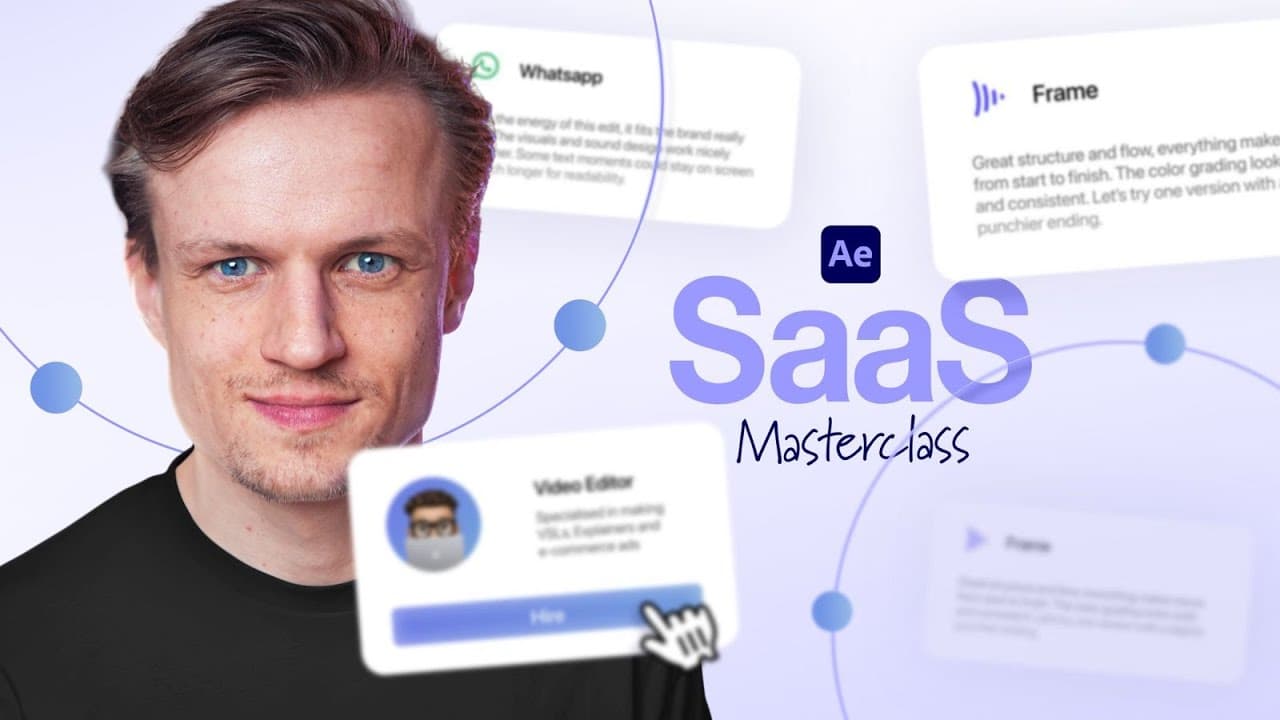
Building a SaaS launch animation starts with a solid layer given a four color gradient set to 100% jitter, which removes banding and adds subtle noise. A rounded rectangle with roughly 60 roundness, a light gray stroke, and a 5% opacity drop shadow at 90 degrees forms the UI card. Parent every element to a null, then keyframe scale for a zoom-out reveal.
Transcript
You've probably seen those software as a service product launch videos. They're smooth, minimalistic, and you can make a lot of money by making them. And today, I will show you exactly how to create one. I came up with a fake software as a service, and this is what we're going to create today. If you've ever hired a video editor, you know the pain.... Read More
Key Insights
- Setting jitter to 100% on the four color gradient effect prevents banding in the background and adds a light noise texture, which the creator considers a desirable side effect rather than a flaw in the gradient render.
- A convincing UI card is made from a rounded rectangle with fully white fill, a light grayish stroke for separation from the background, and roundness set around 60, described as high but not too high.
- Soft drop shadows read as premium when the size is increased by a lot, the angle set to 90 degrees, distance increased so the shadow sits below the card, and opacity dropped to roughly 5%.
- An ellipse with a linear gradient fill, using the same colors as the background, can serve as a track matte for a memoji portrait so the image crops cleanly at the bottom edge of the circle.
- Parenting all layers except the already parented PNG to a new null object allows a single scale keyframe pair to zoom out from the fully screen filling card, which is then eased with Keyframe Assistant, Easy Ease.
- Bounce can be created manually without expressions or plugins like Motion Tools by pressing F9 to ease keyframes, then dragging the graph editor handles out and overshooting the final scale value.
- Text animates smoothly using Animate, Position plus the added Opacity property, with position at 50 and opacity at zero, then keyframing the range selector offset from minus 100% to 100%.
- Setting the range selector advanced Based On value to Words instead of characters makes text arrive word by word, with shape set to Ramp Up and Ease Low at 100% for a smoother entrance.
- Motion blur enabled on the composition and on every individual layer is applied early in the process, before detailed element animation, because it immediately improves the polish of the movement.
Install to Summarize YouTube Videos and Get Transcripts
Explore YouTube Video Summarizer or Get YouTube Transcript Extractor
Questions & Answers
Q: How do you create a soft gradient background in After Effects for a SaaS animation?
Create a new solid through Layer, New Solid, where the chosen color does not matter, then search the Effects and Presets panel for four color gradient and double click it with the solid selected. Adjust the colors toward an off white and a less saturated blue, turn the blend up by a lot, and reposition the gradient points. Finally set jitter to 100% so no banding appears, which also introduces a light noise texture across the background.
Q: What composition settings are used for this SaaS motion graphics project?
The composition is created at 4K resolution running at 25 frames per second. Duration is set high from the start, to around one minute, because the imported voice over track runs long, and the tutorial notes that this duration can still be changed later if needed. The voice over audio is imported first and dragged into the composition so the animation timing can be built against the spoken lines, beginning with the line about having hired a video editor.
Q: How do you make a UI card look premium in After Effects?
Use the rounded rectangle tool with fill set to fully white and add a light grayish stroke, keeping the stroke subtle so it separates the card from the background without being too noticeable. Set roundness around 60, high but not extreme. Then right click the layer, choose Layer Styles, Drop Shadow, increase the size a lot for softness, set the angle to 90 degrees, increase distance so the shadow falls below the card, and reduce opacity to about 5%.
Q: How do you animate text word by word in After Effects?
Select the text layer, open Animate and choose Position, then use Add, Property, Opacity. Set position to 50 and opacity to zero. Open the range selector, go to the Advanced tab, and change Based On to Words so whole words animate instead of individual characters. Set shape to Ramp Up and ease low to 100%. Keyframe the offset by clicking its stopwatch, starting at minus 100% and ending at 100%, then stretch the keyframes for a smoother result.
Q: How do you create a bounce animation without plugins or expressions?
Set a scale keyframe, move earlier in time and set scale to zero, then press F9 to ease the keyframes. Open the graph editor, drag the handles out, and set the incoming value slightly larger than the final size so the element overshoots and settles, which produces the bounce. If the motion is not smooth enough, drag the last keyframe handle further out, and dial the overshoot down if it feels excessive. Expressions or a plugin such as Motion Tools are alternatives, but are not required.
Q: What is the fake SaaS product used in this tutorial about?
The product is called Edit from, invented for the tutorial. Its pitch addresses anyone who has hired a video editor and knows the pain of feedback scattered across emails, WhatsApp, Slack, and Frame without a clear overview. Edit from solves this by bringing everything into one place, specifically projects, feedback, files, and communication. This scripted voice over drives the animation, and the full voice over file is available for download through a link in the video description.
Q: How do you crop a memoji into a circle in After Effects?
Import the memoji, which can be a custom one made on an Apple iPhone, found through Google, or generated with ChatGPT, then press S to scale it down. Draw an ellipse with stroke set to none and a linear gradient fill using the background colors. Move the ellipse below the image, scale the image so its bottom meets the bottom of the ellipse, then use the ellipse as a track matte. Parent the image to the shape and scale down.
Q: How do you build a zoom out reveal from a UI card?
Create a new null object through Layer, New Null Object and move it to the top of the layer stack. Select every layer except the PNG, which is already parented to the shape, and parent them to the null. Press S for scale, set a keyframe, move later in time, then scale in heavily at the earlier keyframe so the card fills the entire screen. Apply Keyframe Assistant, Easy Ease, then shape the curve in the graph editor for a steep, quick move.
Summary & Key Takeaways
-
The project is built around a fake SaaS called Edit from, pitched as a fix for editor feedback scattered across emails, WhatsApp, Slack, and Frame, bringing projects, feedback, files, and communication into one place. The animation is divided into three scenes, with a transition technique connecting them.
-
Setup uses a 4K composition at 25 frames per second with duration set to about one minute to fit the longer voice over. The downloadable voice over is linked in the description. The background is a new solid with the four color gradient effect applied, colors adjusted to off white and a muted blue, blend raised high, and jitter at 100%.
-
The UI card is a rounded rectangle with white fill, a light gray stroke, and roundness near 60, finished with a soft layer style drop shadow at 90 degree angle, large size, increased distance, and about 5% opacity. A memoji sits on a gradient ellipse used as a track matte, parented to the shape and scaled down.
Read in Other Languages (beta)
Share This Summary 📚
Summarize YouTube Videos and Get Video Transcripts with 1-Click
Try YouTube Summary with ChatGPT & Claude or YouTube Transcript Generator
Explore More Summaries from TomsProject 📚
Summarize YouTube Videos and Get Video Transcripts with 1-Click
Try YouTube Summary with ChatGPT & Claude or YouTube Transcript Generator