Google accidentally made the ULTIMATE Smart Home Dashboard!
TL;DR
Transform a Google Pixel tablet into a smart home dashboard with motion activation and third-party apps for a comprehensive user-friendly experience.
Transcript
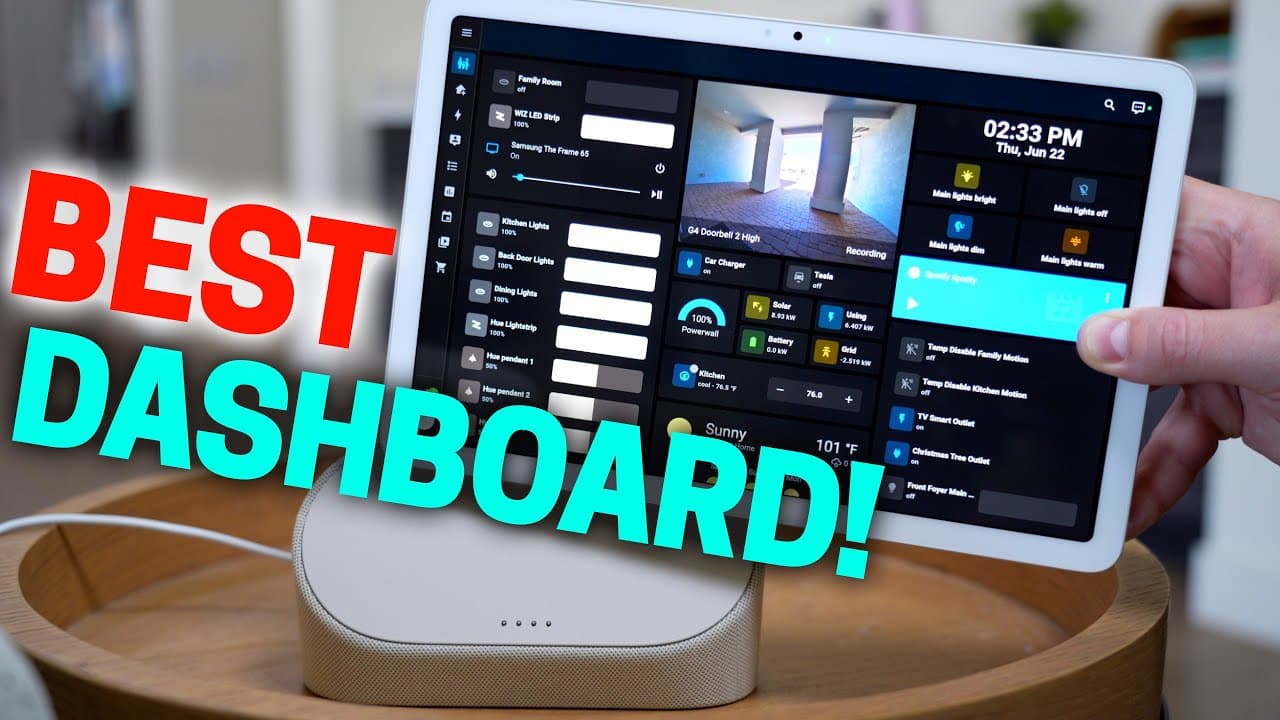
really fast pixel tablet check wireless charging dock with a speaker chat Voice Assistant with a smart display Check Smart dashboard it doesn't really have one so I made a few tweaks and now it has one of the best dashboards you can get right now it has even motion activation and everything it's the ultimate smart home dashboard to be honest when I... Read More
Key Insights
- 😀 Google Pixel tablet, paired with third-party apps like Fully Kiosk Browser, offers a customizable smart home dashboard experience.
- 👪 Motion activation on the smart home dashboard adds convenience by automatically turning on the screen when needed.
- 📱 Integration of live doorbell views and control over smart devices enhances the functionality of the smart home dashboard.
- 🛟 The wireless charging dock for the Google Pixel tablet is a practical addition, preserving battery life and ensuring constant usability.
- 📱 Despite the initial lack of a built-in smart dashboard, the Google Pixel tablet can be transformed into an ultimate smart home dashboard with additional apps and accessories.
- 👻 The removable tablet feature allows users to switch between using the device as a smart home dashboard and a regular tablet seamlessly.
- 😥 The price point of the Google Pixel tablet with accessories may seem high, but the added functionality and usability justify the investment for a comprehensive smart home experience.
Install to Summarize YouTube Videos and Get Transcripts
Explore YouTube Video Summarizer or Get YouTube Transcript Extractor
Questions & Answers
Q: How can a Google Pixel tablet be transformed into a smart home dashboard?
By using third-party apps like Fully Kiosk Browser, the Google Pixel tablet can display smart home dashboards seamlessly in full-screen mode, offering convenient features like motion activation for the screen.
Q: What makes the Fully Kiosk Browser app a valuable tool for creating a smart home dashboard?
The Fully Kiosk Browser app enables users to display their home assistant dashboards on the Google Pixel tablet in a user-friendly full-screen mode, with added features like automatic screen activation via motion detection.
Q: What are the advantages of having a smart home dashboard on a Google Pixel tablet with a wireless charging dock?
The integration of a smart home dashboard on a Google Pixel tablet with a wireless charging dock offers convenience with motion activation, live doorbell views, and control over smart devices, providing an enhanced user experience.
Q: How does the Google Pixel tablet with a smart home dashboard compare to standalone tablets or smart displays?
The Google Pixel tablet, when transformed into a smart home dashboard, offers a more interactive user experience with motion activation, live views, and control over smart devices, making it more convenient and engaging than standalone tablets or smart displays.
Summary & Key Takeaways
-
Google Pixel tablet lacks a built-in smart dashboard, but with third-party apps like Fully Kiosk Browser, it can display smart home dashboards seamlessly.
-
The Fully Kiosk Browser app enables full-screen display of home assistant dashboards with convenient features like motion activation for the tablet screen.
-
The Google Pixel tablet, paired with a wireless charging dock and speaker, offers an ultimate smart home dashboard experience with features like live doorbell view and control over smart devices.
Read in Other Languages (beta)
Share This Summary 📚
Summarize YouTube Videos and Get Video Transcripts with 1-Click
Try YouTube Summary with ChatGPT & Claude or YouTube Transcript Generator
Explore More Summaries from Smart Home Solver 📚

Summarize YouTube Videos and Get Video Transcripts with 1-Click
Try YouTube Summary with ChatGPT & Claude or YouTube Transcript Generator