How to Refactor React Code for Empty State Management
TL;DR
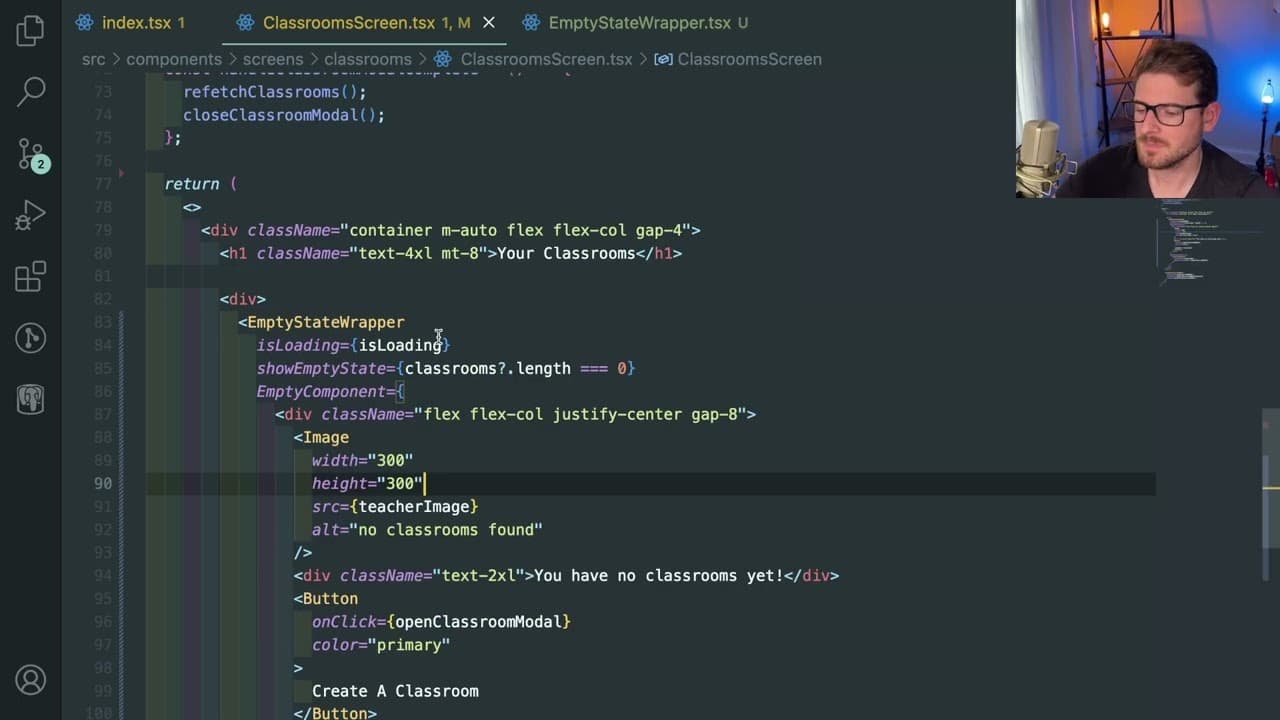
To refactor your React code effectively for empty state management, create a reusable 'empty state wrapper' component. This component should handle loading states and display either a custom message or the actual data, significantly reducing repetitive code and improving maintainability across your application.
Transcript
all right so in this video i'm just going to add on a little refactoring to this project i've been working on um basically someone pointed out to me that there's a pattern called like a a query cell pattern you can use where basically when you have a page that has like a a blank state to it you probably want to show some type of button and an image... Read More
Key Insights
- 👻 Implementing a query cell pattern allows for a structured approach to manage different data states within React applications.
- 👨💻 The creation of a reusable component, such as the empty state wrapper, enhances code maintainability by reducing redundancy across different components.
- 👤 Utilizing conditional rendering effectively can improve UI responsiveness and user experience by providing clear feedback during data fetching periods.
- 🪜 Refactoring decisions should be evaluated continuously to ensure they add clear value without complicating the development process unnecessarily.
- ⌛ TypeScript syntax can enhance coding practices in React by providing type definitions and reducing run-time errors through compile-time checks and validations.
- 😫 Consistency in UI elements, such as loaders and empty states, fosters better user experiences across various application sections by setting clear expectations.
- 👋 The discussion encourages a community-driven approach, inviting feedback and interaction on best practices in React development among peers or from viewers.
Install to Summarize YouTube Videos and Get Transcripts
Explore YouTube Video Summarizer or Get YouTube Transcript Extractor
Questions & Answers
Q: What is the query cell pattern discussed in the video?
The query cell pattern is a design approach used to manage different states of data in React applications. It effectively handles scenarios where data may be empty, loading, or filled, thus improving user experience by showing appropriate feedback based on the application's state.
Q: Why is the "empty state wrapper" component introduced?
The "empty state wrapper" component is introduced to abstract the logic that determines what content to display based on the current state of data. By using this reusable component, the code becomes cleaner, eliminates repetitive conditional logic, and improves maintainability throughout the application.
Q: How does the presenter handle loading states in the implementation?
The presenter uses a loading boolean to indicate when the application is in a fetching state, displaying a spinner. This simplifies the user experience by providing immediate feedback during data load without cluttering the UI with additional conditionals.
Q: Did the presenter find the refactoring process worthwhile?
Throughout the video, the presenter expressed uncertainty about the necessity of their refactorings but ultimately acknowledged that simplifying the component structure and reducing conditional logic led to cleaner code and reusable patterns, reinforcing the idea that refactoring can be beneficial if done thoughtfully.
Q: What role does TypeScript play in this refactoring?
TypeScript is employed to define types for props being passed into components, ensuring type safety and helping catch potential errors during development. This practice improves code reliability by making sure components receive the expected data shapes, enhancing overall maintainability.
Q: How does the speaker address potential code over-engineering?
The speaker reflects on their design choices and actively questions whether each abstraction is necessary for the application's usability. This self-analysis helps ensure that while they strive for cleaner code, they also maintain a user-friendly implementation without falling into the trap of unnecessary complexity.
Summary & Key Takeaways
-
The content focuses on implementing a query cell pattern in a React project to efficiently handle classroom data, particularly in scenarios where the data might be empty or loading.
-
The presenter demonstrates creating a reusable component—an "empty state wrapper"—to manage different application states such as loading, showing an empty state, or displaying actual data.
-
Through various implementations and refinements, the presenter emphasizes the importance of clean code and reusable components to streamline the application while reducing conditional logic across multiple components.
Read in Other Languages (beta)
Share This Summary 📚
Summarize YouTube Videos and Get Video Transcripts with 1-Click
Try YouTube Summary with ChatGPT & Claude or YouTube Transcript Generator
Explore More Summaries from Web Dev Cody 📚





Summarize YouTube Videos and Get Video Transcripts with 1-Click
Try YouTube Summary with ChatGPT & Claude or YouTube Transcript Generator