How to Make Your Phone Less of a Distraction
TL;DR
Make your phone less distracting by keeping it out of reach, using Do Not Disturb, removing unnecessary apps, and limiting tempting ones with iOS Screen Time. Review each app for actual use, duplicated functionality, drawbacks, and wasted time; the creator removes Twitter and YouTube Studio but keeps YouTube for audio listening. Read on for the complete app-audit questions and practical mitigation settings.
Transcript
- This video is sponsored by CuriosityStream. Get access to my streaming service Nebula when you sign up for CuriosityStream at the link below. This is not a phone. Or, at least, that's now how you should view this piece of technology. Instead, you should look at this thing as a powerful computer, nearly as powerful as the other computers you use, ... Read More
Key Insights
- 😾 Redefining the relationship with smartphones is crucial to minimize distractions and improve focus during work or outings.
- 😀 Decluttering and organizing apps on the phone can enhance productivity and reduce time-wasting.
- 😀 Understanding the benefits and drawbacks of each app helps prioritize and eliminate unnecessary ones.
Install to Summarize YouTube Videos and Get Transcripts
Explore YouTube Video Summarizer or Get YouTube Transcript Extractor
Questions & Answers
Q: How can you make your phone less of a distraction?
Keep the phone on the other side of the room or in a different room while working, use Do Not Disturb during most of the workday, and carry it in a backpack instead of a pocket when going out. You can also delete attention-grabbing apps or constrain them with iOS Screen Time.
Q: What questions should you ask when decluttering phone apps?
Ask whether you actually use the app, whether it needlessly duplicates functionality available on another device, and whether its benefits outweigh its drawbacks. Finally, ask whether it is a time suck and, if so, whether you can mitigate that problem.
Q: Should you delete every app you do not currently use?
Not necessarily; the creator makes an exception when he feels reasonably certain that he will use an app again. He keeps UDisc because it shows disc golf park locations and he wants to try the activity with his fiancée.
Q: Why remove apps that duplicate another device's functionality?
Removing duplicate apps helps shift activities away from the phone and makes them more proactive. The creator deletes MuseScore because sheet music works better on his iPad, and he removes YouTube Studio so he can check analytics strategically on his computer instead of reacting to them on his phone.
Q: How should an app's benefits and drawbacks be evaluated?
Do not keep an app merely because it offers one small benefit; compare that benefit with the attention and time it consumes. The creator deletes Twitter because it pulls at his attention and duplicates functionality already available on his computer.
Q: How can iOS Screen Time reduce app distractions?
Screen Time can impose limits on individual apps or entire app categories. The examples given are a 15-minute daily Instagram limit and a 30-minute limit for all Social Networking apps.
Q: How can you restrict phone use at night?
Use the downtime feature within iOS Screen Time to make the phone largely unusable during selected hours. The creator gives ten p.m. to seven a.m. as an example schedule.
Q: Which useful apps does the creator keep on his phone?
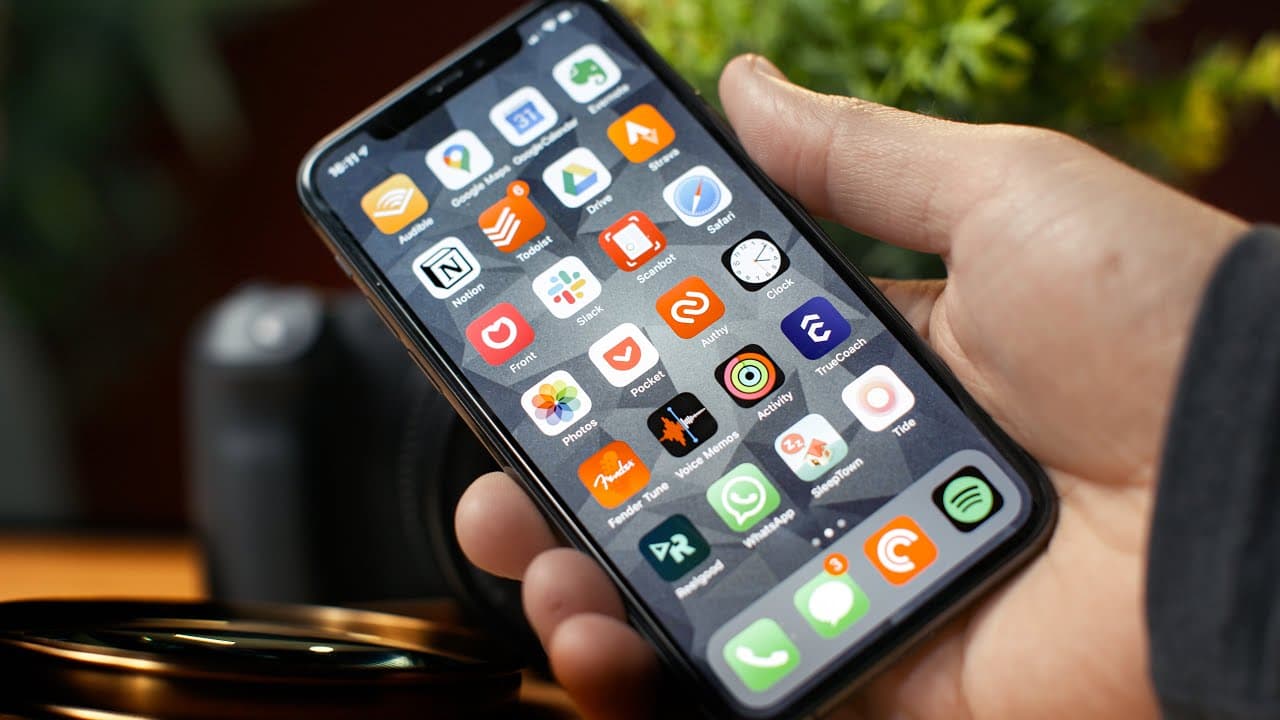
The highlighted apps include Roam QC for quickly capturing ideas, Voice Memos for recording thoughts, Notion for business management and scriptwriting, Fender Tune for tuning a guitar, and Strava for tracking cycling and running distances. He also keeps YouTube because YouTube Premium lets him turn off the screen and listen to videos like podcasts during long bike rides or skating sessions.
Summary & Key Takeaways
-
The content creator emphasizes the need to view smartphones as powerful computers that can be distracting. He shares his strategies for redefining his relationship with his smartphone, such as keeping it away during work and outings.
-
The creator provides a step-by-step process for reorganizing and decluttering the phone. He recommends asking questions like whether the app is actually used, if it duplicates functionalities, if the benefits outweigh the drawbacks, and if it is a time suck.
-
The content creator showcases helpful apps on his phone, highlighting their uses and importance in his daily life. He also shares tips for mitigating distractions from certain apps, such as disabling them from search suggestions.
Read in Other Languages (beta)
Share This Summary 📚
Summarize YouTube Videos and Get Video Transcripts with 1-Click
Try YouTube Summary with ChatGPT & Claude or YouTube Transcript Generator
Explore More Summaries from Thomas Frank 📚

Summarize YouTube Videos and Get Video Transcripts with 1-Click
Try YouTube Summary with ChatGPT & Claude or YouTube Transcript Generator