DWIN Display Tutorials #3 - Simple weather station project
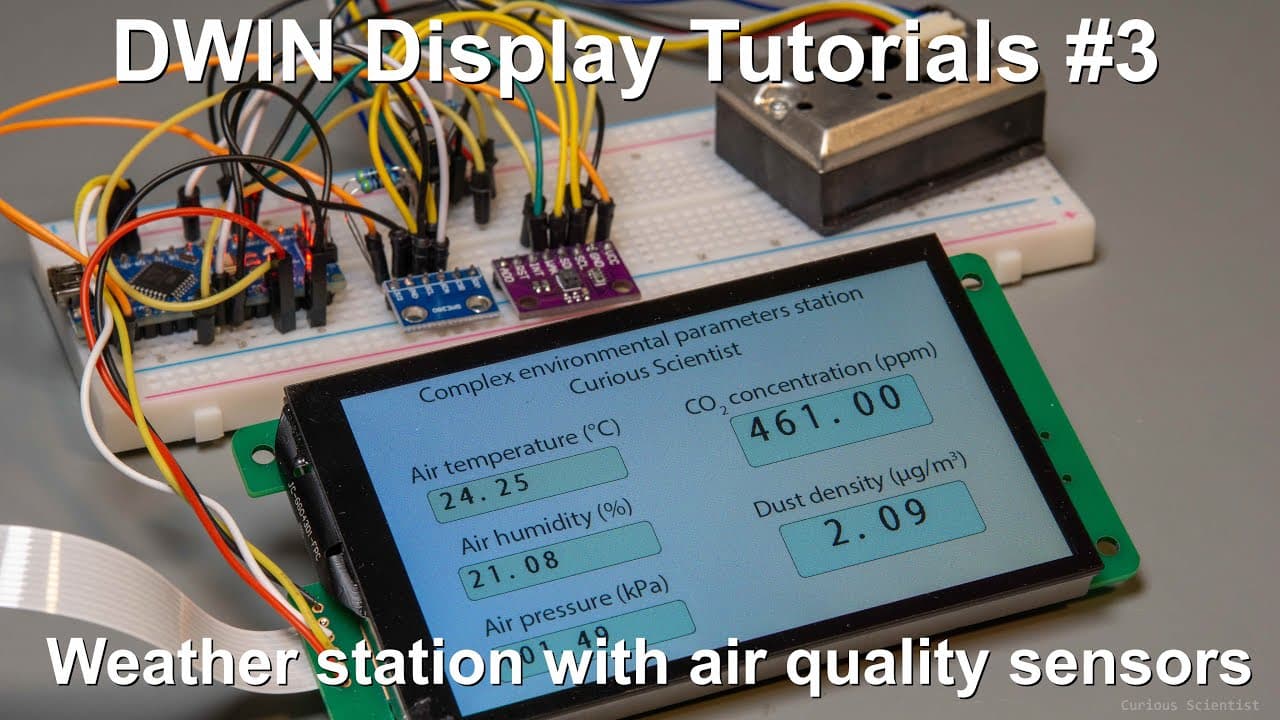
TL;DR
Demonstrates creating a weather station display using Arduino sensors.
Transcript
welcome everyone in this video I'm going to show you a more fun example of using this diving display that I've been showing you in my last few videos and I made some kind of environmental parameters station or weather station if you can see the parameters so I will show you how can I fetch the data from the sensors which produce these data and then... Read More
Key Insights
- ❓ The tutorial illustrates the integration of multiple sensors, enabling versatile environmental monitoring with Arduino.
- 😥 Floating-point precision is highlighted as essential for displaying accurate sensor data in real time.
- 🚉 The BME 280 sensor is a central element for measuring temperature, humidity, and pressure, showcasing its utility in weather stations.
- 👱 The dust and CO2 sensors add complexity, enabling the monitoring of air quality alongside basic meteorological data.
- 🦮 The tutorial serves not only as a practical guide but also as an educational resource for understanding sensor data handling in programming.
- 👨💻 The presenter encourages exploration and experimentation with coding practices for better performance and efficiency.
- 🥺 Supporting the creator through platforms like Patreon can lead to more extensive content creation and enhanced tutorials.
Install to Summarize YouTube Videos and Get Transcripts
Explore YouTube Video Summarizer or Get YouTube Transcript Extractor
Questions & Answers
Q: What are the main components of the weather station displayed in the video?
The weather station consists of several sensors, most notably the BME 280 sensor, which measures temperature, humidity, and pressure. It also utilizes a CO2 concentration sensor and a dust density sensor, showcasing how multiple environmental parameters can be monitored and displayed in real time.
Q: How does the presenter explain the use of floating-point numbers in the Arduino code?
The presenter emphasizes that many tutorials overlook the use of floating-point numbers. He demonstrates how to manage these numbers effectively for accurate readings from sensors. Through a dedicated function, the floating-point values are converted and sent to the diving display, ensuring clear representation of data.
Q: Can the display update in real-time? If so, how is this achieved?
Yes, the display is capable of real-time updates. The Arduino code continually fetches data from the various sensors at set intervals, allowing for immediate visualization of changing environmental conditions like temperature and humidity.
Q: What troubleshooting steps are mentioned regarding sensor connections?
The presenter discusses that if the code seems unresponsive, it often points to issues with the sensor connections. He encourages users to double-check the wiring and ensure that each sensor is properly connected to the Arduino to avoid communication failures.
Q: What future projects or enhancements does the presenter hint at?
The presenter mentions plans for future videos that include graphing the collected data over time to display changes in temperature, humidity, and other parameters. This could enhance the educational value of the project, offering insights into environmental trends.
Q: How does the dust sensor work in the weather station?
The dust sensor operates by using an infrared LED that emits light, with a phototransistor detecting the amount of light scattered by dust particles in the air. The intensity of scattered light is proportional to dust density, allowing for a quantitative measurement displayed in real-time.
Q: What libraries are mentioned as necessary for running the Arduino code?
The video mentions the wire library for I²C communication with the sensors, as well as libraries specific to the BME 280 and CCS811 sensors. These libraries streamline data collection from the sensors, making it easier to integrate sensor outputs with the Arduino code.
Summary & Key Takeaways
-
The video showcases how to build a weather station using Arduino, featuring five environmental parameters and a diving display.
-
Step-by-step, the presenter explains how to fetch data from sensors like BME 280 and CO2 detectors, displaying real-time values.
-
The tutorial emphasizes utilizing floating-point numbers for precise display outputs and includes links for further resources.
Read in Other Languages (beta)
Share This Summary 📚
Summarize YouTube Videos and Get Video Transcripts with 1-Click
Try YouTube Summary with ChatGPT & Claude or YouTube Transcript Generator
Explore More Summaries from Curious Scientist 📚



![Building a coil winder [Part 6] - A few improvements thumbnail](/_next/image?url=https%3A%2F%2Fi.ytimg.com%2Fvi%2F3eyxG_g2iUA%2Fhqdefault.jpg&w=750&q=75)
Summarize YouTube Videos and Get Video Transcripts with 1-Click
Try YouTube Summary with ChatGPT & Claude or YouTube Transcript Generator