ProTake Portrait Video Mode & Long-Exposure Time Lapse: What's New?
TL;DR
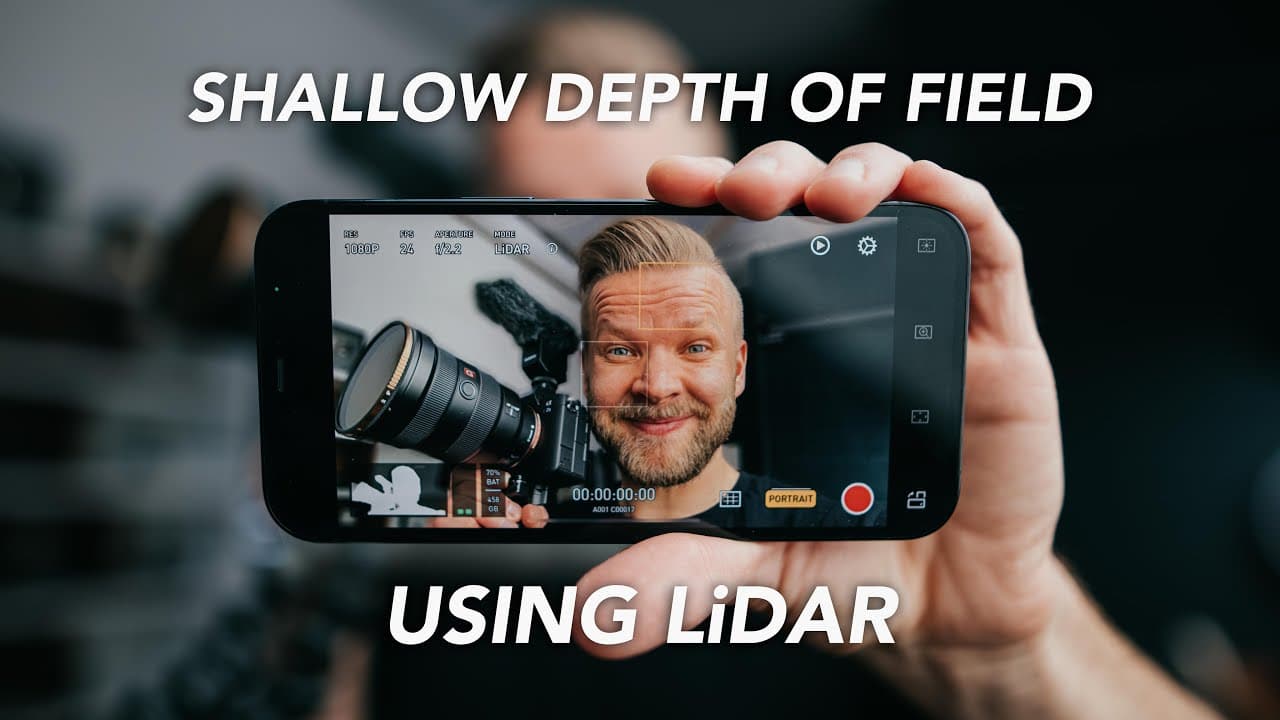
ProTake now adds a portrait video mode that produces a shallow depth of field on the iPhone using lidar, plus new control over slow shutter speeds in time lapse mode. Portrait mode records in 1080 with no stabilization, and a non-lidar version trades precision for stabilization. The app also has auto, pro, and dual modes, the last recording two cameras at once. See how well the lidar depth effect actually holds up.
Transcript
do you guys remember me raving to everyone and anyone about lidar on the new iphones and then it came out and it didn't really do anything and i knew somebody was gonna do it but of course it was my favorite filmmaking app they added a portrait video mode you can get shallow depth of field on your iphone now okay so this video is sponsored by prota... Read More
Key Insights
- 👶 ProTake's new portrait video mode provides a shallow depth of field effect on the iPhone, using lidar technology for depth perception.
- 😀 The app's intuitive controls and extensive features make it a favorite among filmmakers.
- ⌛ ProTake's improved long exposure controls in time lapse mode offer greater customization and creative options.
- 😀 The native iPhone camera app lacks the ability to control exposure and slow shutter speeds effectively, making ProTake a valuable tool for filmmakers.
- 😘 While the portrait video mode has limitations, such as lack of stabilization and lower resolution, it still performs surprisingly well.
- 👤 The addition of dual mode enables users to simultaneously record with two cameras, expanding creative possibilities.
- 🙂 The availability of a non-lidar version for the portrait video mode provides stabilization but with slightly less precision.
Install to Summarize YouTube Videos and Get Transcripts
Explore YouTube Video Summarizer or Get YouTube Transcript Extractor
Questions & Answers
Q: What new features did ProTake add?
ProTake added a portrait video mode that creates a shallow depth of field on the iPhone using lidar. It also added control over slow shutter speeds in time lapse mode, letting you choose the specific shutter speed. A new dual mode records with two cameras, such as the telephoto and ultra wide, at the same time.
Q: How well does ProTake's portrait video mode work?
It works surprisingly well on a face, doing a pretty good job of adding a shallow depth of field, though parts like the ears may get blurred when they shouldn't. It struggles with smaller objects like a hand or fingers because it is not that precise yet. The creator attributes this mainly to a hardware limitation rather than the app itself.
Q: What are the limitations of the portrait video mode?
The portrait mode only records in 1080 resolution and has no stabilization. Precision drops on small objects like fingers. These are described as current limitations you have to live with for now.
Q: Is there a portrait mode option without lidar?
Yes. There is a non-lidar version that uses visual information from the different cameras to create a similar effect. It is not as precise, but the benefit is that you get stabilization in that mode.
Q: How does ProTake improve time lapse shooting compared to the native camera app?
The native iPhone camera app only enables slow shutter speed when the phone is completely stable, like on a tripod, and turns it off as soon as you move. ProTake lets you decide when the slow shutter kicks in and choose the shutter speed for longer or shorter trails. This makes cleaner nighttime time lapses and hyperlapses possible.
Q: Why might you need a variable ND filter for slow shutter time lapses?
Doing slow shutter speeds outside in bright light will make the shot overexposed. A variable ND filter for smartphones cuts the light so those slow shutter time lapses are usable, which is why the creator says these filters just got more important.
Q: What are ProTake's main modes and controls?
ProTake offers auto mode for quick shooting, pro mode with full manual control, and dual mode for recording two cameras at once, plus the new portrait mode. Controls include shutter speed and ISO wheels, zoom and focus, scopes like waveform, video assist features like zebra and peaking, and built-in looks such as an Alexa or C-log profile. Much of the functionality is available in the free version.
Q: Can you lock ProTake into horizontal or vertical shooting?
Yes. You can lock in whether you want to be in horizontal or vertical mode. The creator notes this is useful, for example, when filming an Instagram story in auto mode and just adding a look.
Summary & Key Takeaways
-
ProTake is a filmmaking app that offers intuitive controls and features such as camera settings, exposure controls, zoom and focus, and video assist features.
-
The app now includes a portrait video mode, allowing users to achieve a shallow depth of field on their iPhone.
-
Another new feature is the ability to have more control over long exposure in time lapse mode, enabling users to capture time lapses with slow shutter speeds and choose the specific shutter speed they desire.
Read in Other Languages (beta)
Share This Summary 📚
Summarize YouTube Videos and Get Video Transcripts with 1-Click
Try YouTube Summary with ChatGPT & Claude or YouTube Transcript Generator
Explore More Summaries from Matti Haapoja 📚
Summarize YouTube Videos and Get Video Transcripts with 1-Click
Try YouTube Summary with ChatGPT & Claude or YouTube Transcript Generator