How To Light Your Videos (without expensive lights)
TL;DR
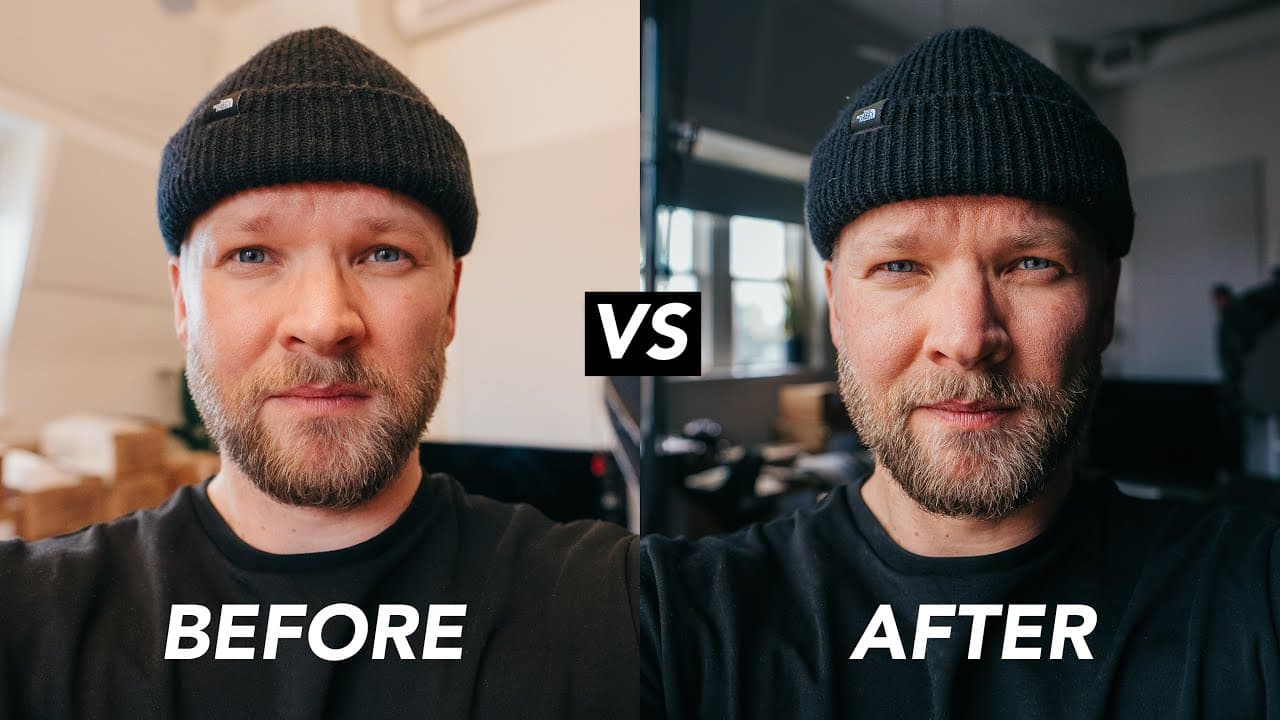
Learn how to utilize window light as a professional lighting source for your videos.
Transcript
today i'm going to show you how to light your videos like a pro maybe you're saying right away i don't have pro lights like that or that or that or this one but you do have one of these a window that's a fancy pro light and it's actually super super simple you just gotta know how to use it but before i show you we got another nmo drop not me only l... Read More
Key Insights
- 🙂 Window light can act as a professional lighting source for videos, providing soft, flattering, and customizable lighting effects.
- 🙂 Understanding the influence of different light sources and surfaces on the image is crucial for achieving desired lighting results.
- 🙂 Turning off house lights when using window light helps to maintain a consistent color temperature and avoid contrasting lighting sources.
- 😚 Getting closer to the window enhances brightness and creates a more visually appealing separation between the subject and the background.
- 🙂 Positioning the subject at a 45-degree angle to the window light can add contrast and make the lighting more dynamic.
- 🙂 Additional lights can be used creatively to amplify the effects of window light and create more complex lighting scenarios.
- 🙂 Window light is not as consistent as pro lights and may vary depending on weather conditions and time of day. Filming during cloudy days or in shaded areas can provide more consistent lighting.
Install to Summarize YouTube Videos and Get Transcripts
Explore YouTube Video Summarizer or Get YouTube Transcript Extractor
Questions & Answers
Q: What are the advantages of using window light for video lighting?
Window light is a cost-effective and easily accessible light source that can provide softer and more flattering lighting for videos. It adds depth and interest to the image, and can be adjusted by proximity and positioning.
Q: How does turning off house lights contribute to better video lighting with window light?
House lights, often tungsten lights, have a different color temperature than window light. Turning them off allows for a more consistent and natural-looking lighting setup, avoiding color contrasts between different light sources.
Q: Why is it recommended to get closer to the window for better video lighting?
Getting closer to the window increases the brightness of the window light, which helps to separate the subject from the background. It also makes the light source larger in relation to the subject, resulting in softer and more flattering lighting.
Q: How can additional lights be used to enhance window light in videos?
Additional lights can be strategically positioned to create interesting lighting effects. For example, a light can be placed to provide a backlight or kick, adding depth and separation between the subject and the background.
Summary & Key Takeaways
-
The content discusses the benefits of using window light for video lighting, highlighting that it is a simple and effective way to achieve professional-looking results.
-
It emphasizes the importance of understanding how different light sources and surfaces can affect the image, and explains how to create more uniform lighting by turning off house lights and utilizing natural light from windows.
-
The video provides practical tips such as getting closer to the window for brighter lighting, turning 45 degrees for more interesting lighting, and utilizing additional lights for added effects.
Read in Other Languages (beta)
Share This Summary 📚
Summarize YouTube Videos and Get Video Transcripts with 1-Click
Try YouTube Summary with ChatGPT & Claude or YouTube Transcript Generator
Explore More Summaries from Matti Haapoja 📚

Summarize YouTube Videos and Get Video Transcripts with 1-Click
Try YouTube Summary with ChatGPT & Claude or YouTube Transcript Generator