How Does Google Antigravity Manage Coding Agents?
TL;DR
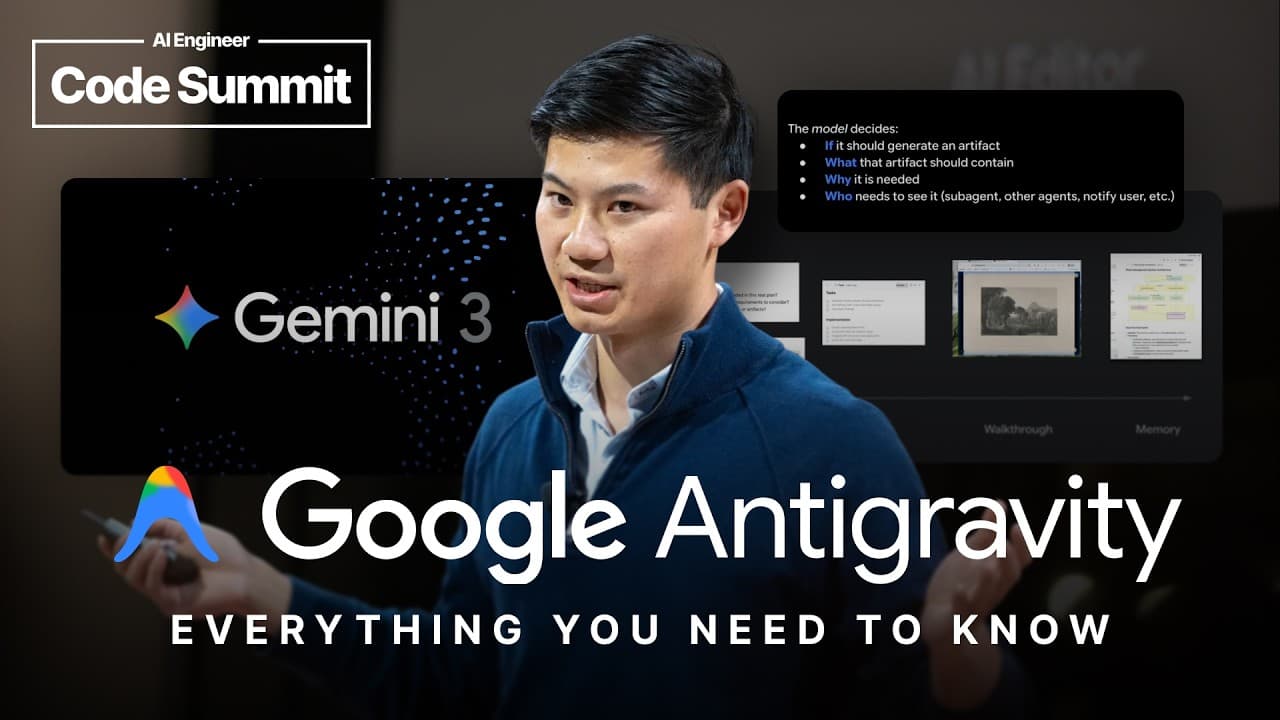
Google Antigravity organizes software development around an agent manager connected to an AI editor and an agent-controlled Chrome browser. This structure lets developers supervise multiple agents, retrieve authenticated web context, approve sensitive terminal actions, and verify completed work through browser recordings, while moving quickly into the editor when direct coding remains necessary.
Transcript
All right. Hello. Last one of the day. Can we get a uh little energy boost? Who's ready? Who's ready? All right, happy Friday. I hope everyone has had a good week, a good conference. Um, and let me tell you, it's been a really bad week if you are Gravity. Wicked 2 is coming out tonight. And then, of course, Anti-gravity came out earlier this week a... Read More
Key Insights
- Google Antigravity is an AI developer platform composed of three surfaces: an agent manager, an AI editor, and an agent-controlled browser. The design places agents outside the traditional IDE boundary so they can operate across several environments used during software development.
- The agent manager is the central control panel for supervising agents at a level above individual code changes. It presents an agent-first view, supports management of multiple tasks, and gathers requests that need human attention into an inbox.
- The AI editor is connected directly to the agent manager and includes fast autocomplete plus an agent sidebar. Developers can use it when a task requires hands-on work, particularly during the later stages that cannot be completed entirely by an agent.
- Switching between the editor and agent manager takes under 100 milliseconds through Command-E or Control-E. This rapid transition supports a workflow in which developers supervise agents broadly, then enter the code-focused environment whenever direct intervention becomes necessary.
- The agent-controlled Chrome browser provides authenticated access to resources that developers already use, including Google Docs and GitHub dashboards. This gives agents contextual information beyond source code, such as institutional knowledge, bug data, experiments, and other material relevant to implementation decisions.
- Browser control enables agents to click, scroll, execute JavaScript, and test applications through the interface. Instead of presenting only a code diff, an agent can supply a browser recording that shows its actions and offers visual evidence that a feature works.
- The agent manager's inbox supports safer multi-agent operation by surfacing consequential requests, such as terminal commands requiring approval. Operating-system notifications alert developers when intervention is needed, reducing the need to monitor every background task continuously.
- Antigravity's product design follows improvements in model intelligence, tool use, long-running task execution, and multimodal processing. Access to Gemini 3 before launch allowed the product team and DeepMind researchers to match the interface to model strengths and investigate gaps in the desired experience.
Install to Summarize YouTube Videos and Get Transcripts
Explore YouTube Video Summarizer or Get YouTube Transcript Extractor
Questions & Answers
Q: What is Google Antigravity?
Google Antigravity is an AI developer platform created by a product engineering team at Google DeepMind. It combines an agent manager, an AI editor, and an agent-controlled Chrome browser. These connected surfaces let agents work beyond source code, use web-based context, interact with applications, test changes, and provide evidence of results while developers supervise their activity from a central location.
Q: How does the Google Antigravity agent manager work?
The agent manager acts as a central control panel that places the developer one level above individual code changes. It supports the supervision of multiple agents and includes an inbox for items requiring attention, such as terminal commands that should be approved. Operating-system notifications signal when input is needed, allowing developers to coordinate several tasks without watching every agent continuously.
Q: How are the agent manager and AI editor connected?
The AI editor includes fast autocomplete and an agent sidebar whose activity is mirrored with the agent manager. Developers can move between the two surfaces using Command-E or Control-E, with the transition taking under 100 milliseconds. This connection allows broad supervision in the manager and immediate movement into the editor when a task requires direct coding or final hands-on work.
Q: What can the agent-controlled browser do in Antigravity?
The agent-controlled Chrome browser can retrieve web context and interact with websites. With permission, it can access authenticated resources such as Google Docs and GitHub dashboards. It can also click, scroll, execute JavaScript, and operate an application much as an engineer would during testing. These capabilities give agents both additional development context and a practical way to verify implemented changes.
Q: How does Antigravity verify that an agent completed a task?
Antigravity can use its controlled browser to test an application after changing the code. The agent may produce a recording of Chrome that shows the interaction, including mouse movement and the resulting interface behavior. This supplies visual, verifiable evidence of the completed work instead of relying exclusively on a code diff or an unsupported statement that the implementation functions correctly.
Q: Why does Antigravity place agents outside the IDE?
Placing agents outside the IDE allows them to operate across the different surfaces involved in software development. The transcript separates the work into deciding what to build, determining how to build it, and performing the implementation. Browser access adds context from documents, dashboards, bugs, and experiments, while the editor remains available for direct code work and the manager coordinates everything centrally.
Q: Which Gemini 3 improvements shaped Antigravity?
Antigravity was shaped by four stated categories of model improvement: intelligence and reasoning, tool use, longer-running tasks, and multimodal capabilities. Gemini 3 is described as better at instruction following and more nuanced in its use of tools. It can also think for longer, perform background work, and combine multimodal functions with other models used within the broader product experience.
Q: Why did Google DeepMind build an agent-first developer platform?
Google DeepMind built the platform around the view that product paradigms change when underlying model capabilities improve. Short-form model performance enabled autocomplete, reinforcement learning from human feedback supported chat, and later improvements supported agents. Antigravity aims to raise the capability ceiling by designing its workflow around stronger reasoning, broader tool access, longer tasks, multimodal input, browser context, and direct verification.
Summary & Key Takeaways
-
Google Antigravity is an AI developer platform from Google DeepMind built around three connected surfaces: an agent manager, an AI editor, and an agent-controlled Chrome browser. The agent manager provides a higher-level control panel, while the editor supports direct coding and the browser supplies authenticated context, application interaction, testing, and visual verification of results.
-
The agent manager is designed for supervising multiple concurrent tasks instead of concentrating exclusively on code and diffs. Its inbox gathers actions requiring attention, including terminal commands that should receive explicit approval. Operating-system notifications alert developers when input is needed, helping them manage parallel work without continuously watching every active agent or development surface.
-
Antigravity reflects a broader progression in AI development tools from autocomplete to chat and then agents. Its design responds to Gemini 3 improvements in reasoning, instruction following, nuanced tool use, longer-running work, and multimodal capabilities. DeepMind's product and research teams collaborated to expose model strengths, identify experience gaps, and improve the supporting model-product combination.
Read in Other Languages (beta)
Share This Summary 📚
Summarize YouTube Videos and Get Video Transcripts with 1-Click
Try YouTube Summary with ChatGPT & Claude or YouTube Transcript Generator
Explore More Summaries from AI Engineer 📚
Summarize YouTube Videos and Get Video Transcripts with 1-Click
Try YouTube Summary with ChatGPT & Claude or YouTube Transcript Generator