MacBook Air M2 vs M1: Which One Should You Buy?
TL;DR
The MacBook Air M2 offers a new design, brighter 13.6-inch display, and a significantly upgraded 1080p webcam, making it a great choice for those needing modern features. The M1 is still a strong contender for basic use at a lower price point of $999, compared to the M2's starting price of $1,199. Choose M2 for enhanced performance and aesthetics, or M1 for value.
Transcript
apple has got two different macbook airs on sale right now there's a classic m1 air there's a brand new m2 air frankly there's a lot that's the same about them but also a lot of differences so i'm gonna help you try to figure out which macbook air you need so i've started using apple's new macbook air with the new m2 chip in it that's only been out... Read More
Key Insights
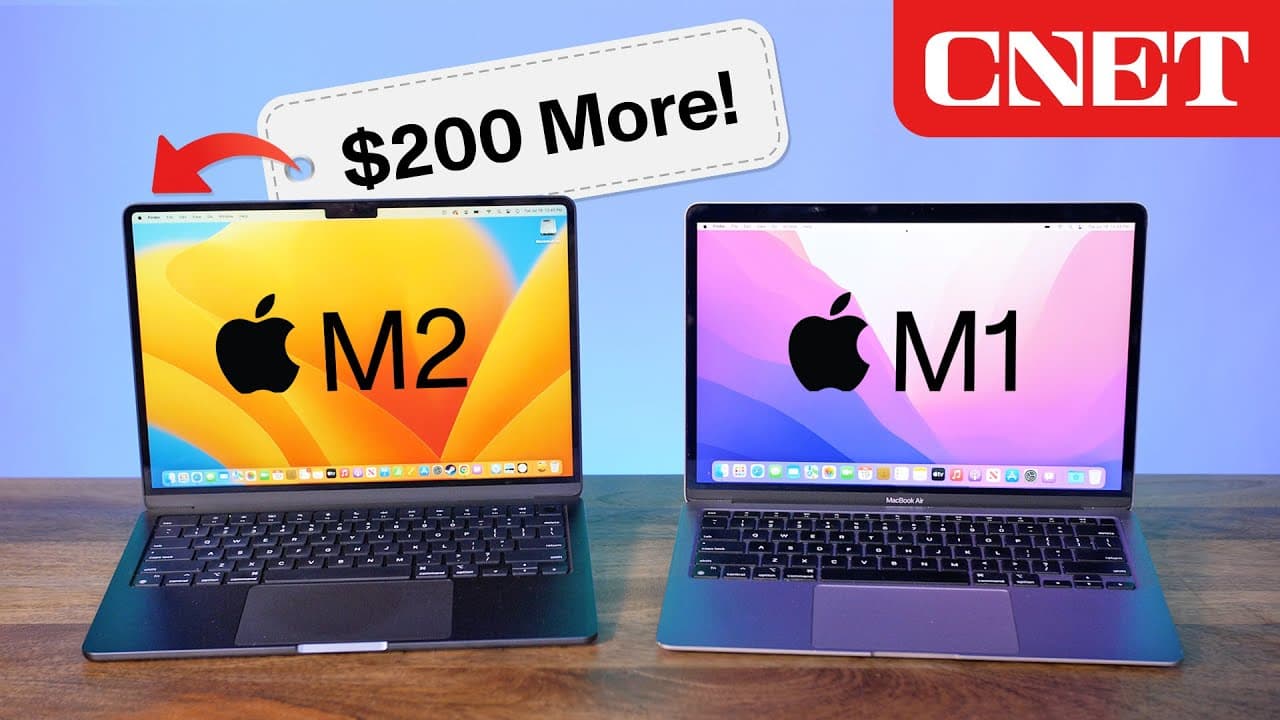
- 💻 The design of the M2 MacBook Air has undergone a significant change, adopting a flat and squared-off design similar to the 14-inch and 16-inch MacBook Pro models.
- 🌈 The M2 MacBook Air offers new color options, including a deep black with a bluish tinge called "midnight," reminiscent of the classic black MacBook from the mid-2000s.
- ⚖️ The weight difference between the M1 and M2 MacBook Air is minimal, with the M2 being slightly thinner overall, but carrying either model will feel similar.
- 🖥️ While both the M1 and M2 MacBook Air have a 13-inch screen, the M2 version has a slightly larger, 13.6-inch display with smaller bezels, providing more screen real estate.
- 🚀 The main difference between the two models lies in the chips inside. The M1 MacBook Air features the first-generation Apple Silicon chip, while the M2 MacBook Air has a newer, faster M2 chip.
- 🔌 Both the M1 and M2 MacBook Air have two USB-C Thunderbolt ports, but the M2 version also brings back the MagSafe power connection, offering more charging options.
- 📸 The M2 MacBook Air comes with an upgraded 1080p resolution camera, a significant improvement compared to the 720p camera found in the M1 MacBook Air.
- 💰 The decision between the two models may come down to price, design preference, the desire for a higher resolution webcam, or the need for the newer M2 chip, with prices starting at $1,000 for the M1 and $1,200 for the M2.
Install to Summarize YouTube Videos and Get Transcripts
Explore YouTube Video Summarizer or Get YouTube Transcript Extractor
Questions & Answers
Q: What are the differences in design between the M1 and M2 MacBook Air models?
The M1 MacBook Air maintains the classic design, while the M2 MacBook Air features a new flat and squared-off design with new color options, including a midnight black variant.
Q: Is there a difference in screen size and display quality between the M1 and M2 MacBook Air models?
Both models have a 13-inch screen, but the M2 MacBook Air has a slightly larger display with smaller bezels and a brighter screen, making it ideal for working in bright environments.
Q: What is the major difference between the M1 and M2 MacBook Air models?
The main difference lies in the chips inside. The M1 MacBook Air has the first Apple Silicon chip, while the M2 MacBook Air features the newer M2 chip, which is slightly faster.
Q: Are there any differences in ports and connections between the M1 and M2 MacBook Air models?
Both models have two USB-C Thunderbolt ports, but the M2 MacBook Air also includes the returning MagSafe power connection, while the M1 MacBook Air does not.
Q: What is the standout feature of the M2 MacBook Air compared to the M1 MacBook Air?
The M2 MacBook Air comes with an updated 1080p camera, which is a significant improvement over the 720p camera found in the M1 MacBook Air, making it ideal for video meetings and chats.
Q: Which MacBook Air model is more suited for budget-conscious users?
The M1 MacBook Air, priced at $999, is still a great option for those on a budget, offering similar performance and functionality to the M2 MacBook Air at a lower price point.
Q: Why would someone choose the M2 MacBook Air over the M1 MacBook Air?
The M2 MacBook Air offers a newer design, brighter display, MagSafe power connection, and an improved webcam, making it a better choice for those who prioritize these features.
Summary & Key Takeaways
-
The M2 MacBook Air features a completely new design with new colors, while the M1 MacBook Air has a classic look.
-
The M2 MacBook Air has a slightly larger screen with smaller bezels and a brighter display compared to the M1 MacBook Air.
-
The major difference between the two models is the chip inside, with the M2 being slightly faster, but the M1 still being a viable option for most users.
Read in Other Languages (beta)
Share This Summary 📚
Summarize YouTube Videos and Get Video Transcripts with 1-Click
Try YouTube Summary with ChatGPT & Claude or YouTube Transcript Generator
Explore More Summaries from CNET 📚





Summarize YouTube Videos and Get Video Transcripts with 1-Click
Try YouTube Summary with ChatGPT & Claude or YouTube Transcript Generator