How to Add Essential Features to a React Shopping Cart
TL;DR
To enhance a React shopping cart, add a clear cart button, implement total cost calculations, manage item quantities, and categorize products. These features improve user experience and organization, making it easier for customers to manage their purchases. The tutorial encourages hands-on coding and testing, emphasizing the importance of refactoring for better code quality.
Transcript
hey everyone welcome back to another web dev junkie video my name is Cody Seibert and in this video what we're gonna be doing is taking that react shopping cart that I made a video on a couple of days ago and we're gonna add on four new features so if you're new to programming are new to react to web development I highly recommend that you clone th... Read More
Key Insights
- 🛒 The addition of a clear cart feature enhances user experience by allowing users to quickly empty their shopping carts.
- 🤸 Accurate calculation of total cart costs introduces essential financial tracking, which is crucial for e-commerce applications.
- 👤 Proper item quantity management helps users understand their purchases better, improving the shopping experience through clear visibility.
- 🛒 Implementing product categorization features allows for enhanced organization and searchability within the shopping cart.
- 🤩 The tutorial advocates for hands-on practice, urging viewers to code along and troubleshoot, which is key to effective learning.
- 👨💻 Testing code incrementally helps developers catch errors early, minimizing the time spent on debugging later in the development process.
- 👨💻 Refactoring is a vital practice that leads to improved code quality, and developers should feel encouraged to revisit and optimize their code regularly.
Install to Summarize YouTube Videos and Get Transcripts
Explore YouTube Video Summarizer or Get YouTube Transcript Extractor
Questions & Answers
Q: What are the new features being added to the React shopping cart?
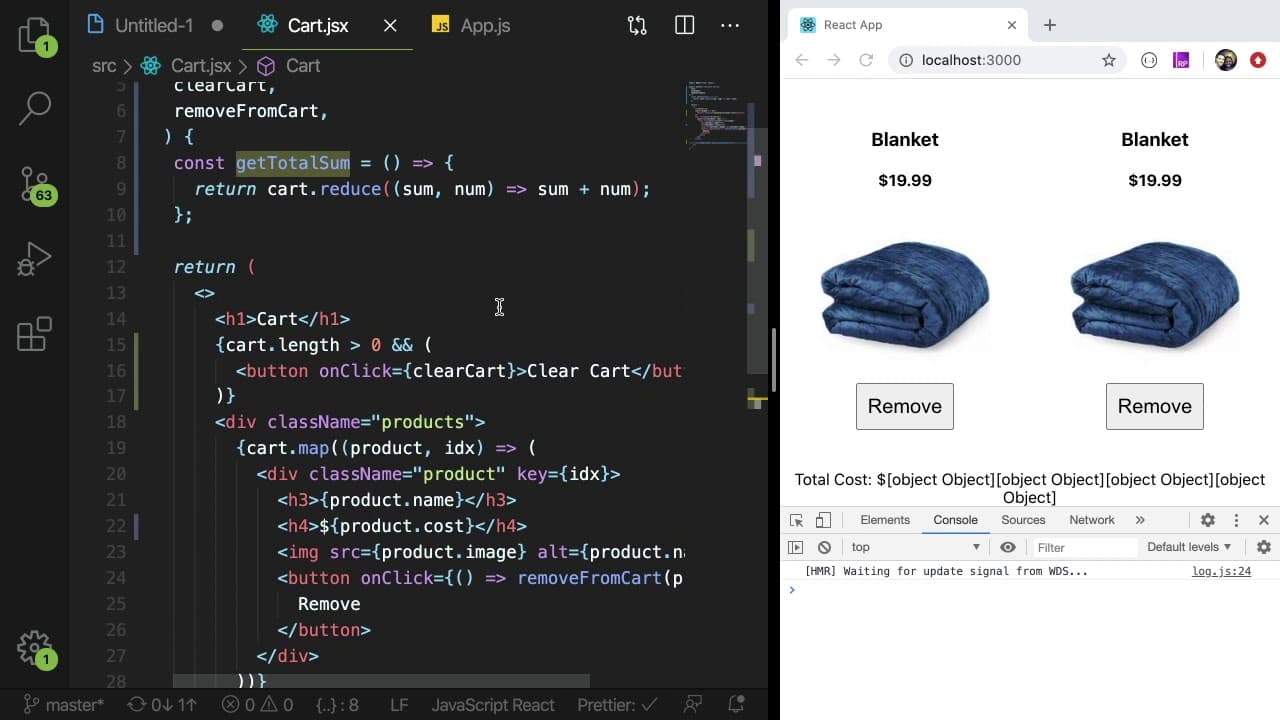
The video adds four new features to the React shopping cart: a button to clear all items, calculation of the total cost of items, management of individual item quantities, and categorization of products for improved usability.
Q: How can I clear all items from the cart in the application?
To clear all items, the video guides viewers to implement a function named clearCart, which sets the cart state to an empty array. A button is then added to trigger this function when clicked, effectively removing all items from the cart.
Q: What approach does the tutorial suggest for calculating the total cost of items in the cart?
The tutorial utilizes the JavaScript reduce method to iterate over cart items, summing their costs. By ensuring each item's cost is a numeric value, the function calculates the total dynamically as users add or remove items.
Q: How is item quantity managed in the shopping cart?
Item quantity is managed by adding a functionality to check if an item already exists in the cart. If it does, the quantity is incremented; if not, a new entry with a quantity of 1 is added. This allows users to see the total quantity of each item in their cart.
Q: What improvements are suggested in organizing functional components within the application?
The tutorial suggests refactoring by organizing functions related to cart functionality directly within the cart component rather than in the main app file. This improves code readability and maintainability by keeping relevant logic together.
Q: How can users filter products by category in the shopping cart?
A dropdown menu is implemented, allowing users to select different product categories. The tutorial creates a function that filters products based on the selected category, displaying only those products that match and updating the displayed items dynamically.
Q: What debugging techniques are mentioned in the video for troubleshooting?
The video encourages using console logs and debugger statements during development to track values and behaviors in the code. Testing out code in small increments and examining outputs helps avoid large debugging sessions later on.
Q: How does the tutorial address the importance of code refactoring?
The video emphasizes that code refactoring is a normal part of the development process. Cody encourages programmers to adapt and rearrange their code to make it cleaner and more functional, and to implement changes as they discover inefficiencies.
Summary & Key Takeaways
-
The video showcases enhancements to a previously created React shopping cart by adding four essential features, targeting beginner developers to improve their skills.
-
Key features include a clear cart button, total cost calculation, item quantity management, and product categorization for better organization and usability.
-
The tutorial encourages viewers to code along, troubleshoot issues, and learn through hands-on practice, emphasizing the importance of structured coding and refactoring.
Read in Other Languages (beta)
Share This Summary 📚
Summarize YouTube Videos and Get Video Transcripts with 1-Click
Try YouTube Summary with ChatGPT & Claude or YouTube Transcript Generator
Explore More Summaries from Web Dev Cody 📚





Summarize YouTube Videos and Get Video Transcripts with 1-Click
Try YouTube Summary with ChatGPT & Claude or YouTube Transcript Generator