How to Reset Forms in Next.js Without Client Components
TL;DR
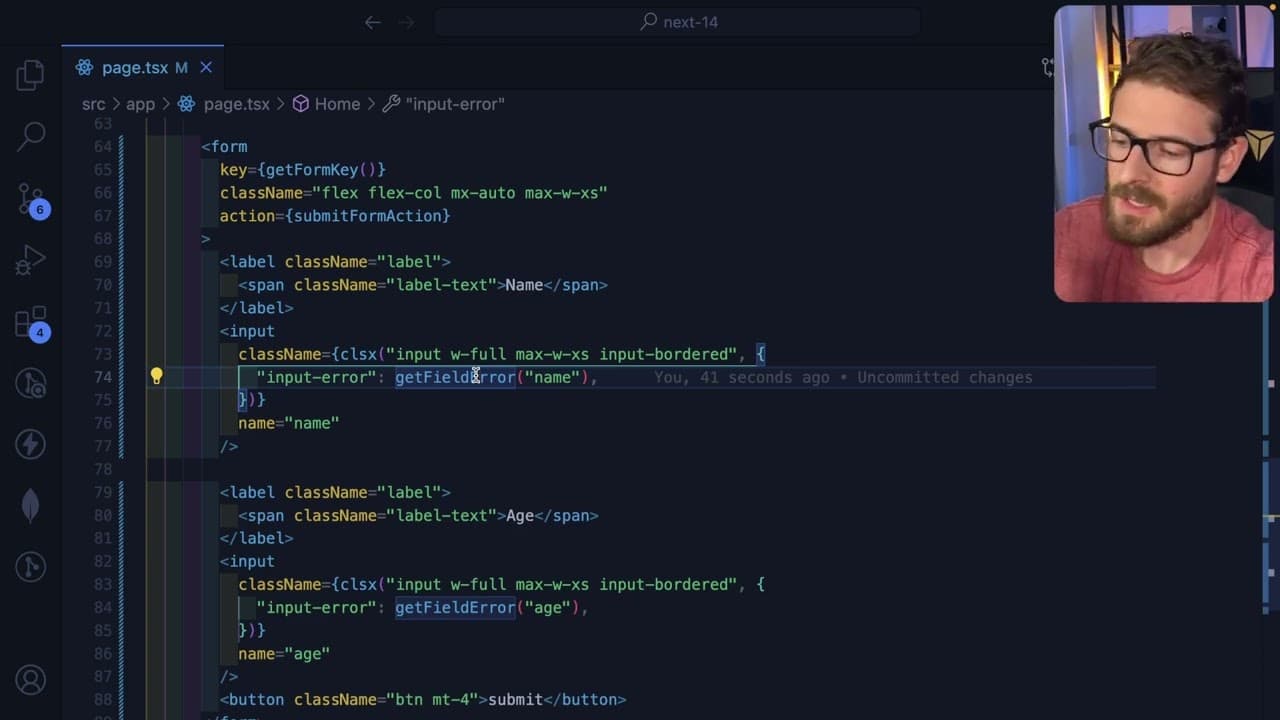
To reset forms in Next.js using only server actions, manipulate the form's key with a random value upon submission. This technique effectively resets the form fields by breaking the component’s state without relying on client-side components. While useful, the method has its limitations regarding error handling and data communication in server-rendered applications.
Transcript
so I was scrolling through Twitter and I saw another content creator who is called James qqu he has a YouTube channel I definitely recommend go subscribe to his channel and follow him on Twitter he posted this question using nextjs server actions how do you reset your form after submitting and this is something I actually ran into a while back wher... Read More
Key Insights
- 💨 Next.js and React Server Actions provide a powerful way to handle server-side rendering, but they come with unique challenges, especially for form data management.
- 🤩 Using random values as keys is a practical hack to force form resets while avoiding client-side overhead, reflecting the creative problem-solving often required in coding.
- 💁 Ensuring a smooth user experience during form submission involves careful consideration of both error handling and state management, highlighting the importance of frontend responsiveness.
- 🙈 Community feedback on forums and social platforms plays a significant role in troubleshooting and improving coding techniques, as seen through interactions with other developers.
- 💁 Alternative solutions to server-side form management are still being explored, underscoring the dynamic nature of web development practices and the ongoing evolution of frameworks like Next.js.
- 🥺 Importing functions directly from Next.js can lead to cleaner code; however, reliance on undocumented features or private imports may pose risks in future updates.
- 🕴️ The video showcases the importance of adapting traditional frontend concepts to suit modern server-side rendering, making it a valuable resource for developers navigating these frameworks.
Install to Summarize YouTube Videos and Get Transcripts
Explore YouTube Video Summarizer or Get YouTube Transcript Extractor
Questions & Answers
Q: What is the primary issue addressed in the video regarding form submission?
The primary issue is how to reset a form in Next.js after submission while only using server actions, without relying on client-side components. Most community responses suggest using client components, which the presenter aims to avoid. They seek a solution that aligns with using server-rendered approaches in React.
Q: What workaround does the presenter recommend for resetting the form?
The presenter recommends using a mathematical random value as a key for the form. By changing the form's key upon successful submission, the React rendering engine is prompted to reset the form's state and clear any input values. This method provides a cleaner implementation compared to fully transitioning to client components.
Q: How does the presenter handle validation errors after form submission?
Validation errors are managed using Zod, a schema declaration and validation library. The presenter establishes an error handling mechanism, which redirects the user back to the form with relevant error information encoded in the query string, allowing for visible error display within the form context.
Q: What are the limitations outlined in the content regarding server actions and form handling?
The limitations include the inability to use headers within actions for data transfer and the necessity of using cookies or URL query strings for managing state communication. The presenter expresses a desire for more robust server action features to alleviate these constraints, highlighting the lack of alternatives to client-side solutions.
Summary & Key Takeaways
-
The video addresses a common issue in Next.js where resetting a form after submission using only server actions can be challenging. The presenter shares their experience and a workaround they discovered, suggesting methods to handle form state without client components.
-
The key workaround involves manipulating the form's key with a random value upon submission, effectively breaking the component’s state and prompting a reset of the form fields. This approach helps keep the code clean and avoids unnecessary client component usage.
-
Discussions within the video touch on various methods of handling errors and state communication between server actions and components, emphasizing the limitations of relying solely on server-side techniques while aiming for an effective user experience.
Read in Other Languages (beta)
Share This Summary 📚
Summarize YouTube Videos and Get Video Transcripts with 1-Click
Try YouTube Summary with ChatGPT & Claude or YouTube Transcript Generator
Explore More Summaries from Web Dev Cody 📚





Summarize YouTube Videos and Get Video Transcripts with 1-Click
Try YouTube Summary with ChatGPT & Claude or YouTube Transcript Generator