How to Refactor a React Modal Component for Clarity
TL;DR
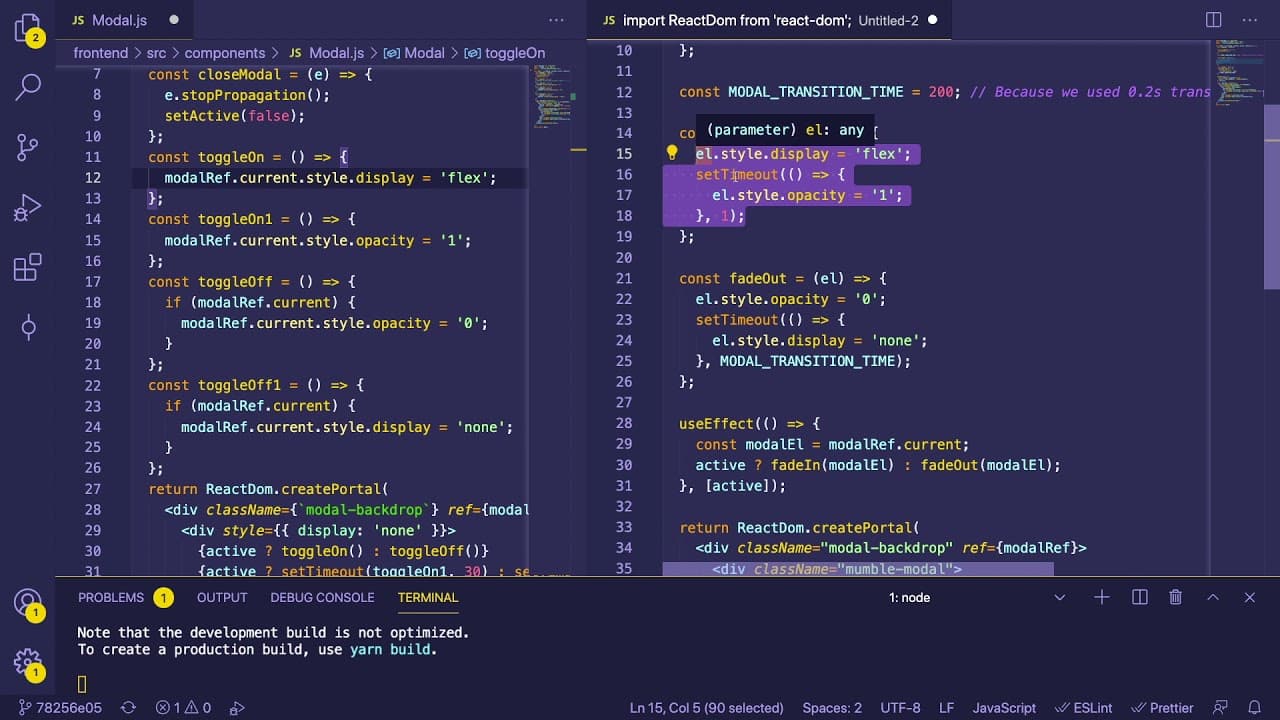
To refactor a React modal component for improved clarity, use descriptive method names like 'fade in' and 'fade out' and implement React's useEffect to manage state changes effectively. This approach enhances readability and maintainability, reducing complex logic and promoting the use of third-party libraries for animations.
Transcript
hey everyone hope you guys are having a great day welcome back to another webdav junkie video so i'm actually recording this video from my um living room so i don't have my mic or my camera set up but i just kind of want to show you an example of how you can potentially refactor some code and maybe that'll help you understand when you can refactor ... Read More
Key Insights
- 🥺 Refactoring emphasizes clarity through descriptive method names that accurately describe behavior, leading to more understandable code.
- 💄 Utilizing React's useEffect hook can streamline state management and enhance the modularity of components, making them easier to maintain.
- 🥺 Complex logic and hacks like multiple timeouts can lead to confusion; simpler alternatives should be prioritized for better readability and performance.
- 📽️ Community-driven projects like the Mumble GitHub project encourage collaborative coding practices and can benefit from shared improvements and suggestions.
- 👨💻 While refactoring can make code cleaner and more efficient, relying on established libraries can further enhance functionality and reduce boilerplate code.
- 🤗 Focusing on readability and maintainability is crucial in software development, especially in open-source projects where multiple contributors are involved.
- 🫵 The importance of feedback and community interaction is highlighted, inviting viewers to share suggestions on improving the code.
Install to Summarize YouTube Videos and Get Transcripts
Explore YouTube Video Summarizer or Get YouTube Transcript Extractor
Questions & Answers
Q: What is the main purpose of the video?
The video aims to demonstrate how to refactor a React modal component to improve its code readability and maintainability. It focuses on showing the differences between an original implementation and a cleaner, more intuitive alternative, along with the rationale behind these changes.
Q: What issues are presented with the original modal code?
The original modal code contained vague method names like "toggle on" and "toggle off," which did not clearly convey the methods' purposes. It also used complex logic involving multiple timeouts and state toggles that could confuse developers unfamiliar with the code, hindering understanding and collaboration.
Q: How does the refactored code improve clarity?
The refactored code introduces descriptive method names such as "fade in" and "fade out," allowing developers to grasp the functions' purposes without digging into the implementation details. Additionally, the use of React's effects to monitor state changes eliminates convoluted logic, streamlining the code.
Q: What libraries are recommended for handling animations in React?
The video suggests using third-party libraries such as "React Transition Group" or "Framer Motion" for managing animations within React components. These libraries can standardize and simplify animation tasks, providing developers with more straightforward solutions and reducing the need for custom timeout logic.
Summary & Key Takeaways
-
The video discusses refactoring a React modal component's fading logic, comparing the original and improved code methods to enhance readability and maintainability.
-
Better method names like "fade in" and "fade out" are suggested to clarify the component's functionality, contrasting with less descriptive names like "toggle on."
-
Using React's effects is emphasized to manage state changes more intuitively, with recommendations to utilize third-party libraries for improved animation handling.
Read in Other Languages (beta)
Share This Summary 📚
Summarize YouTube Videos and Get Video Transcripts with 1-Click
Try YouTube Summary with ChatGPT & Claude or YouTube Transcript Generator
Explore More Summaries from Web Dev Cody 📚





Summarize YouTube Videos and Get Video Transcripts with 1-Click
Try YouTube Summary with ChatGPT & Claude or YouTube Transcript Generator