How to Install an External GPU on a Laptop
TL;DR
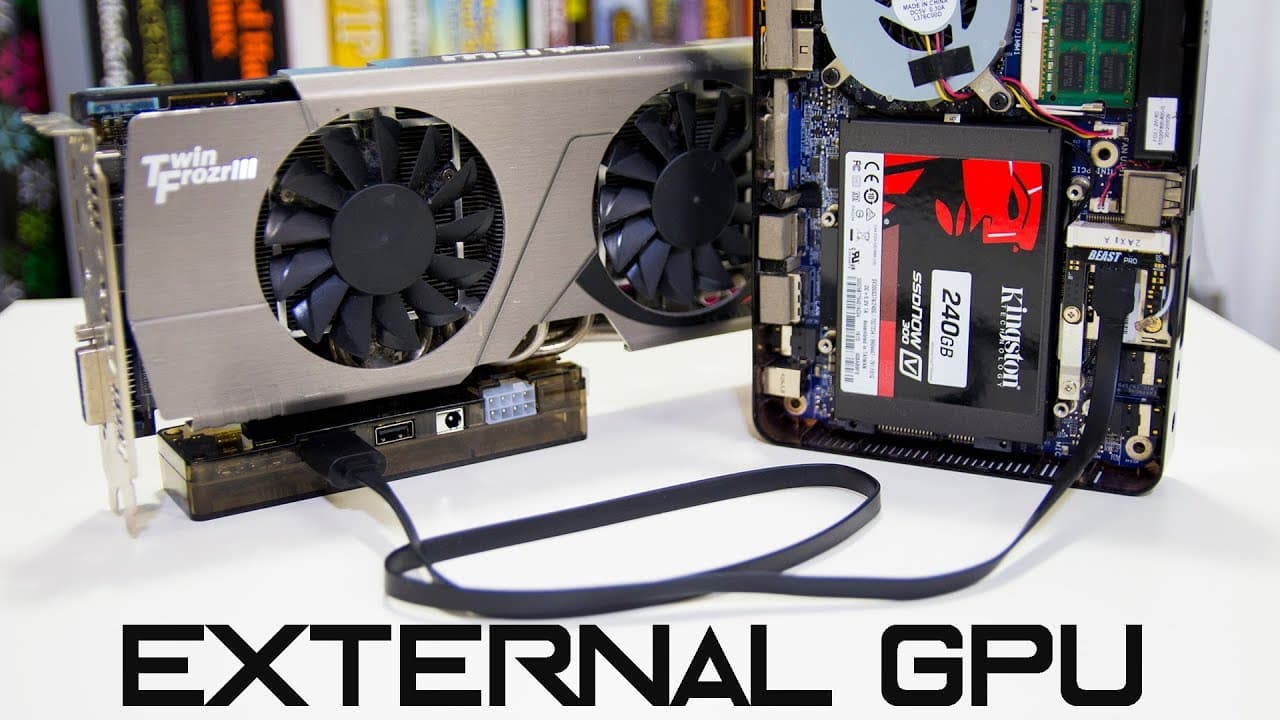
To install an external GPU on a laptop, use an M PCIe to PCIe adapter and connect an appropriate graphics card along with a power supply. This setup can significantly improve video encoding times, although the CPU may become a limiting factor in performance. Compatibility is crucial, so ensure your laptop supports the necessary connections before proceeding.
Transcript
hey guys what's going on it's dawn here from Nova Spirit Tech and today we are gonna be installing an external graphic card on our laptop now I'm gonna give you a little bit of a story time Before we jump into that a couple of days ago I uploaded video and completely forgot to enable my audio channel before I upload it now mind you I attend nights ... Read More
Key Insights
- 🎮 The video serves as an instructional guide for enhancing laptop video performance through external graphics solutions.
- 🎮 Proper hardware identification is critical as compatibility issues arose from the original configuration used in the video.
- ⌛ Installing an external graphics card can dramatically improve encoding times but may reveal other system bottlenecks, like the CPU.
- 😒 The use of older hardware demonstrates how budget-friendly components can still offer significant processing power for specific tasks.
- 😀 The creative process reflects common frustration and troubleshooting faced in tech DIY projects, providing relatability for viewers.
- 🥳 Technical setup requires careful attention to details like power supply ratings and ensuring all parts are compatible.
- 😒 Creative problem-solving is highlighted, as the creator pivoted to use different equipment when initial attempts failed.
Install to Summarize YouTube Videos and Get Transcripts
Explore YouTube Video Summarizer or Get YouTube Transcript Extractor
Questions & Answers
Q: What prompted the creator to make this video on external graphics card installation?
The creator experienced a frustrating situation where a previously uploaded video had no audio, due to forgetting to enable the audio channel. This incident highlighted the need for a more efficient encoding setup, which led to the decision to install an external graphics card for better performance during video editing.
Q: What are the specific components used for this installation?
The creator utilized an M PCIe to PCIe adapter costing around $45, an older ATI 7950 graphics card, and had to acquire an appropriate power supply. The setup included rearranging cables and ensuring connections were correctly made to facilitate the power supply and graphics card integration into the laptop.
Q: What limitations did the creator face during the installation process?
The installation process was not straightforward. The original laptop proved incompatible with the graphics card due to PCIe lane limitations. This required switching to a different machine (a net top), and the creator faced challenges with video encoding speed, primarily bottlenecked by the CPU rather than the GPU.
Q: How significant was the improvement in encoding times after installing the graphics card?
After successfully installing the graphics card, the encoding time dropped to approximately one hour and 30 minutes, a substantial decrease from earlier attempts. However, the creator noted that the CPU became the new bottleneck, indicating that while the GPU improved performance, further enhancements would require addressing CPU limitations as well.
Summary & Key Takeaways
-
The video starts with a personal anecdote about the creator's previous video having no audio, leading to the necessity for a new hardware setup to enhance video encoding performance.
-
The installation process involves using an M PCIe to PCIe adapter, an older graphics card, and a suitable power supply while detailing challenges with compatibility and setup steps.
-
Ultimately, the creator successfully installs the graphics card, noting significant improvements in encoding time but also emphasizing CPU limitations that were encountered throughout the process.
Read in Other Languages (beta)
Share This Summary 📚
Summarize YouTube Videos and Get Video Transcripts with 1-Click
Try YouTube Summary with ChatGPT & Claude or YouTube Transcript Generator
Explore More Summaries from Novaspirit Tech 📚






Summarize YouTube Videos and Get Video Transcripts with 1-Click
Try YouTube Summary with ChatGPT & Claude or YouTube Transcript Generator