Using a Macro in LabChart to calculate RR intervals and Heart Rate Variability (HRV)
TL;DR
Learn how to automate repetitive data analysis tasks using macros in Lab Chart.
Transcript
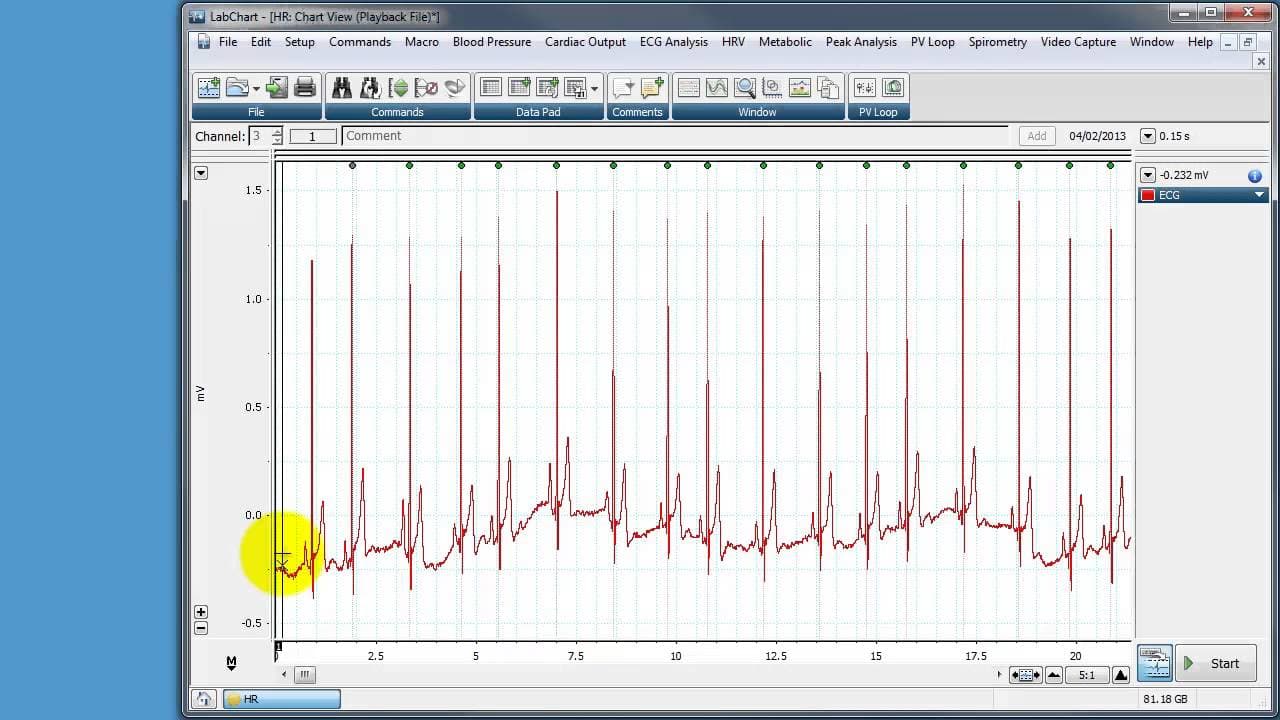
hello this is a quick demonstration of how to use a macro in lab chart in order to automate what would be a rather laborious repetitive job for instance here I've got an ECG recording and the ECG recording is around 10 minutes long it's recorded on a subject Lim Le to at rest and you can see we've got a a lot of pqrst complexes here um let's ask a ... Read More
Key Insights
- 🥼 Macros in Lab Chart are a powerful tool for automating repetitive data analysis tasks.
- 😟 The example demonstrated in the content shows how macros can be used to measure RR interval variability in an ECG recording.
- 👻 Macros allow users to find peaks, measure intervals, and add them to the data pad automatically.
- 👤 By using macros, users can save time and effort in data analysis tasks.
- 👤 Macros can be customized to perform specific actions based on the user's requirements.
- 😒 Saving macros in template files enables their use in future recordings and analyses.
- 👤 Lab Chart's macro functionality provides a user-friendly interface and simplifies programming tasks.
Install to Summarize YouTube Videos and Get Transcripts
Explore YouTube Video Summarizer or Get YouTube Transcript Extractor
Questions & Answers
Q: What is the purpose of using macros in Lab Chart?
Macros in Lab Chart are used to automate repetitive tasks in data analysis, saving time and effort. They allow users to create customized commands to perform specific actions automatically.
Q: How can macros be used to measure RR interval variability in an ECG recording?
By using macros, users can find the peaks of the R waves in the ECG recording, measure the time between them, and add the intervals to the data pad. This process can be repeated for the entire recording, resulting in a list of RR intervals.
Q: Can macros in Lab Chart be used for other types of data analysis?
Yes, macros can be used for various types of data analysis in Lab Chart. They allow users to create customized commands and automate repetitive tasks, making data analysis more efficient.
Q: How can macros be saved and used for future analyses?
Macros are saved within the Lab Chart file. To use a macro for future analyses, it can be saved in a template file or the current file can be saved as a template. This allows the macro to be accessible for analysis in future recordings.
Summary & Key Takeaways
-
This content demonstrates the use of macros in Lab Chart to automate repetitive tasks in data analysis.
-
The example used is analyzing the RR interval variability in an ECG recording.
-
The process involves finding the peaks of the R waves, measuring the time between them, and adding it to the data pad using macros.
Read in Other Languages (beta)
Share This Summary 📚
Summarize YouTube Videos and Get Video Transcripts with 1-Click
Try YouTube Summary with ChatGPT & Claude or YouTube Transcript Generator
Explore More Summaries from Dory Video 📚






Summarize YouTube Videos and Get Video Transcripts with 1-Click
Try YouTube Summary with ChatGPT & Claude or YouTube Transcript Generator