How to Build a Claude Command Center in 15 Minutes
TL;DR
Build a Claude command center quickly without code by first interviewing Claude to establish context, then mapping sources and connectors, and finally validating visibility before building. This approach keeps information focused and reliable, reducing clutter while ensuring accurate data feeds drive decisions.
Transcript
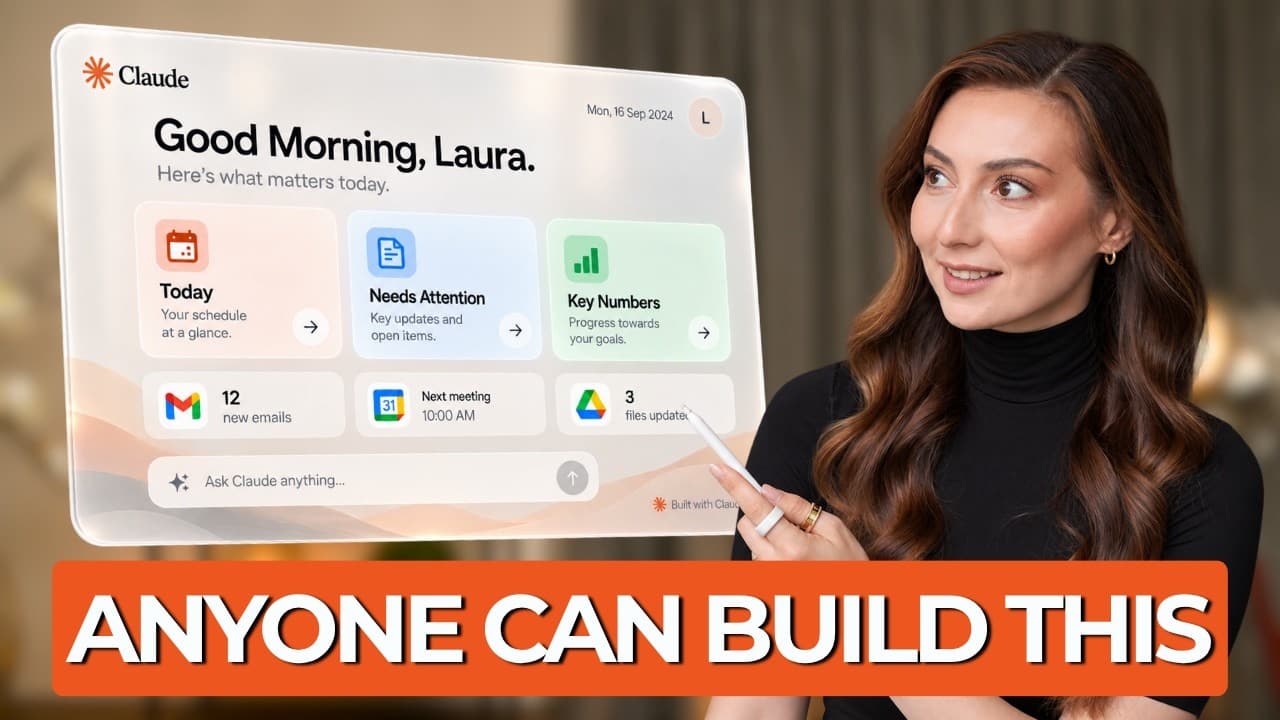
A few months ago, if you wanted to build something like this with Claude, the tutorials usually started with terminals and claude code, which I mean is great unless you're non-technical and you look at that and think, great, I'm never going to build that because it required code, but not anymore. I built this command center in about 15 minutes with... Read More
Key Insights
- Claude interview builds context before any design work. The interview step extracts what you really need from Claude and your data sources.
- A command center brief is created from the interview, detailing roles, priorities, and key metrics you care about.
- Source mapping ties each item to its data location so Claude knows exactly where to fetch information.
- Connecting the right apps is essential and should be done with clearly assigned data sources for each item.
- A visibility check verifies Claude can access real data before building the dashboard to avoid data gaps.
- Trustworthy dashboards require proving access to each source and validating sample data intervals.
- The build prompt should be concise, since Claude already has context and source mapping set up.
- The guiding rule is to never build from data you have not proven Claude can see, to prevent lying dashboards.
Install to Summarize YouTube Videos and Get Transcripts
Explore YouTube Video Summarizer or Get YouTube Transcript Extractor
Questions & Answers
Q: How do you start building a Claude command center?
To start, you interview Claude to extract context about your role and needs. This yields a command center brief that describes the information that matters and the decisions you face. The interview reduces unnecessary items by focusing on what actually changes decisions, enabling a lean setup.
Q: What is a command center brief and why is it important?
The command center brief is a distilled document that captures your role, priorities, and the specific metrics you care about. It guides what information should appear on the dashboard and ensures the build stays aligned with decision making rather than presenting every possible data point.
Q: How do you map sources for the command center?
You create a source map that assigns every dashboard item to its data location, such as calendar, spreadsheet, or email. This ensures Claude knows where to pull each metric and prevents ambiguity when the same type of information exists in multiple places.
Q: Why are connectors necessary and how do you use them?
Connectors enable Claude to access the required apps and data sources. You enable them for calendar, drive, spreadsheet, email, and others, then clearly assign which data each item will draw from. This makes data retrieval consistent and traceable.
Q: What is the visibility check and when should you perform it?
The visibility check asks Claude to prove what it can see in each connected source before building the dashboard. You request a current access snapshot and a real example of retrievable data. This step reveals any missing access or misconfigurations so you can fix them.
Q: What could go wrong if you skip the visibility check?
If you skip it, Claude might build with incomplete or incorrect data, leading to a dashboard that appears polished but lies about the data. Early verification prevents unrealistic dashboards and saves time by catching access gaps before build.
Q: What is the recommended prompting approach after context is set?
With context and source mapping in place, prompts can be concise and focused. The build instruction simply communicates the task and relies on Claude having sufficient background information, reducing the risk of overly long or contradictory prompts.
Q: What is the key rule for building with Claude?
Never ask Claude to build from data you have not proven it can see. This rule helps ensure the resulting dashboard reflects reality and supports correct decisions rather than presenting a misleading view.
Summary & Key Takeaways
-
A concise, step by step approach is shown to create a Claude based command center with minimal coding. The process starts with setting context through a Claude interview, then translating needs into a command center brief. After that, data sources are mapped, connections enabled, and a crucial visibility check is performed to ensure data accuracy.
-
The method emphasizes restraint over information overload by evaluating whether each item would change future actions. It advocates validating access to sources before building the dashboard to prevent misleading results.
-
The video concludes with a streamlined build that leverages prior context and verified data paths, resulting in a reliable, decision enabling command center rather than a visually impressive but potentially inaccurate dashboard.
Read in Other Languages (beta)
Share This Summary 📚
Summarize YouTube Videos and Get Video Transcripts with 1-Click
Try YouTube Summary with ChatGPT & Claude or YouTube Transcript Generator
Explore More Summaries from AI Founders 📚





Summarize YouTube Videos and Get Video Transcripts with 1-Click
Try YouTube Summary with ChatGPT & Claude or YouTube Transcript Generator