How Do Software Systems Achieve Zero Downtime During Deployments?
TL;DR
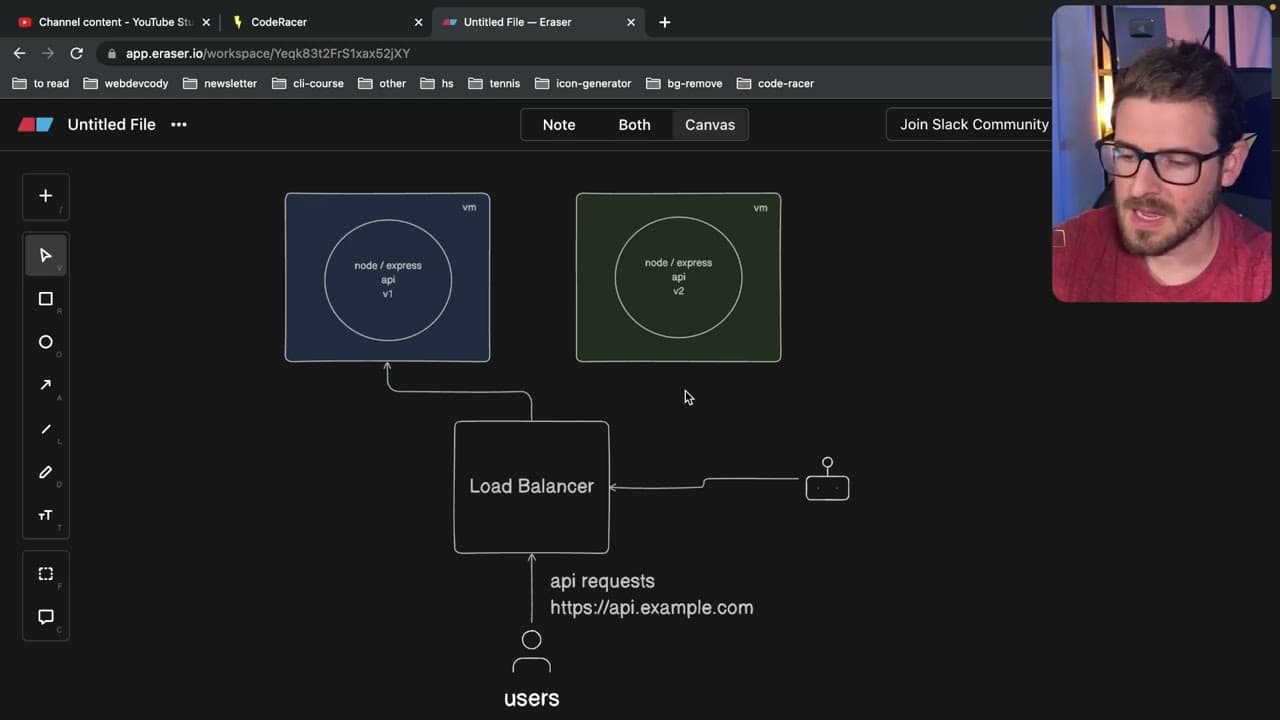
Software systems achieve zero downtime during deployments through blue-green deployment, where two identical environments are maintained. A load balancer routes user requests to the live version while ensuring users can complete their actions without interruption. This strategy also allows for quick rollbacks and canary deployments, enabling gradual user migration while monitoring for errors.
Transcript
so if you ever use any type of app deployment service like I don't know for sale or digitalocean netlify one thing that you'll notice is that you can deploy new versions of your code without your users experiencing downtime the one thing I want to walk you through in this video is how do they achieve that and I'm assuming the way they achieve that ... Read More
Key Insights
- 💚 Blue-green deployment significantly enhances user experience by eliminating downtime during application updates.
- ♻️ Two distinct environments, blue and green, facilitate safe transitions to new software versions while preserving the user experience.
- 🖐️ Load balancers play a critical role in directing user traffic to the appropriate environment during deployment switches.
- 👶 The method empowers quick rollbacks in case of bugs or issues in a new version, providing a safety net for developers.
- 😚 Canary deployments introduce a gradual approach to user migration, allowing for close monitoring and minimizing risks.
- 🚥 Automation is essential in managing traffic routing and facilitating effective rollbacks during deployment processes.
- 💚 Understanding deployment strategies like blue-green and canary is crucial for developers aiming to improve application management.
Install to Summarize YouTube Videos and Get Transcripts
Explore YouTube Video Summarizer or Get YouTube Transcript Extractor
Questions & Answers
Q: What is blue-green deployment, and why is it important?
Blue-green deployment is a software release management strategy that reduces or eliminates downtime during updates. Instead of taking a system offline, two identical environments—blue (current) and green (new version)—are maintained. Users continue interacting with the blue environment while the new version is deployed in parallel, ensuring a seamless transition. This is essential for enhancing user experience and maintaining service availability.
Q: How does a load balancer function in blue-green deployment?
In a blue-green deployment, a load balancer distributes incoming user traffic between the two environments. It directs users to the blue environment until the green environment is ready. Once the deployment is complete, the load balancer switches traffic to the green environment, ensuring users experience a seamless transition without downtime. This feature is crucial for maintaining uninterrupted service during updates.
Q: What are the potential drawbacks of blue-green deployment?
While blue-green deployment offers many advantages, there are challenges, particularly with database management. New releases may contain database schema changes that complicate rollbacks. If the new version is incompatible with the existing database, reverting to the previous version could lead to errors. Moreover, maintaining two environments can increase costs and resource requirements, making it less feasible for smaller projects.
Q: What is a canary deployment, and how does it relate to blue-green deployment?
A canary deployment is a strategy that gradually rolls out a new version of an application to a small subset of users before a full-scale deployment. It allows developers to monitor the new version's performance and gather real-time feedback. This method complements blue-green deployment by enabling safe transitions, reducing risk, and ensuring any potential problems are addressed before impacting the entire user base.
Summary & Key Takeaways
-
Blue-green deployment allows for the update of applications without user downtime by using two live environments, which minimizes disruption during the transition to a new version.
-
When switching from an older version (blue) to a newer version (green), a load balancer reroutes traffic to ensure users can complete their requests without interruption.
-
The strategy also supports quick rollbacks in case of issues with the new version and includes implementation of canary deployments that gradually shift users over while monitoring system performance.
Read in Other Languages (beta)
Share This Summary 📚
Summarize YouTube Videos and Get Video Transcripts with 1-Click
Try YouTube Summary with ChatGPT & Claude or YouTube Transcript Generator
Explore More Summaries from Web Dev Cody 📚





Summarize YouTube Videos and Get Video Transcripts with 1-Click
Try YouTube Summary with ChatGPT & Claude or YouTube Transcript Generator