How to Use SUMIF, SUMIFS, COUNTIF, and COUNTIFS in Excel
TL;DR
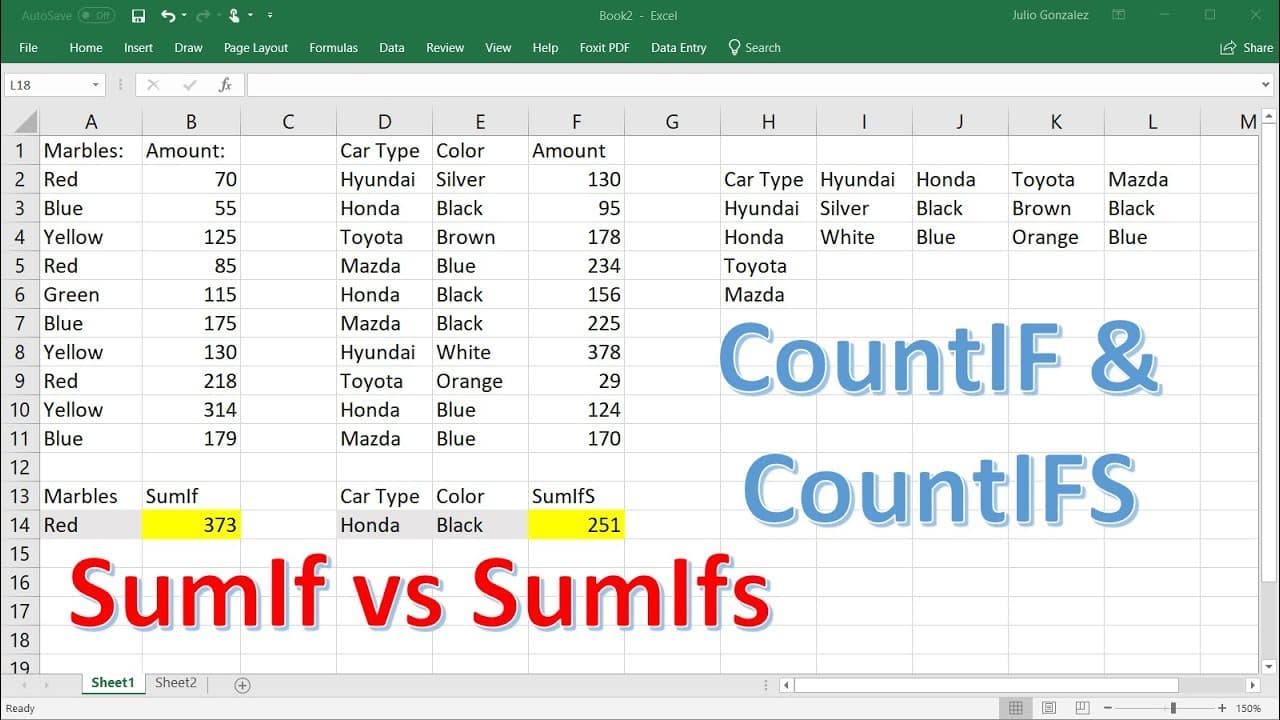
To utilize SUMIF, SUMIFS, COUNTIF, and COUNTIFS in Excel, use SUMIF for summing values based on a single criterion, while SUMIFS allows for multiple criteria. COUNTIF counts occurrences of specific items, and COUNTIFS counts based on multiple categories. Creating drop-down lists can streamline data entry for these functions.
Transcript
in this video i want to focus on the sum if function the sum ifs function or sum if s function as well as the counter function and the countif s function so most of you are familiar with the sum function if you type in equal sum and then if you highlight this column you're going to get the total sum for that column well let's say if we don't want t... Read More
Key Insights
- 👻 The sumif function allows users to find the sum of specific elements in a column based on a single criteria.
- 👤 The sumifs function is an advanced version of the sumif function that enables users to find the sum of elements based on multiple criteria.
- 🔄 The countif function is useful for counting the occurrences of specific elements in a column.
- 👻 The countifs function extends the functionality of the countif function to allow users to count elements based on multiple criteria.
- 💦 Creating drop-down lists can enhance the efficiency of data entry and analysis in Excel.
- 💦 Excel's data validation feature provides an easy way to create drop-down lists for selecting criteria.
- 🎭 The sumif, sumifs, countif, and countifs functions are powerful tools for performing calculations and counting elements in Excel.
Install to Summarize YouTube Videos and Get Transcripts
Explore YouTube Video Summarizer or Get YouTube Transcript Extractor
Questions & Answers
Q: What is the difference between the sumif and sumifs functions?
The sumif function is used to find the sum of elements in a column based on a single criteria, while the sumifs function allows users to specify multiple criteria to calculate the sum.
Q: Can I use the sumif function to add elements based on text values?
No, the sumif function is typically used for numerical values. If you want to add elements based on text values, you can use the countif function instead.
Q: How can I create a drop-down list for selecting criteria in Excel?
You can use the data validation feature in Excel to create a drop-down list. Go to the Data tab, select Data Validation, choose the List option, and enter the criteria options manually or select them from a range.
Q: What is the purpose of the countif function?
The countif function is used to count the number of occurrences of specific elements in a column. It is handy for tracking the frequency of certain values or categories.
Summary & Key Takeaways
-
The video focuses on explaining the sumif function, which allows users to find the sum of specific elements in a column based on a criteria.
-
The tutorial also covers the sumifs function, which enables users to find the sum of elements based on multiple criteria.
-
The countif function is introduced as a tool to count the occurrences of specific elements in a column.
-
The video concludes with an explanation of the countifs function, which allows users to count elements based on multiple criteria.
Read in Other Languages (beta)
Share This Summary 📚
Summarize YouTube Videos and Get Video Transcripts with 1-Click
Try YouTube Summary with ChatGPT & Claude or YouTube Transcript Generator
Explore More Summaries from The Organic Chemistry Tutor 📚




Summarize YouTube Videos and Get Video Transcripts with 1-Click
Try YouTube Summary with ChatGPT & Claude or YouTube Transcript Generator