How to Build Mobile Apps Using Claude Code
TL;DR
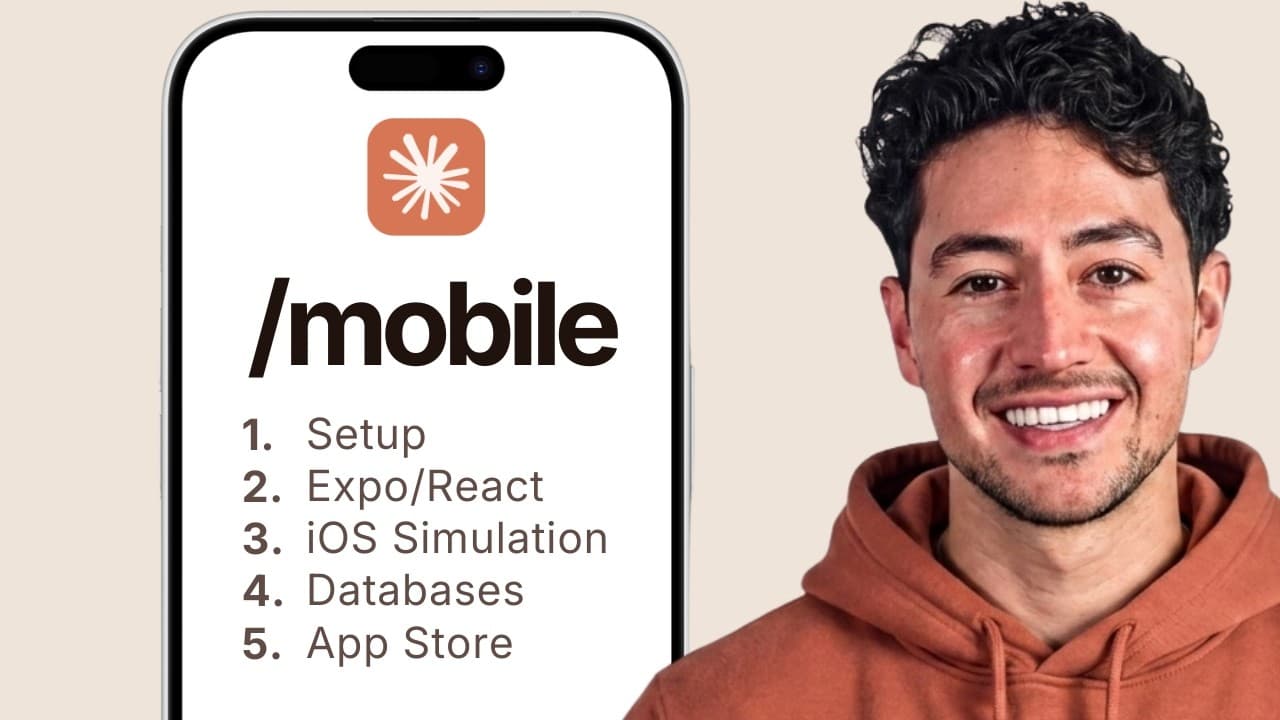
Build a working mobile app by setting up Claude Code, creating the interface as a web application, and then adapting it for iOS and Android with Expo and React Native. Start with local storage, test continuously on a physical phone, and progressively add APIs, a cloud database, authentication, AI functionality, and the steps required for App Store and Google Play submission.
Transcript
Hey, this is a full course on how to build a real mobile app with cloud code. So, from nothing to a working app on your phone, whether it's Android or iOS. I run a business that does around 300K a month, and it's almost entirely built on Cloud Code now. I've also shipped several web apps and SAS products. And the number one most requested video I g... Read More
Key Insights
- A web-first development workflow is the course’s recommended starting point because it lets developers design and test an application in a browser before adapting it for phones and tablets. The resulting project can also remain available as a website while supporting mobile distribution.
- The habit tracker is a teaching vehicle for common application requirements, including creating records, reading stored information, modifying data, presenting an interactive interface, and eventually adding authentication. Its purpose is to demonstrate reusable functionality rather than propose another habit-tracking product as the final goal.
- The development sequence is intentionally progressive, starting with local storage and no third-party API or database. It then adds an API, a database, cloud deployment, authentication, and more complete cloud-connected functionality, allowing each architectural concept to be introduced separately.
- Claude Code can be accessed through several interfaces, including its web application, desktop application, Visual Studio Code, and the Google-developed Anti-Gravity application. The course uses Anti-Gravity because it displays project files alongside a Claude Code window and supports detailed access to the project structure.
- Physical-device testing is part of the workflow, so the completed applications run on an actual iOS or Android phone instead of remaining mockups or emulator demonstrations. The course also shows how to test changes on the phone in real time during development.
- Expo and React Native are central frameworks in the course’s mobile development approach. They support the transition from the initial application design into software that can be optimized for phones and tablets and prepared for both iOS and Android distribution.
- AI functionality can be combined with conventional application features by collecting input, such as a photograph, and sending it to an API. The calorie-tracking project demonstrates this pattern alongside more traditional interface, data-storage, authentication, and cloud components.
- App distribution requires steps beyond building and testing the interface. The course concludes by explaining how to prepare and submit completed applications to Apple’s App Store and the Google Play Store, with a separate step-by-step publishing guide included in the course resources.
Install to Summarize YouTube Videos and Get Transcripts
Explore YouTube Video Summarizer or Get YouTube Transcript Extractor
Questions & Answers
Q: How can beginners build mobile apps with Claude Code?
Beginners can start by signing up for Claude, accessing Claude Code through the web, desktop software, Visual Studio Code, or Anti-Gravity, and setting up a phone as a testing device. The course requires no previous mobile development experience and frames the basic interaction as writing English instructions in a terminal. The first project keeps complexity low by storing habit data locally without an API or external database.
Q: Why does the course build the app as a web application first?
The web-first approach makes the interface accessible in a browser, where it can be designed and reviewed conveniently on a computer. That same work can then be published as a website and ported to a phone. Afterward, the interface can be optimized for phones and tablets. The course presents this as the simplest and most straightforward development system, while acknowledging that other mobile development approaches also exist.
Q: What does the Claude Code mobile app course build?
The course builds multiple applications to reinforce the workflow at different levels of complexity. The examples include a habit tracker, a calorie tracker with AI functionality, and a Pomodoro application using AI design. The habit tracker introduces common data and interface operations, while later projects add APIs, cloud services, a database, authentication, and AI-driven features before the applications are prepared for store submission.
Q: How does the habit tracker demonstrate common app features?
The habit tracker demonstrates how an application creates, reads, and modifies information through a front-end interface. Its initial version stores everything on the phone or in local storage, without calling a third-party API or using a separate database. Later stages introduce database and authentication capabilities. The example is intended to teach reusable application patterns, not to position habit tracking as the only product developers can create.
Q: How should app functionality progress from local storage to the cloud?
The recommended progression begins with an application that stores information locally and makes no requests to third-party services. The next stage wraps functionality supplied by an external API. A database is then added, followed by a cloud solution. The final architecture combines cloud hosting, an API, user authentication with a login screen, and a database, allowing each new dependency to be understood before the complete system is assembled.
Q: Which tools and frameworks are used for mobile app development?
The course focuses on Claude Code for generating and modifying the project, with Anti-Gravity used as the primary development interface. It also says Claude Code can be used through its website, desktop application, or Visual Studio Code. For the mobile framework, the course discusses React Native and Expo. The workflow targets both iOS and Android and includes optimization for phones and tablets.
Q: How can developers test Claude Code apps on a real phone?
The workflow includes configuring an iOS or Android phone as a testing device after Claude Code and the mobile development environment are installed. Developers first work with the interface locally on their computer, using a mobile-sized resolution for design. They can then test the application on the physical phone in real time as development continues, producing a working application rather than only a mockup or emulator demonstration.
Q: How are Claude Code apps submitted to mobile app stores?
After the applications are built, optimized, and tested, the course covers submission to Apple’s App Store and the Google Play Store. The description also provides a separate step-by-step publishing guide among the course resources. Store submission is presented as the final phase after progressively implementing local functionality, APIs, database integration, cloud services, authentication, and the application’s user-facing features.
Summary & Key Takeaways
-
The course begins by setting up Claude Code, a development environment, and a physical phone for testing. It presents several available interfaces, including the Claude Code web app, desktop app, Visual Studio Code, and Google’s Anti-Gravity application, while emphasizing that each interface provides access to the same underlying model intelligence.
-
The development workflow starts by creating an application that is accessible in a web browser. This makes interface design easier and allows the same project to be published for the web before being adapted for phones and tablets. Expo and React Native are introduced as key frameworks for producing iOS and Android applications.
-
The practical projects increase in complexity, beginning with a habit tracker that stores information locally without external APIs or a database. Later stages incorporate third-party APIs, cloud services, database integration, authentication, and AI features. The course also builds calorie-tracking and Pomodoro applications before covering App Store and Google Play submission.
Read in Other Languages (beta)
Share This Summary 📚
Summarize YouTube Videos and Get Video Transcripts with 1-Click
Try YouTube Summary with ChatGPT & Claude or YouTube Transcript Generator
Explore More Summaries from Nick Saraev 📚

Summarize YouTube Videos and Get Video Transcripts with 1-Click
Try YouTube Summary with ChatGPT & Claude or YouTube Transcript Generator