How to Create a Histogram from a Frequency Distribution Table
TL;DR
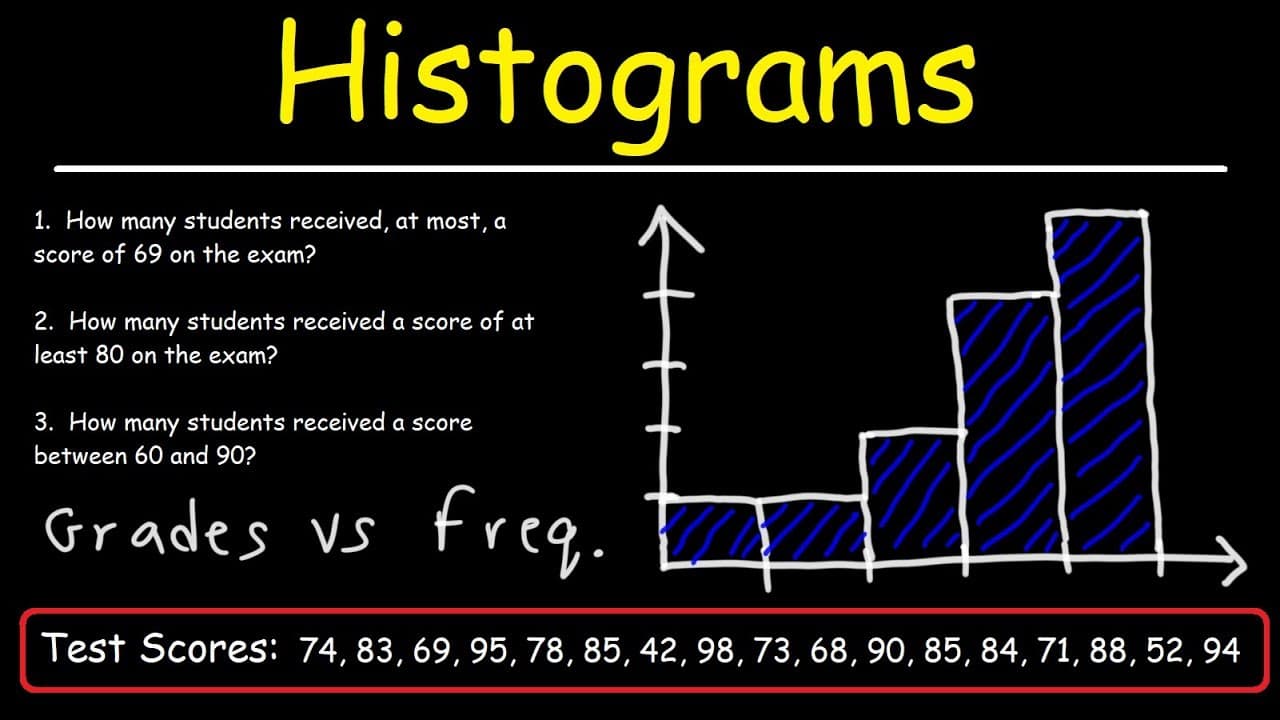
To create a histogram from a frequency distribution table, first group data into ranges and compute the frequency for each range. Plot the frequencies on the y-axis and the ranges on the x-axis, connecting the bars to represent data continuity. Use the histogram to analyze distribution patterns and answer statistical questions.
Transcript
in this video we're going to talk about how to make a histogram and so what we have here is the test scores of many students in the class how can we use this information to construct a histogram well the first thing we need to do is create a frequency distribution table so we're going to have two columns the first one is going to be the grades and ... Read More
Key Insights
- 🧡 Creating a frequency distribution table helps organize and summarize data into ranges.
- 🛀 Histograms provide a visual representation of data, showing the frequency distribution patterns.
- 🍸 Skewness can be identified by observing the tail lengths on the histogram.
Install to Summarize YouTube Videos and Get Transcripts
Explore YouTube Video Summarizer or Get YouTube Transcript Extractor
Questions & Answers
Q: How do you create a frequency distribution table?
To create a frequency distribution table, group the data into ranges, record the frequencies for each range, and organize the data in a table format. This helps to summarize and analyze the data effectively.
Q: What is the purpose of constructing a histogram?
The purpose of constructing a histogram is to visually represent the frequency distribution of data. It helps in understanding the distribution patterns, identifying modes, and making comparisons between different ranges or categories.
Q: How can you determine if the data is skewed to the left or right using a histogram?
With a histogram, if there is a long tail on the left side, the data is skewed to the left or has a negative skew. Similarly, if there is a long tail on the right side, the data is skewed to the right or has a positive skew.
Q: What is the mode in a histogram?
The mode in a histogram represents the range with the highest frequency. It indicates the most common or frequent values in the data set.
Summary & Key Takeaways
-
The video explains how to create a frequency distribution table by grouping test scores into ranges and recording the frequency for each range.
-
Once the frequency distribution table is set up, a histogram can be constructed with the grades (independent variable) on the x-axis and frequencies (dependent variable) on the y-axis.
-
Using the histogram, questions can be answered, such as determining the number of students who received scores within specific ranges.
Read in Other Languages (beta)
Share This Summary 📚
Summarize YouTube Videos and Get Video Transcripts with 1-Click
Try YouTube Summary with ChatGPT & Claude or YouTube Transcript Generator
Explore More Summaries from The Organic Chemistry Tutor 📚



Summarize YouTube Videos and Get Video Transcripts with 1-Click
Try YouTube Summary with ChatGPT & Claude or YouTube Transcript Generator