How to Convert Decimal Numbers to Binary Coded Decimal?
TL;DR
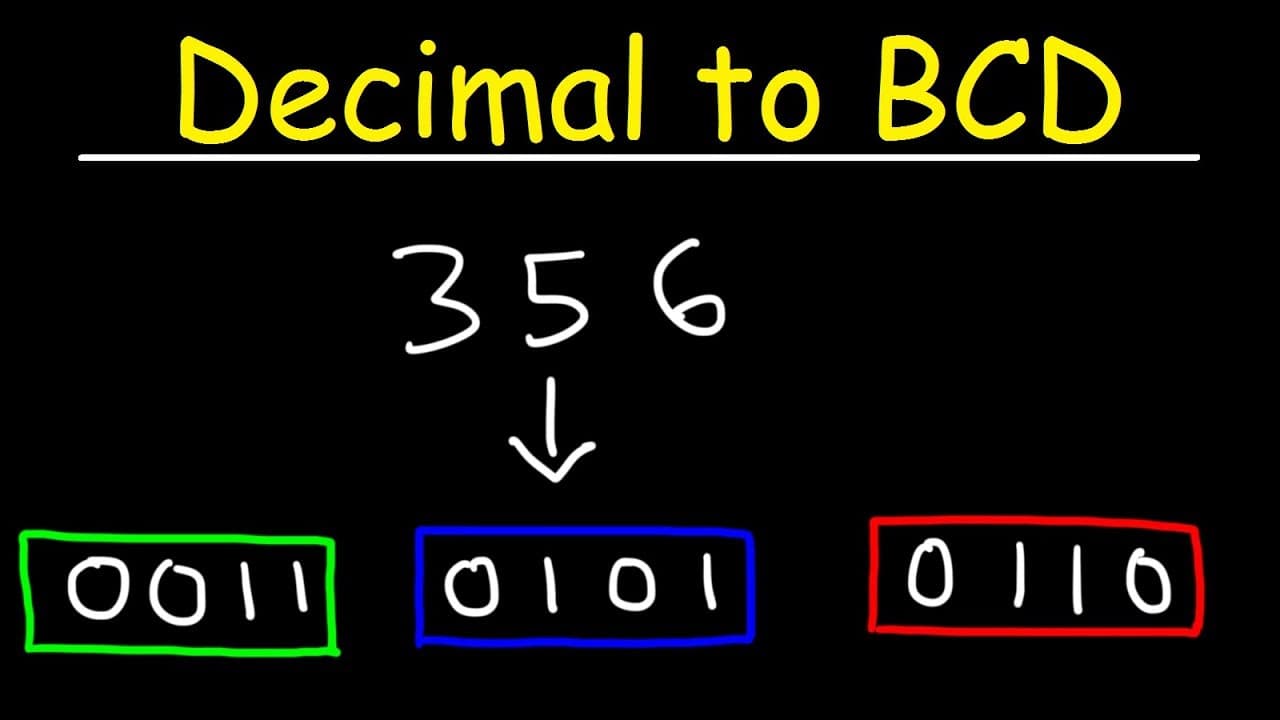
To convert a decimal number to Binary Coded Decimal (BCD), separate each digit and represent it using a 4-bit binary code. For example, the decimal number 356 converts to BCD as 0011 0101 0110 by using binary representations for 3, 5, and 6. The process is applicable for both three-digit and four-digit numbers.
Transcript
in this video we're gonna talk about how to convert a decimal number into a binary coded decimal so let's say we have the number 356 how can we convert it into a binary coded decimal first separate each digit now each digit is going to be represented by a 4-bit binary code so let's write eight four two one for each number now three is the sum of tw... Read More
Key Insights
- 👨💻 Decimal numbers can be converted into binary coded decimals by following a straightforward process.
- 🫦 Each digit of the decimal number is represented by a 4-bit binary code.
- #️⃣ The binary coded decimal accurately represents the original decimal number, allowing for easy conversion between the two number systems.
- #️⃣ The process remains consistent for both three-digit and four-digit decimal numbers.
- 👨💻 Converting decimal numbers into binary coded decimals can be easily accomplished by separating the digits and replacing the binary codes.
- 👻 The 4-bit binary code allows for a maximum of 16 unique representations, covering the decimal digits from 0 to 9.
- 👨💻 Binary coded decimals can be used in various applications, such as digital circuits and data storage systems.
Install to Summarize YouTube Videos and Get Transcripts
Explore YouTube Video Summarizer or Get YouTube Transcript Extractor
Questions & Answers
Q: What is the process for converting a decimal number into a binary coded decimal?
The process involves separating each digit and representing it with a 4-bit binary code. By replacing the binary codes, the decimal number can be converted into a binary coded decimal.
Q: Why do we use a 4-bit binary code for each digit?
The 4-bit binary code allows us to represent each digit from 0 to 9. It provides enough combinations to represent all possible digits in binary form.
Q: Can you explain the steps to convert the decimal number 748 into a binary coded decimal?
First, separate the digits (7, 4, 8). Then, replace the binary codes for each digit: 7 becomes 0111, 4 becomes 0100, and 8 becomes 1000. Therefore, 748 in binary coded decimal is represented as 011101001000.
Q: How can we convert a four-digit decimal number, like 9527, into a binary coded decimal?
Separate the four digits (9, 5, 2, 7) and replace the binary codes: 9 becomes 1001, 5 becomes 0101, 2 becomes 0010, and 7 becomes 0111. Consequently, 9527 in binary coded decimal is 1001010100100011.
Summary & Key Takeaways
-
This video provides a step-by-step process for converting decimal numbers into binary coded decimals.
-
Each digit of the decimal number is represented by a 4-bit binary code.
-
By separating each digit and replacing the corresponding binary codes, the decimal number can be converted into a binary coded decimal.
Read in Other Languages (beta)
Share This Summary 📚
Summarize YouTube Videos and Get Video Transcripts with 1-Click
Try YouTube Summary with ChatGPT & Claude or YouTube Transcript Generator
Explore More Summaries from The Organic Chemistry Tutor 📚


Summarize YouTube Videos and Get Video Transcripts with 1-Click
Try YouTube Summary with ChatGPT & Claude or YouTube Transcript Generator