How to Build and Publish a Unity 6 Runner Game
TL;DR
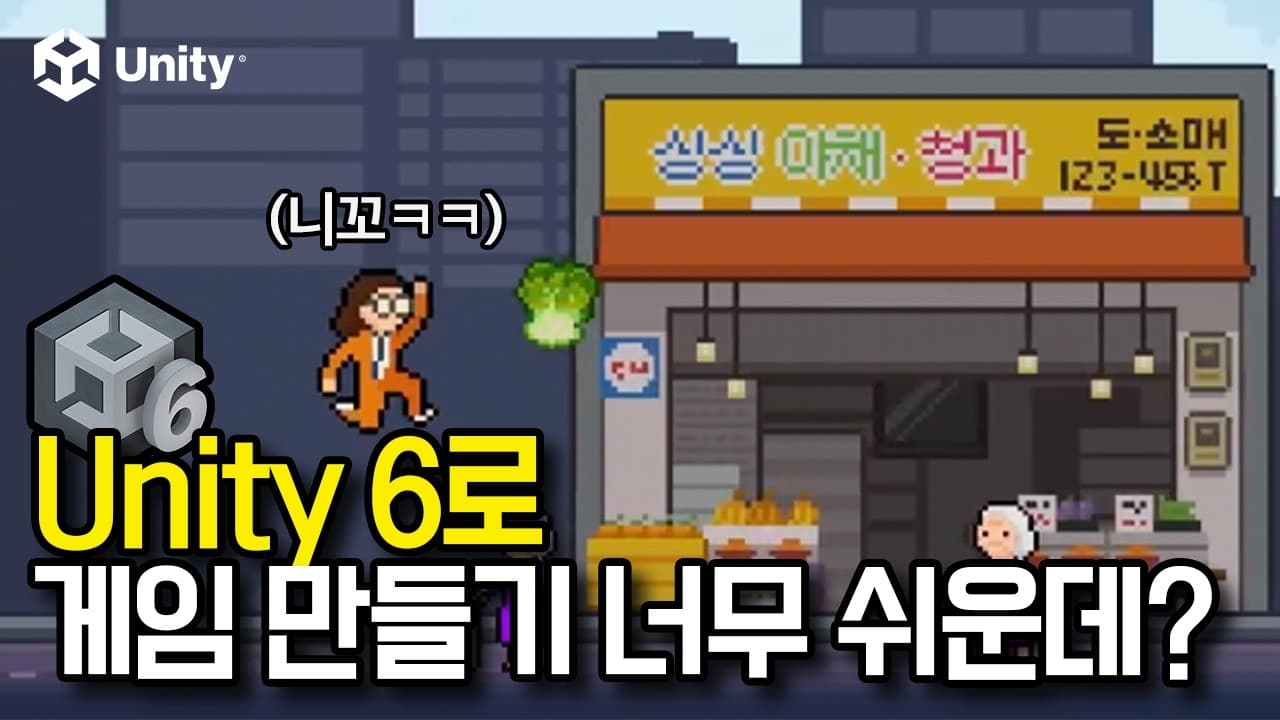
Install the recommended Unity 6 LTS editor through Unity Hub, add WebGL Build Support, and create a project from the Universal 2D template. The tutorial builds Kimchi Run as an infinite runner, covering movement, jumping, animation, obstacles, collisions, lives, healing, scoring, storage, cameras, physics, and publishing to the web.
Transcript
Nas I made a game called Kim run it is a game inspired by gim Jang season where I run through a Xiang collecting beu goou and Manon while avoiding pedala Yoshi and Xiang harmonies the game is now published on the web and app stores I made a tutorial to show you exactly how I built it from scratch so if you follow along you will have your own Kim Jo... Read More
Key Insights
- Kimchi Run is an infinite runner in which Hungry Niik must survive as long as possible during kimjang season. The core loop combines obstacle avoidance, ingredient collection, limited lives, healing, scoring, and a temporary protective power.
- The player has three lives, and tripping over an obstacle removes one life. Collecting a kimchi ingredient restores a life, connecting successful item collection directly to survival rather than treating collectibles only as score bonuses.
- Ggultip grants five seconds of kimchi power and is described as less common but more valuable than ordinary ingredients. During this temporary state, nothing can hurt the player, giving rare collectibles a distinct gameplay effect.
- Unity Hub is the installer used to obtain the Unity game engine and related packages. The setup requires a Unity account and an active license before the recommended editor version can be installed and used.
- The recommended Unity editor is the official LTS release marked as recommended. The precise version number may change, so the tutorial advises selecting the currently recommended release rather than depending on one fixed version number.
- WebGL Build Support is required to build and export the game for the web. Platform modules can be added later, so developers should install only the targets they expect to use instead of consuming storage with every available package.
- The Universal 2D template provides the starting project for Kimchi Run. The project uses one main scene because its scope is limited, although Unity games can separate menus, levels, loading screens, and settings into different scenes.
- Unity 6 web publishing supports mobile browsers, and the transcript states that web memory limits were doubled. The finished game can therefore be published online and played directly through a phone browser without requiring an app-store download.
Install to Summarize YouTube Videos and Get Transcripts
Explore YouTube Video Summarizer or Get YouTube Transcript Extractor
Questions & Answers
Q: How do you start building a Unity 6 runner game?
Download Unity Hub from Unity's download page, install it, create or sign into a Unity account, and activate the required license. In the Installs tab, choose the recommended Unity 6 LTS editor and add WebGL Build Support. After installation, create a new project with the Universal 2D template, name it, choose its storage location, and open it in the editor.
Q: What is the main objective of Kimchi Run?
Kimchi Run is an infinite runner inspired by kimjang season. Hungry Niik must survive for as long as possible while running through the game world, avoiding obstacles, and collecting kimchi ingredients. Survival time drives the score, while the lives, healing items, and temporary kimchi power systems create consequences for collisions and rewards for successful collection.
Q: How do lives, damage, and healing work in Kimchi Run?
Hungry Niik starts with three lives. Tripping over an obstacle costs one life, while collecting a kimchi ingredient restores one. This design makes both avoidance and collection essential to continued survival. The tutorial schedule includes dedicated sections for obstacles, player hit and healing behavior, and a game manager that coordinates the broader game systems.
Q: What does kimchi power do in the runner game?
Collecting the less common and more valuable ggultip activates five seconds of kimchi power. During that period, nothing can hurt Hungry Niik. The power therefore differs from regular ingredient collection, which restores a life. It provides temporary protection and gives players a reason to prioritize a rarer collectible while continuing to avoid obstacles and survive.
Q: Which Unity 6 modules are needed for web publishing?
WebGL Build Support is the required module for building and exporting the game to the web. A code editor is also needed to write the game's scripts, and Unity Hub can offer Visual Studio Code if it is not already installed. Other platform modules, including Android or iOS support, are unnecessary unless the developer intends to export to those platforms.
Q: Why should you install the recommended Unity 6 LTS release?
The tutorial directs developers to the official release carrying both the LTS tag and the recommended designation. LTS means long-term support, while the recommended label identifies the appropriate version to install at the time. The displayed version number may change later, so following those labels is more reliable than looking for the exact number shown during the recording.
Q: What Unity concepts does the Kimchi Run tutorial cover?
The tutorial covers Unity concepts including physics, cameras, collisions, sprites, animations, storage, scenes, and game objects. Its scheduled sections also address backgrounds, a scrolling script, player jumping, obstacles, hit and healing behavior, a game manager, high scores, and publishing. These topics take the project from initial setup through a playable and distributable runner game.
Q: How is a Unity scene organized in this project?
The project uses one main scene because the game is not especially complex. The Hierarchy lists the game objects inside that scene, beginning with a main camera and global light. The camera determines what the player sees, while the light makes objects visible. Players, enemies, backgrounds, and other game objects are then added to the Hierarchy as development continues.
Summary & Key Takeaways
-
Kimchi Run is an infinite runner inspired by kimjang season. Hungry Niik survives by avoiding obstacles and collecting ingredients. The player begins with three lives, loses one after tripping over an obstacle, restores a life by collecting an ingredient, and can gain five seconds of protective kimchi power.
-
The setup begins by downloading Unity Hub, creating or signing into a Unity account, activating a license, and installing the recommended Unity 6 LTS editor. WebGL Build Support is selected for browser publishing, while Visual Studio Code can be installed when the developer does not already have a code editor.
-
The project uses Unity's Universal 2D template and a single main scene. The tutorial introduces the Project tab, Hierarchy, Inspector, cameras, lights, game objects, physics, collisions, sprites, animation, storage, scrolling backgrounds, jumping, obstacles, hit and healing behavior, game management, high scores, and web publishing.
Read in Other Languages (beta)
Share This Summary 📚
Summarize YouTube Videos and Get Video Transcripts with 1-Click
Try YouTube Summary with ChatGPT & Claude or YouTube Transcript Generator
Explore More Summaries from 노마드 코더 Nomad Coders 📚




Summarize YouTube Videos and Get Video Transcripts with 1-Click
Try YouTube Summary with ChatGPT & Claude or YouTube Transcript Generator