How to Design Beautiful AI-Coded Mobile Apps
TL;DR
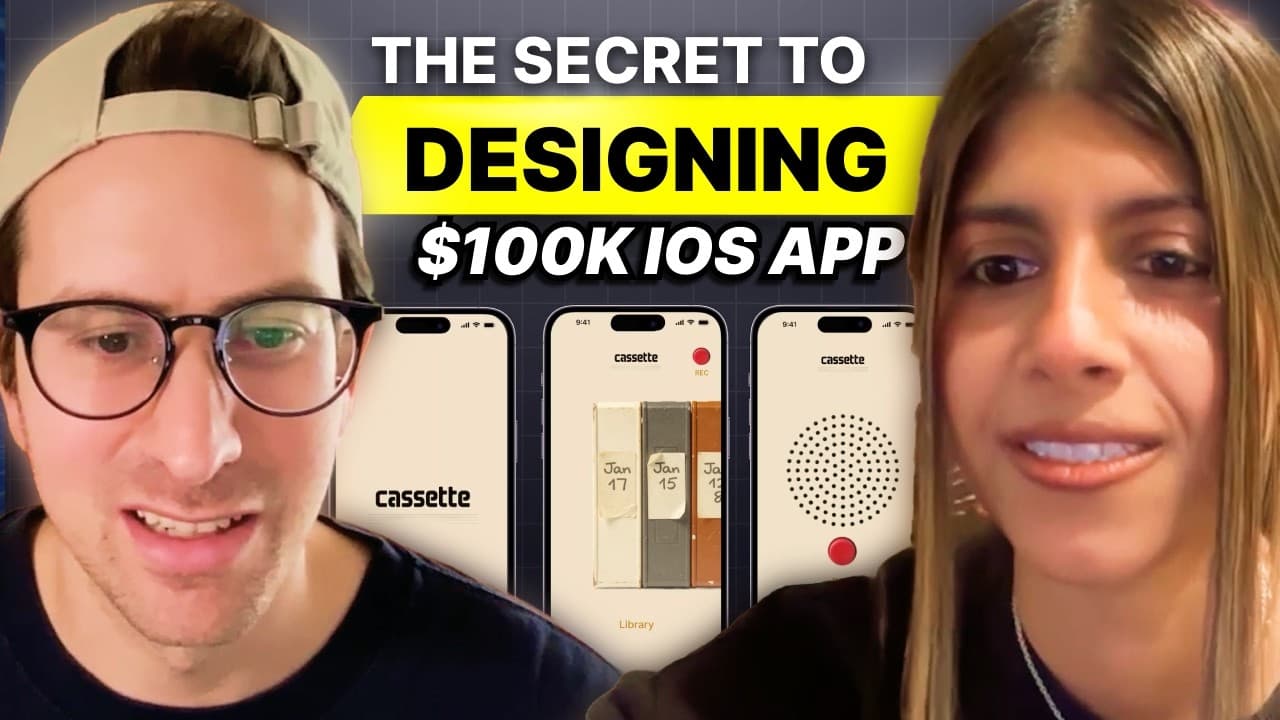
Start by defining how the product should make users feel, then build a brand identity before polishing the interface. The demonstrated workflow moves from a functional Google AI Studio prototype through Claude, Cosmos, Weavy AI, Flux, Ideogram, and Figma, then returns the completed visual direction to Google AI Studio for implementation.
Transcript
I'll let you in to a little secret. There's a tool called Weev AAI that is the secret to creating absolutely jaw-dropping beautiful mobile apps, software, etc. So, if you're anything like me, you vibe coded using tools like Google AI Studio, Claude Code, Lovable, and the results don't look that beautiful. Like, they they look fine, but they don't l... Read More
Key Insights
- Functional requirements are only the starting point for product design. Recording audio, displaying previous entries, showing transcripts, and running a timer establish what the voice journal must do, but they do not determine why someone would enjoy using or downloading it.
- A product's intended feeling should be defined before its visual details. The voice journal is designed for people who want to think aloud without writing and who may be tired of constant phone use, which points toward a calmer and more analog experience.
- Generic AI output results from outsourcing both functionality and creative direction. AI can handle solved implementation problems, but the designer's decisions about how the product behaves, feels, and presents itself are necessary for creating a distinctive identity.
- Google AI Studio is useful for quickly generating an end-to-end, one-shot interface. The initial prototype establishes screens and interactions, allowing the later workflow to focus on branding and visual quality instead of repeatedly reconsidering the application's basic functional structure.
- Claude can help translate emotional goals into a brand identity and practical guidelines. The workflow gives Claude context about the intended audience, the journaling experience, and the feelings the interface should create before developing the visual direction.
- Weavy AI is a node-based visual workflow used to generate color palettes and custom assets. The demonstration combines it with Flux for visual generation and Ideogram for logo work, supporting experimentation with record buttons, cassette elements, and branded interface components.
- Figma serves as the assembly stage for the generated visual system. Color choices, interface elements, custom imagery, logos, and screen compositions are combined there so the complete direction can be evaluated as a coherent product rather than as isolated AI outputs.
- Inspiration should receive dedicated time before implementation resumes. The workflow builds a mood board, defines a brand, produces custom assets, and composes screens before pasting the design back into Google AI Studio, reducing aimless prompting between coding models.
Install to Summarize YouTube Videos and Get Transcripts
Explore YouTube Video Summarizer or Get YouTube Transcript Extractor
Questions & Answers
Q: How do you make an AI-coded app look professionally designed?
Begin with a functional prototype, but do not treat it as the finished product. List what every screen must do, identify the intended user, and define how the experience should feel. Develop brand guidelines, gather inspiration, generate a coordinated palette and custom assets, assemble the interface in Figma, and then take that complete visual direction back into the coding tool.
Q: Why do vibe-coded apps often look the same?
Vibe-coded apps often look similar because their creators ask AI to decide both what the product should do and how it should look and feel. The models can quickly reproduce common interface patterns, but those patterns lack a distinctive point of view. Keeping emotional direction, branding decisions, and the product's unique interpretation under human control produces a more recognizable result.
Q: What should be defined before designing an app interface?
Define the audience, the functional requirements, and the emotional outcome before refining the interface. For the voice journal, the core functions include recording audio, displaying history and transcripts, and showing a timer. Its intended users want to express thoughts without lengthy writing and may be tired of screens, so the experience should feel calm, analog, and respectful of attention.
Q: How is Google AI Studio used in the design workflow?
Google AI Studio creates the first end-to-end prototype from a basic prompt describing the mobile voice journal and its required screens. That prototype confirms the core interactions and supplies screenshots for visual evaluation. After the branding, assets, and layouts are developed through other tools and assembled in Figma, the completed design is pasted back into Google AI Studio for implementation.
Q: How can Claude help create an app brand identity?
Claude can help articulate a brand identity when it receives more than a list of interface features. The workflow gives it information about the target user, the purpose of voice journaling, the desire for an analog feeling, and the need to avoid an attention-seeking experience. Those emotional and behavioral goals become the basis for brand identity and design guidelines.
Q: What is Weavy AI used for in app design?
Weavy AI provides the node-based visual workflow used to explore and generate branded design materials. In the demonstrated process, it supports color palette generation with Flux, creates custom record controls and cassette-inspired history elements, and incorporates Ideogram for logo generation. These assets help replace generic interface components with visuals connected to the voice journal's specific identity.
Q: Why is Figma included in an AI design workflow?
Figma is used to composite the final application screens after the brand direction and visual assets have been generated. It brings the palette, logo, record button, cassette history elements, and interface layout into one coherent design. That assembled result provides a clearer implementation target than sending a coding model a sequence of disconnected visual requests or incremental style prompts.
Q: When should inspiration and mood boards be created?
Inspiration gathering should happen after the product's purpose and intended feeling are understood, but before final interface implementation. The workflow uses Cosmos to build a mood board, then develops palettes, assets, and logos around that direction. Spending time on inspiration first gives later AI generations and Figma compositions a consistent reference instead of relying on repeated, unguided revisions.
Summary & Key Takeaways
-
A voice journaling app begins as a functional Google AI Studio prototype with recording, transcripts, history, and a timer. Although the generated interface works, it resembles many other apps. The exercise separates solved functionality from the distinctive design thinking required to make someone notice, download, and enjoy using the product.
-
The design process starts by identifying the intended user and emotional experience. Someone choosing voice journaling wants to express thoughts without writing and may already feel tired of screens. That context suggests an analog, calm, and non-demanding experience instead of another conventional interface filled with familiar digital patterns or attention-seeking elements.
-
Claude helps develop brand identity and guidelines, while Cosmos supports inspiration gathering. Weavy AI provides a node-based workflow for generating palettes and custom visual assets with models including Flux and Ideogram. The resulting record controls, cassette-inspired history elements, logo, and screens are assembled in Figma before returning to Google AI Studio.
Read in Other Languages (beta)
Share This Summary 📚
Summarize YouTube Videos and Get Video Transcripts with 1-Click
Try YouTube Summary with ChatGPT & Claude or YouTube Transcript Generator
Explore More Summaries from Greg Isenberg 📚





Summarize YouTube Videos and Get Video Transcripts with 1-Click
Try YouTube Summary with ChatGPT & Claude or YouTube Transcript Generator