How to Fake Your Social Media Followers Count Using Chrome
TL;DR
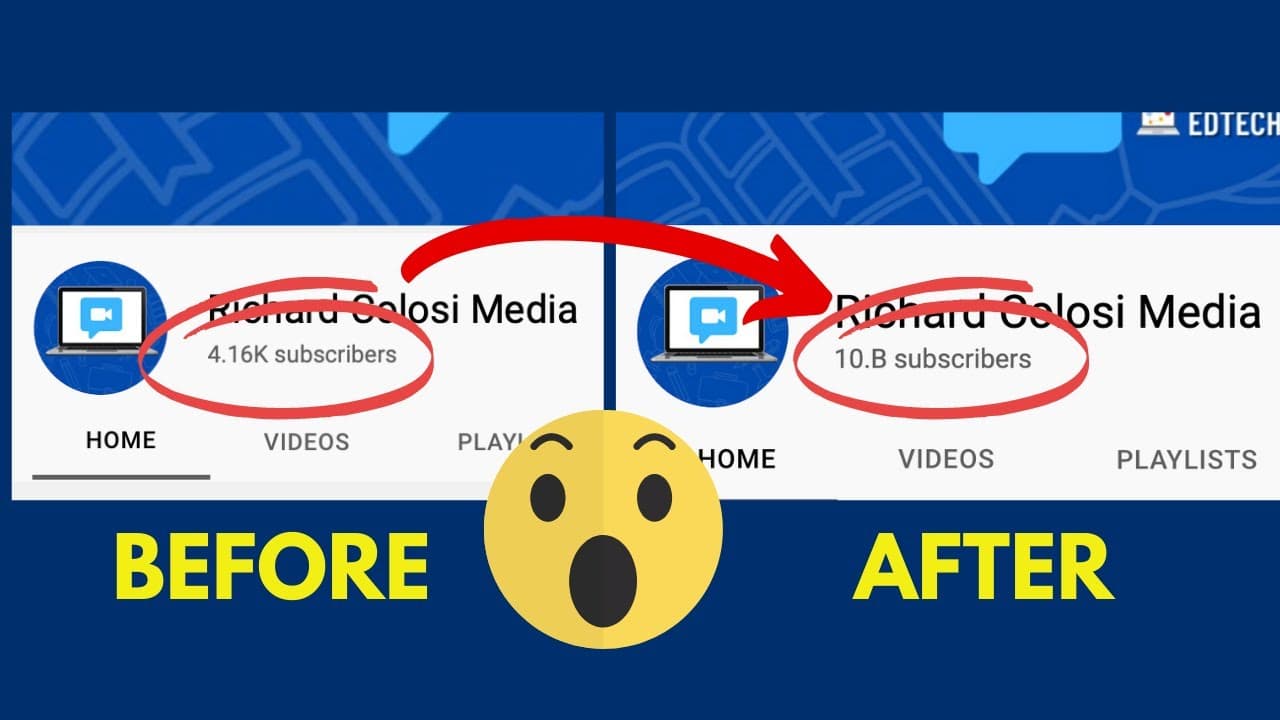
To fake your social media follower count using Chrome, right-click on the webpage and select 'Inspect' to access the code. Highlight the text you want to change, double-click to edit, and type in your desired number. Screenshots of the altered page can be shared, but remember, these changes are temporary and only visible on your screen.
Transcript
hey my name is rich and i have over 10 billion youtube subscribers okay not really but i'm going to show you how you can edit any text on your screen using the chrome browser to trick your friends into believing you have a lot more social media followers then you really do but before i do that i'd encourage you to consider subscribing to my youtube... Read More
Key Insights
- ❓ The trick involves using the Chrome browser's inspect feature to modify text on webpages.
- 💦 It can be applied to various platforms and works for any website with editable text.
- 🛟 The changes are not permanent and won't affect real numbers on the server-side.
- 😜 The trick can be used for jokes, pranks, or simply having fun with friends, but ethical use is crucial.
- ❓ It's important to understand the limitations of the trick and not misuse it to deceive or manipulate others.
- 🛟 Screenshots can preserve the edited text temporarily for sharing.
- 👨💻 The trick doesn't require in-depth knowledge of coding; users only need to locate and modify the desired text.
Install to Summarize YouTube Videos and Get Transcripts
Explore YouTube Video Summarizer or Get YouTube Transcript Extractor
Questions & Answers
Q: Can I use this trick on any platform?
Yes, this trick works with the Chrome browser on any platform, including Windows, Mac, and Linux.
Q: Will the edited text stay changed when sharing the webpage with others?
No, once the webpage is shared as a link, it will revert back to the original text. However, you can still take a screenshot to fool someone temporarily.
Q: Are there any limitations to what text can be edited?
The trick allows you to edit most text on a webpage, but it does not modify any underlying data or affect the actual numbers on the server-side.
Q: Can this trick be used for malicious purposes?
While the trick can be used for harmless pranks or jokes, it is essential to be responsible and use it ethically. Misusing it to deceive or manipulate others is not recommended.
Summary & Key Takeaways
-
Demonstrates a trick to edit text on webpages using the Chrome browser, allowing users to manipulate their social media stats.
-
Explains the process of accessing the coding pane in Chrome and locating the text to be changed.
-
Provides examples of changing subscriber counts on YouTube and follower counts on Twitter.
Read in Other Languages (beta)
Share This Summary 📚
Summarize YouTube Videos and Get Video Transcripts with 1-Click
Try YouTube Summary with ChatGPT & Claude or YouTube Transcript Generator
Explore More Summaries from EdTech Hustle 📚





![Keynote: Remove The Background of Any Photo [Using Instant Alpha] thumbnail](/_next/image?url=https%3A%2F%2Fi.ytimg.com%2Fvi%2F0Ji-uTffzJE%2Fhqdefault.jpg&w=750&q=75)
Summarize YouTube Videos and Get Video Transcripts with 1-Click
Try YouTube Summary with ChatGPT & Claude or YouTube Transcript Generator