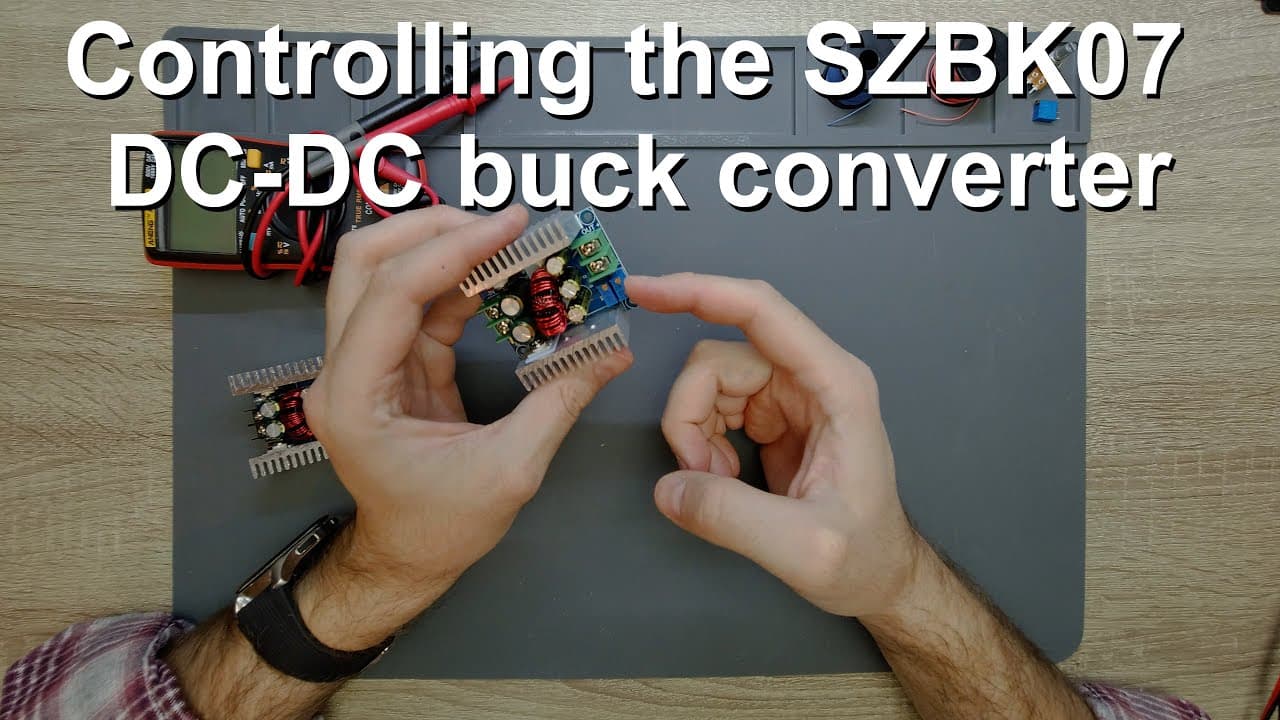
Controlling the SZBK07 DC-DC converter
TL;DR
Exploring the SZBK07 DC-DC converter and its modifications.
Transcript
welcome everyone in this video i would like to discuss this dc dc converter again so this is this szbk07 dc dc converter this one already has the potentiometers removed this is a brand new part i even have the package for it so why i want to discuss this so this is a very nice dc dc converter it takes 6 to 40 volts on the input and it can give 1.2 ... Read More
Key Insights
- 🍵 The SZBK07 converter is versatile, handling varying input and output voltage levels, making it applicable in numerous electronic projects.
- ⚡ The design includes trimmer potentiometers for precise voltage and current regulation, essential for tailoring output to specific applications.
- ⚡ Exploring circuit modifications introduces valuable learning opportunities about voltage management, potentiometers, and circuit design intricacies.
- ⚡ Understanding the limitations of digital components is crucial for successful modifications, highlighting the need for proper voltage ratings.
- 🎮 Practical applications showcased in the video demonstrate essential troubleshooting and adjustment techniques, valuable for both beginners and experienced electronics enthusiasts.
- ⌛ Functional testing through multimeter readings illustrates the importance of real-time feedback and monitoring during voltage adjustments.
- 🫵 The video emphasizes community engagement, encouraging viewers to explore further and donate for improved content, showcasing a collaborative attitude towards electronics learning.
Install to Summarize YouTube Videos and Get Transcripts
Explore YouTube Video Summarizer or Get YouTube Transcript Extractor
Questions & Answers
Q: What is the intended input and output voltage range for the SZBK07 DC-DC converter?
The SZBK07 DC-DC converter is designed to accept an input voltage range of 6 to 40 volts, allowing it to output a voltage between 1.2 to 36 volts. This flexibility makes it suitable for various applications where specific voltage levels are necessary based on the input supply.
Q: Why is substituting the analog potentiometer with a digital one in the SZBK07 circuit problematic?
Substituting the analog potentiometer with a digital one can be problematic because most digital potentiometers can only handle inputs up to 5 volts. Since the SZBK07 can output significantly higher voltages (up to 36 volts), using a digital potentiometer directly in this scenario could damage it due to overvoltage, making it impractical for modulation purposes.
Q: What are the suggested methods to modify the output voltage of the SZBK07?
To modify the output voltage of the SZBK07, one method involves removing the trimmer potentiometer and connecting a resistor on one side, while the other side is fed voltage through a variable resistor. This setup allows an external voltage source to control the output voltage by managing the resistance, thus enabling precise output voltage adjustments.
Q: How can practical voltage adjustments be achieved in this modification process?
Practical voltage adjustments can be achieved by carefully monitoring the output with measuring instruments while adjusting the potentiometer. By turning the potentiometer gently and observing the voltage changes, users can find the right balance to modify the voltage output effectively without exceeding operational limits, ensuring stable performance.
Summary & Key Takeaways
-
The SZBK07 DC-DC converter operates within a voltage input range of 6 to 40 volts and can output 1.2 to 36 volts, capable of handling up to 20 amps with proper cooling.
-
Discussions revolve around the potential of replacing analog potentiometers with digital ones for better control; however, limitations like voltage handling of digital potentiometers pose challenges.
-
A method is proposed for manipulating the circuit using resistors and potentiometers, allowing for controlled voltage output, with practical demonstrations of voltage adjustments and circuit modifications.
Read in Other Languages (beta)
Share This Summary 📚
Summarize YouTube Videos and Get Video Transcripts with 1-Click
Try YouTube Summary with ChatGPT & Claude or YouTube Transcript Generator
Explore More Summaries from Curious Scientist 📚



Summarize YouTube Videos and Get Video Transcripts with 1-Click
Try YouTube Summary with ChatGPT & Claude or YouTube Transcript Generator