How to Film Yourself with a Phone: Pro Tips
TL;DR
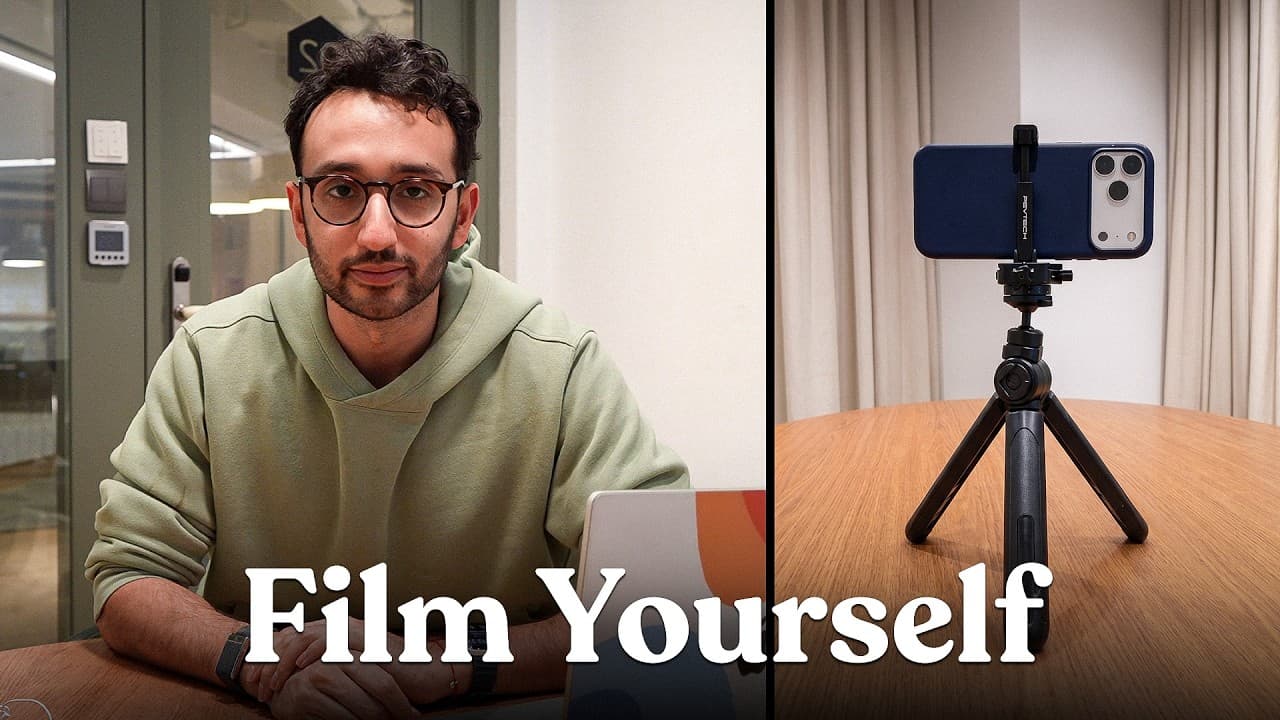
Film yourself professionally with a phone by placing a large light source about 45 degrees from your face, keeping the camera at eye level, and making background lines straight. Position your head near the top of the frame, look directly into the lens, keep the microphone close, and stabilize the phone with a tripod or makeshift support. Read on for practical guidance on lighting, framing, audio, frame rates, and focal lengths.
Transcript
In this video, we're going to talk through how you can film yourself using just your phone. No fancy equipment, no fancy stuff. The hacks and tips and tricks that I've picked up over the last 8 years of being a, I guess, professional content creator. By the way, if you're new here, hello. My name is Ali. I'm a doctor turned entrepreneur. And since ... Read More
Key Insights
- Lighting is crucial; position yourself near a large light source at a 45-degree angle.
- Keep the camera at eye level with straight lines to ensure a professional look.
- Avoid empty backgrounds; add elements to make the shot visually interesting.
- Use the rear camera for better quality and avoid looking at the screen.
- Audio quality is more important than video; keep the microphone close.
- For a cinematic feel, set your phone to 24 or 25 frames per second.
- Use a tripod or makeshift support to stabilize the camera.
- Experiment with different focal lengths for varied viewer experiences.
Install to Summarize YouTube Videos and Get Transcripts
Explore YouTube Video Summarizer or Get YouTube Transcript Extractor
Questions & Answers
Q: How do you film yourself professionally with a phone?
Place a large light source, such as a window, about 45 degrees from your face and avoid filming with the light behind you. Keep the phone at eye level, make background lines straight, position your head near the top of the frame, and look directly into the camera lens.
Q: How should you position lighting when filming yourself?
Use the largest available light source, such as a window, and position it about 45 degrees from your face. Avoid backlighting, and note that light directly in front of you may be less appealing than angled light.
Q: Why should the phone camera be at eye level?
An eye-level camera creates a natural, professional-looking perspective when you look straight into the lens. A low, upward-facing angle can appear powerful or imposing, while a high angle creates a different point of view that should be used deliberately.
Q: Should you use the rear camera or selfie camera?
The rear camera offers better video quality, while the selfie camera makes it tempting to watch yourself instead of looking at the lens. When using the rear camera, identify which lens is active and look directly at it so the video feels more natural.
Q: How can you improve audio quality when filming with a phone?
Keep the microphone close to your mouth to capture clearer audio. Audio quality is especially important because viewers are more forgiving of poor video than bad sound.
Q: What frame rate gives phone footage a cinematic feel?
Set the phone to 24 or 25 frames per second for a more cinematic feel. These settings produce less-smooth motion than 30 frames per second and can better suit a cinematic presentation.
Q: How can you stabilize a phone while filming yourself?
Use a tripod to keep the phone steady, or create a makeshift support with objects such as books or tissue boxes. A stable setup prevents distracting shaky footage and helps the shot look more professional.
Q: How does focal length change the feel of a phone video?
A 0.5x focal length can make handheld footage feel more vlog-like, intimate, and personal. A 1x view can also work handheld, while a 2x focal length creates more of a presenter-style view.
Summary & Key Takeaways
-
To film effectively with a phone, prioritize lighting by positioning yourself near a large light source at a 45-degree angle. Ensure the camera is at eye level and maintain straight lines for a professional appearance. Avoid empty backgrounds by adding elements to create visual interest.
-
Audio quality is critical; keep the microphone close to your mouth for clarity. Use the rear camera for better video quality and avoid looking at the screen. For a cinematic feel, adjust your phone's settings to 24 or 25 frames per second.
-
Stabilize your shot using a tripod or makeshift support. Experiment with different focal lengths to create varied viewer experiences, and remember that gear is not an excuse for not producing content. Authenticity can be more impactful than high production value.
Read in Other Languages (beta)
Share This Summary 📚
Summarize YouTube Videos and Get Video Transcripts with 1-Click
Try YouTube Summary with ChatGPT & Claude or YouTube Transcript Generator
Explore More Summaries from Ali Abdaal 📚

Summarize YouTube Videos and Get Video Transcripts with 1-Click
Try YouTube Summary with ChatGPT & Claude or YouTube Transcript Generator