How to Use Test-Driven Development to Build a CLI Tool
TL;DR
To build a calorie tracking CLI tool using test-driven development (TDD), start by writing tests for expected functionality before implementing code. This approach ensures that each feature is validated against defined requirements. By iterating through unit and integration tests, you can achieve a robust application that reliably tracks calorie input from the command line.
Transcript
all right how's it going everyone so i wanted to kind of create a live coding video where i show you how to do test driven development to build out a really basic command line tool to track uh your calories for the day maybe this is all live coding i don't really have anything planned so test driven development what is it it's where you basically w... Read More
Key Insights
- 😑 Test-driven development is an effective approach, facilitating clear requirements and reliable code through pre-emptive testing.
- 👨💻 Writing tests first can initially feel challenging but enhances understanding of expected functionality and helps guide code design.
- 🏆 Command-line interfaces can be tested through integration tests that simulate actual user commands and verify file output.
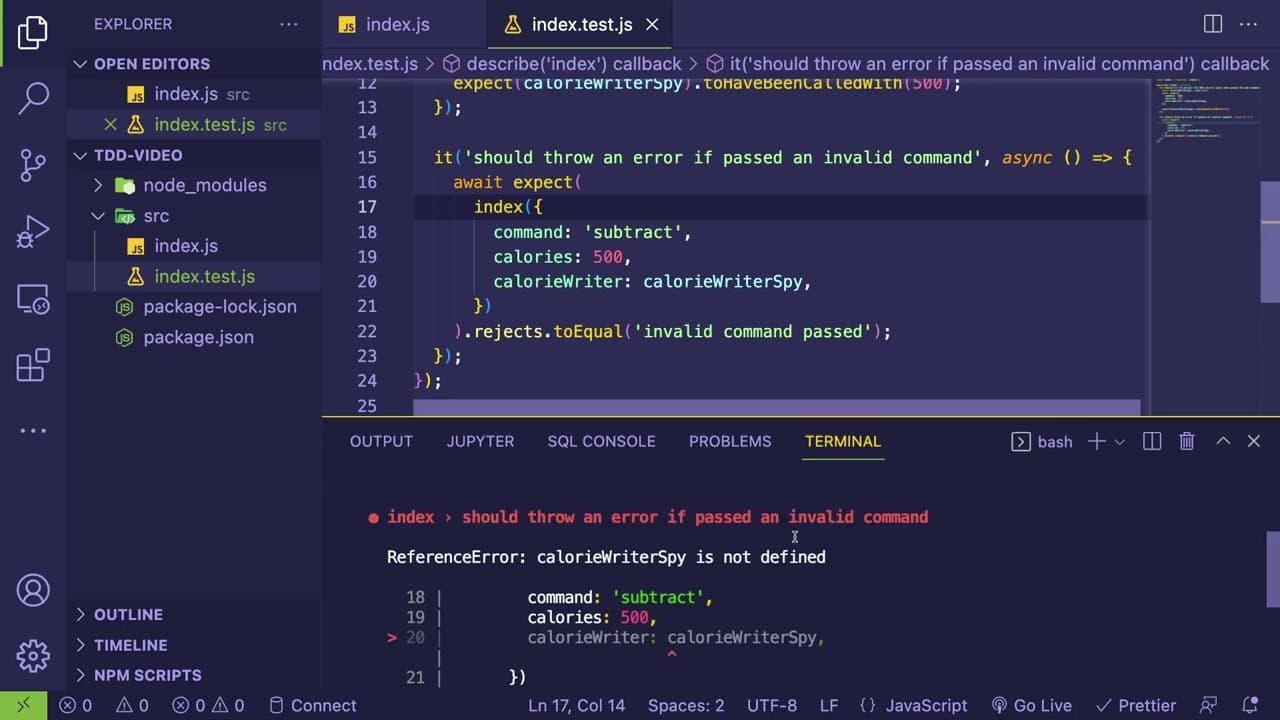
- 👨💻 Handling different paths in code, including exception management for invalid commands, is crucial for maintaining a robust application.
- 👻 Utilizing spies in tests allows for monitoring interactions within the code without affecting the underlying data layer or file system.
- 🏆 The development process illustrates the balance between unit tests for logic verification and integration tests for overall application behavior.
- 👻 Abstraction in the development allows for flexibility; changes in implementation can occur without altering the overall architecture.
Install to Summarize YouTube Videos and Get Transcripts
Explore YouTube Video Summarizer or Get YouTube Transcript Extractor
Questions & Answers
Q: What is test-driven development (TDD) and why is it useful?
Test-driven development (TDD) is a software development process where developers write tests before the actual code. This approach helps clarify the desired behavior of the code and can lead to better-designed, more reliable software because it ensures all functionality is covered by tests.
Q: How does the presenter structure their tests in the coding process?
The presenter begins by creating test cases using a testing framework, following a structure that employs 'describe' blocks for grouping related tests and 'it' statements for individual test scenarios. This organization allows for clear expectations of outcomes while implementing features to meet those expectations.
Q: What are the primary functionalities of the calorie tracking tool being developed?
The calorie tracking tool will allow users to add calorie entries and retrieve total calories consumed. The key commands include adding calories and retrieving the total from a text file, effectively facilitating daily calorie tracking through a command line interface.
Q: What challenges does the presenter face while coding and what solutions do they implement?
The presenter encounters challenges with ensuring files are properly read and written during testing. They address these by creating integration tests that simulate usage scenarios, such as appending entries and checking for accurate file contents, while also managing file cleanup to avoid residual data.
Q: Why does the presenter hesitate to test basic utility functions?
The presenter describes basic utility functions as "humble objects" that simply pass data through without significant logic. They argue that testing such straightforward functions may not yield substantial benefits, recommending integration tests instead for verifying overall functionality in the application.
Q: How does the presenter handle invalid commands in their code?
When an invalid command is received, the code throws an error stating "Invalid command passed." This acts as a safeguard within the system to prevent erroneous inputs from affecting the application's integrity and functioning.
Q: What is the role of integration tests in the development process?
Integration tests are used to evaluate whether different parts of the application work together as expected. They verify interactions, such as command line arguments leading to correct file operations, ensuring that the system performs as intended in realistic scenarios beyond isolated unit tests.
Q: What best practices for coding and testing does the content highlight?
The content emphasizes the importance of test-driven development principles, including writing tests before code implementation, structuring tests clearly, and ensuring every piece of functionality is covered. The presenter advocates for regular integration testing to validate the system as a whole.
Summary & Key Takeaways
-
The content illustrates how to implement test-driven development (TDD) to create a simple command line tool for tracking daily calorie intake. It emphasizes writing tests prior to implementing code to ensure functionality is considered from the start.
-
The session details how to structure tests using a testing framework, demonstrating the importance of unit tests and allowing for incremental development through failing tests that guide code implementation.
-
The presenter explores the development process with JavaScript, focusing on the creation of a calorie appender function, handling command line arguments, and ensuring robust error handling and file operations.
Read in Other Languages (beta)
Share This Summary 📚
Summarize YouTube Videos and Get Video Transcripts with 1-Click
Try YouTube Summary with ChatGPT & Claude or YouTube Transcript Generator
Explore More Summaries from Web Dev Cody 📚





Summarize YouTube Videos and Get Video Transcripts with 1-Click
Try YouTube Summary with ChatGPT & Claude or YouTube Transcript Generator