How to Create a Dark Mode Toggle in JavaScript
TL;DR
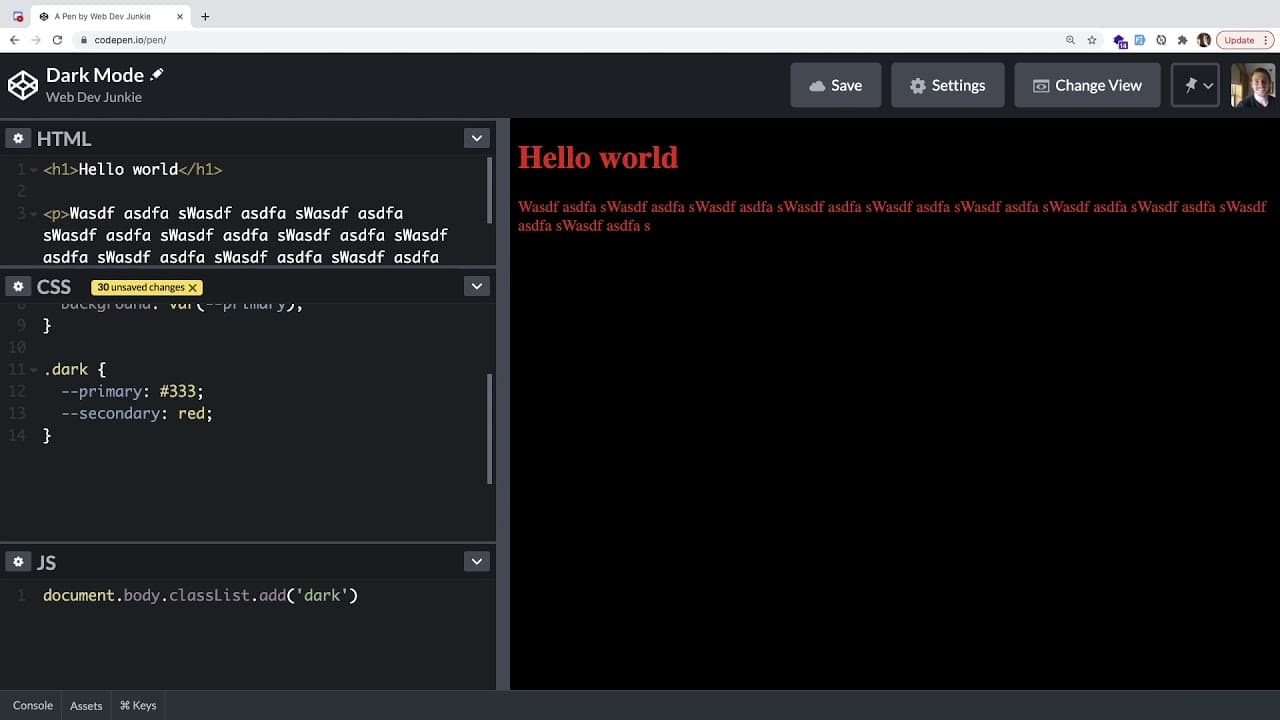
To create a dark mode toggle, use JavaScript to dynamically add or remove a CSS class on the body element. This class will swap CSS variables for primary and secondary colors, allowing you to easily switch between light and dark themes. Start by defining the colors in CSS variables, then implement a toggle function bound to a button for user interaction.
Transcript
hey everyone i hope you guys are having a great day welcome back to another web dev junkie video so in this one i wanted to show you how to build out a dark mode toggle button inside of your vanilla js html css application so i'm going to be doing a css variables approach but there's different ways to do this so let's just kind of jump into this so... Read More
Key Insights
- 👤 Implementing a dark mode toggle enhances user experience by providing an option to switch themes based on personal preference or environmental lighting.
- ❣️ Vanilla JavaScript is effective for simple interactive features like toggling classes and handling user input without relying on heavy frameworks.
- 🕸️ CSS variables streamline the process of theme management, enabling rapid customization and scalable styling changes across different components of a web application.
- 👨💻 Descriptive class names for color definitions (like primary, secondary) improve readability and maintainability of CSS code.
- 👻 The approach discussed allows for easily adding more styles or applying specific changes to different HTML elements as needed.
- 🙂 Web developers can create accessible designs by choosing contrasting colors for text and backgrounds, ensuring readability in both light and dark modes.
- 🕴️ The tutorial encourages creativity, urging developers to explore various color combinations and styles suited to their individual projects.
Install to Summarize YouTube Videos and Get Transcripts
Explore YouTube Video Summarizer or Get YouTube Transcript Extractor
Questions & Answers
Q: What are CSS variables, and why are they beneficial for implementing dark mode?
CSS variables, or custom properties, allow developers to define reusable values for CSS properties, simplifying changes across a stylesheet. By using CSS variables in a dark mode implementation, you can quickly swap color values for various elements without needing to rewrite entire styles, making code easier to maintain and more flexible.
Q: How does the toggle button function interact with CSS classes to change themes?
The toggle button is programmed to call a JavaScript function that either adds or removes a specific class (e.g., "dark") from the body element. This class contains overridden CSS variable values for a dark theme. When the class is added, the variables change, altering the webpage's appearance, and when removed, it restores the default light mode style.
Q: Can the dark mode functionality be expanded for different components on a webpage?
Yes, the dark mode functionality is quite flexible; additional classes and CSS variables can be created for specific components. For example, if a developer wants to apply different color schemes to various sections independently, they can define more variables and classes accordingly to maintain a coherent and customizable dark mode.
Q: How does the video demonstrate the application of CSS variables in changing color themes?
The video shows setting up CSS variables at the root level for colors such as primary and secondary. It also illustrates creating a "dark" class that overrides these variables with different colors. The dynamic change occurs through JavaScript, which toggles this class on button clicks, demonstrating immediate visual changes in the web page's styling.
Summary & Key Takeaways
-
The tutorial demonstrates creating a dark mode toggle button for a web application using vanilla JavaScript, HTML, and CSS. It emphasizes a CSS variables approach for easy manipulation of colors.
-
The presenter outlines how to define CSS variables like primary and secondary colors, allowing them to be easily changed when toggling between light and dark modes.
-
Additionally, the video explains how to attach a toggle function to a button, seamlessly adding or removing a class from the body element to switch the color scheme dynamically.
Read in Other Languages (beta)
Share This Summary 📚
Summarize YouTube Videos and Get Video Transcripts with 1-Click
Try YouTube Summary with ChatGPT & Claude or YouTube Transcript Generator
Explore More Summaries from Web Dev Cody 📚





Summarize YouTube Videos and Get Video Transcripts with 1-Click
Try YouTube Summary with ChatGPT & Claude or YouTube Transcript Generator