How I like to test my react components
TL;DR
An overview of testing React components using the React Testing Library.
Transcript
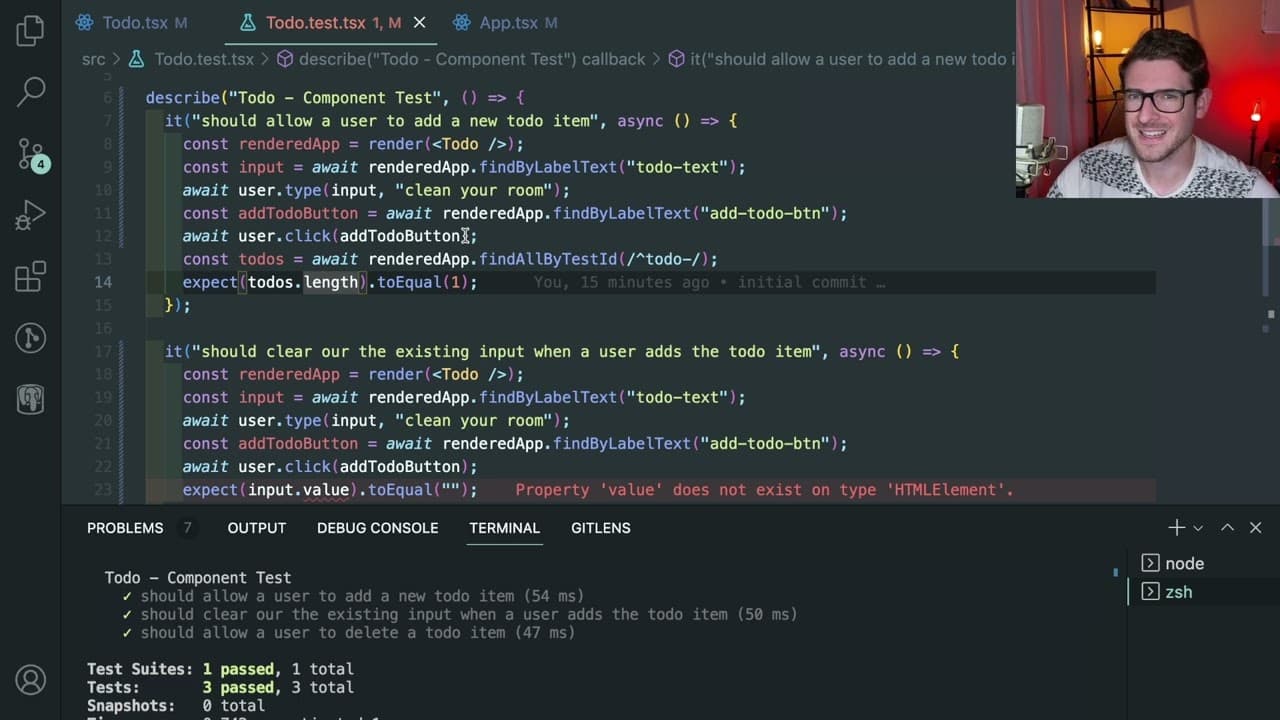
how's it going y'all so i want to have a little talk about testing and react and in fact it's not really a talk i just want to give an overview of how you can kind of test some stuff out so the de facto standard of testing is using react testing library so if you have like a component you want to verify it does like the things it's supposed to do o... Read More
Key Insights
- ❓ Automated testing in React is vital for efficient validation of component functionality, enhancing developer productivity.
- 👤 The React Testing Library is an effective tool that simulates real-world user interactions to verify UI behavior.
- 🦻 Separating component logic using custom hooks facilitates targeted and manageable testing, aiding in quick debugging.
- 🍳 Clear and specific test cases provide valuable insight into the functionality, helping catch changes that could break existing features.
- 🐛 TDD promotes a structured approach to development, highlighting potential bugs before they reach production.
- 🏆 Composing tests that focus on internal logic rather than external UI states can lead to more stable and less brittle test suites.
- 👨💻 Testing collaboratively with a development team can further enhance code quality and foster better coding practices.
Install to Summarize YouTube Videos and Get Transcripts
Explore YouTube Video Summarizer or Get YouTube Transcript Extractor
Questions & Answers
Q: Why is automated testing crucial for React applications?
Automated testing is essential for React applications because it allows developers to catch bugs and verify functionality without manual intervention. Relying on manual UI checks is impractical, especially as applications become more complex, making automated tests invaluable for maintaining code quality and performance.
Q: How does the React Testing Library facilitate component testing?
The React Testing Library provides tools to simulate user interactions and check the state of components in a way that reflects real user behavior. By allowing tests to verify the presence and functionality of UI elements, it helps ensure that components perform as expected when integrated into an application.
Q: What are the benefits of using custom hooks in React testing?
Using custom hooks streamlines the testing process by isolating the logic from the component's UI. This separation makes it easier to test individual functionalities without the overhead of the UI, allowing for faster and more focused tests that can pinpoint issues more effectively.
Q: What approach does the speaker advocate for testing React components?
The speaker advocates writing specific and isolated tests for React components, emphasizing clarity and simplicity. He prefers testing business logic directly through custom hooks rather than depending solely on user-driven interaction tests, as this can reduce brittleness and improve code reliability.
Q: Can testing help in preventing future code bugs?
Yes, consistent testing can prevent future code bugs by ensuring that changes or additions to the codebase do not break existing functionality. By running tests upon code updates, developers can quickly identify new issues, maintaining a stable and reliable application.
Q: What is Test-Driven Development (TDD) and its importance?
Test-Driven Development (TDD) is a software development approach where tests are written before code implementation. This ensures that requirements are clearly defined and helps guide the coding process, significantly reducing the likelihood of introducing bugs while promoting cleaner, more maintainable code.
Q: How does the speaker suggest improving the readability of tests?
The speaker suggests improving test readability by keeping test cases concise and directly related to the functionality being tested. He advises avoiding overly complex or verbose tests, focusing instead on clear, straightforward assertions that make it easy to understand the intended behavior of components.
Summary & Key Takeaways
-
The video introduces testing in React, emphasizing the importance of automated tests to ensure components function correctly and efficiently, minimizing manual UI checks.
-
It discusses the approach of abstracting component logic into custom hooks for easier testing and demonstrates basic testing procedures using the React Testing Library.
-
The speaker illustrates how to write tests for adding and deleting to-do items, advising on best practices to ensure tests remain relevant and effective as application logic evolves.
Read in Other Languages (beta)
Share This Summary 📚
Summarize YouTube Videos and Get Video Transcripts with 1-Click
Try YouTube Summary with ChatGPT & Claude or YouTube Transcript Generator
Explore More Summaries from Web Dev Cody 📚





Summarize YouTube Videos and Get Video Transcripts with 1-Click
Try YouTube Summary with ChatGPT & Claude or YouTube Transcript Generator