Using Divisimate with Cubase
TL;DR
Learn how to set up Divisie Mate in Cubase to easily divide polyphonic parts in your orchestral arrangements, including assigning specific MIDI outputs for each note.
Transcript
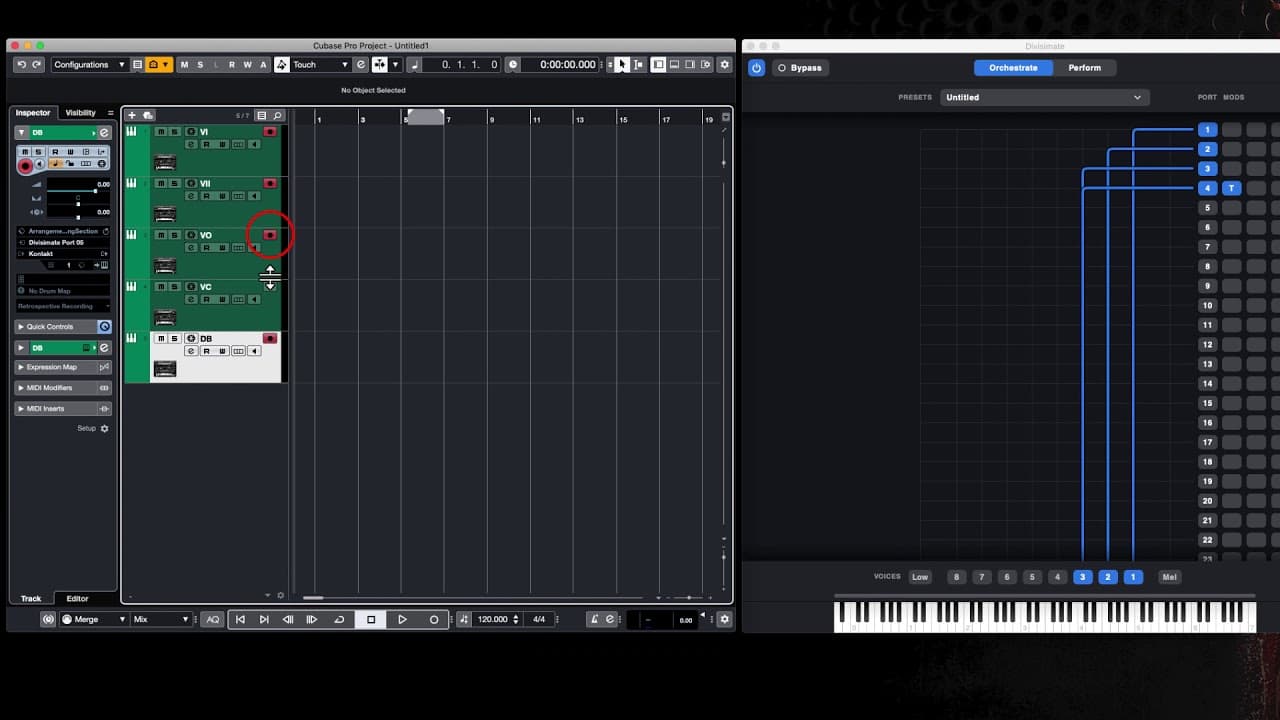
hello in this short tutorial I'm just going to go through how you set up your da W in this case Cubase to work with Divisie mate a quick way of setting up polyphonic articulations in your orchestral arrangements so I've got open on the left hand side of my screen Cubase and I've inserted five virtual instruments a violin one and two viola cello and... Read More
Key Insights
- 😫 Divisie Mate in Cubase offers a quick way to set up polyphonic articulations in orchestral arrangements.
- 😒 By dividing notes to individual MIDI outputs, it enables the use of different playing techniques and articulations for each instrument.
- 🥳 The tutorial demonstrates how to assign MIDI ports, record divided parts, and customize settings for specific instruments like the double bass.
- 👻 The "low" button in Divisie Mate allows for exclusive handling of low notes by assigning them to a specific instrument.
- 😒 It is possible to save and recall presets of the Divisie Mate settings for future use.
- 🥳 With 32 parts available, Divisie Mate offers ample flexibility for arranging and orchestrating multiple instruments.
- ❓ The tutorial focuses on using Divisie Mate with Cubase in combination with the Spitfire Audio chamber strings.
Install to Summarize YouTube Videos and Get Transcripts
Explore YouTube Video Summarizer or Get YouTube Transcript Extractor
Questions & Answers
Q: What is Divisie Mate and how does it enhance orchestral arrangements in Cubase?
Divisie Mate is a tool that allows for the division of polyphonic parts in Cubase, making it easier to create more realistic and expressive orchestral arrangements. By assigning different MIDI outputs to individual notes, it enables the use of various playing techniques and articulations for different instruments.
Q: How do you set up Divisie Mate in Cubase for polyphonic articulations?
To set up Divisie Mate, first, insert the desired virtual instruments in Cubase. Then, in Divisie Mate, configure the MIDI outputs for each note in your polyphonic part. In Cubase, assign the corresponding Divisie Mate ports to each instrument track. Finally, enable recording and play your polyphonic part to have the notes divided in Cubase.
Q: Can you customize the setting for specific instruments within Divisie Mate?
Yes, with Divisie Mate, you can customize settings for individual instruments. For example, by activating the "low" button and adjusting the threshold, you can assign specific MIDI notes to a particular instrument, such as the double bass. This allows for separate handling of low notes and adds flexibility to your arrangements.
Q: Is it possible to save and recall preset settings in Divisie Mate?
Yes, once you have found your preferred settings for the MIDI channels and tracks in Cubase, you can save the preset on your hard disk. This allows you to easily recall the preset later, saving time in future projects with similar orchestral arrangements.
Summary & Key Takeaways
-
This tutorial explains how to set up Divisie Mate in Cubase to work with orchestral virtual instruments, specifically the Spitfire Audio chamber strings.
-
Divisie Mate allows for the division of individual notes to different MIDI outputs, enabling the use of polyphonic articulations in the digital audio workstation (DAW).
-
The video demonstrates how to assign different MIDI ports to various instruments, record and playback the divided parts, and customize settings for specific instruments like the double bass.
Read in Other Languages (beta)
Share This Summary 📚
Summarize YouTube Videos and Get Video Transcripts with 1-Click
Try YouTube Summary with ChatGPT & Claude or YouTube Transcript Generator
Explore More Summaries from Dory Video 📚






Summarize YouTube Videos and Get Video Transcripts with 1-Click
Try YouTube Summary with ChatGPT & Claude or YouTube Transcript Generator