Amplenote Review: Can One App Really Run Your Life?
TL;DR
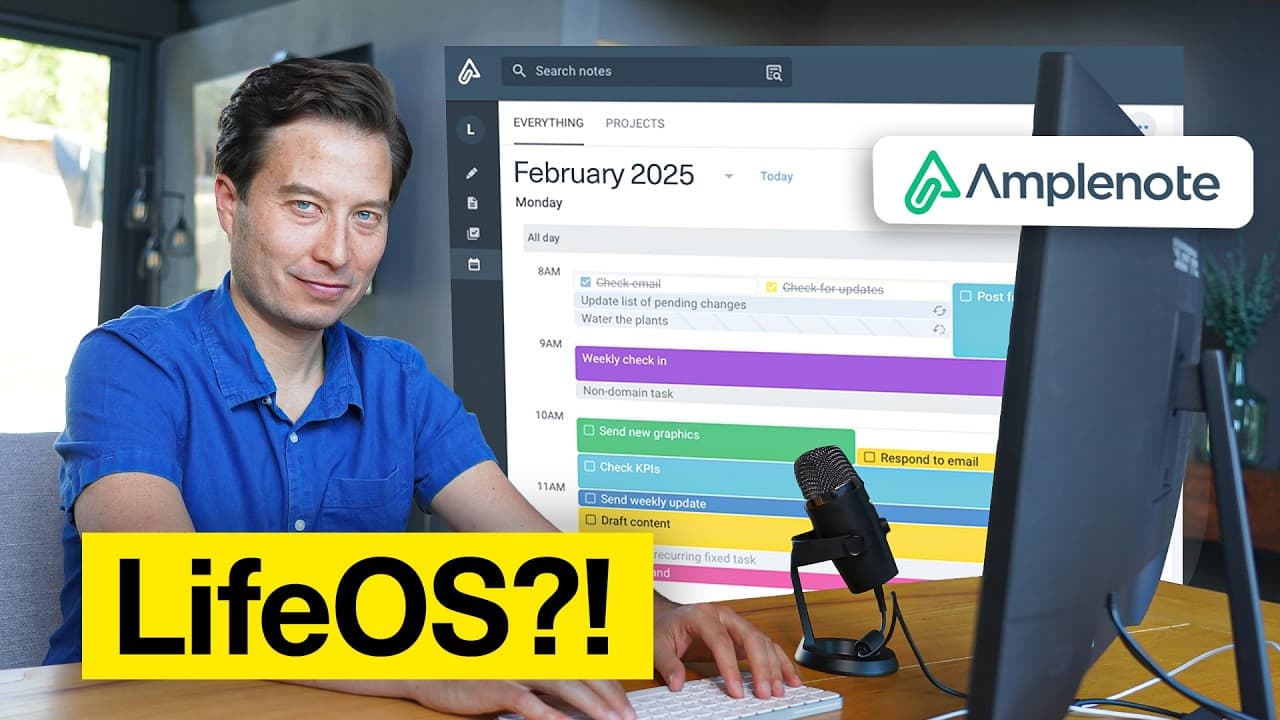
Amplenote is an all-in-one LifeOS that merges tasks, notes, and calendars around an idea-execution funnel of four stages: jots, notes, tasks, and calendar. After roughly a week of stress-testing it on a real zero-gravity-flight project, its capture tools, AI co-pilot, task dependencies, and Google Calendar sync proved genuinely powerful for managing an entire life in a single place.
Transcript
for over a decade now I've used Three core productivity tools a to-do list app a notet taking app and a calendar however what I've noticed over the past few years is that we seem to be entering a new era the era of the all-in-one productivity platform I decided to sit down and stress test one of the most promising ones that I've been hearing a lot ... Read More
Key Insights
- Amplenote is built around an idea-execution funnel with four stages: jots (quick captures), notes (refined ideas), tasks (actionable items), and calendar (scheduled time blocks). Only a small percentage of incoming ideas make it all the way down to a scheduled block.
- The funnel framework is mirrored directly in the app's left sidebar, so the interface itself guides you from rough capture through refinement to a concrete calendar commitment rather than treating notes, tasks, and time as separate tools.
- Amplenote offers a built-in import tool for Evernote and other sources, letting you seed a new blank-slate workspace quickly; in the demo, 100 of the latest Evernote notes were imported as a starting batch of content.
- Readwise highlights sync into Amplenote via a plugin: install it from the plugin directory, add it in account settings, then run the 'sync all' command to pull every highlight and create a note for each book or article.
- Two frictionless capture methods exist: forwarding emails to a unique personal Amplenote address (with tags added in the subject line) and a browser Clipper (Ctrl+Shift+A) offering screenshot, full page, text excerpts, or full URL.
- The AI-powered co-pilot chat finds and inserts related notes: typing /chat and using @notes lets you request all notes mentioning a topic and insert them as links into a project in seconds, gathering scattered captures automatically.
- Task dependencies keep lists clean: the /block feature hides a task until its blocker is completed, so 'invite friends and family' stays hidden until 'contact ZeroG for pricing and dates' is done, then automatically reappears when unblocked.
- Tasks are ordered by a task score that auto-adjusts with priority, so marking a task urgent with /urgent jumps it to the top; the calendar syncs with Google Calendar and flags overdue recurring tasks in red.
Install to Summarize YouTube Videos and Get Transcripts
Explore YouTube Video Summarizer or Get YouTube Transcript Extractor
Questions & Answers
Q: What is Amplenote and what problem does it solve?
Amplenote is an all-in-one productivity platform, or LifeOS, that combines tasks, notes, and calendars in a single app. It aims to replace the traditional setup of three separate tools (a to-do list app, a note-taking app, and a calendar) so you can manage your entire life in one place without constantly navigating, copying, and synchronizing between disconnected apps.
Q: How does Amplenote's idea execution funnel work?
Amplenote organizes work through a four-stage idea-execution funnel. Jots are quick things you note before knowing what they are. Once refined, a jot becomes a note. Actionable items within notes become tasks. Finally, tasks become fully concrete when placed on the calendar as a dedicated block of time. Only a small percentage of ideas make it all the way down.
Q: How do you import existing notes and highlights into Amplenote?
Amplenote provides a built-in import tool for Evernote and a few other sources; the creator exported and imported 100 of his latest Evernote notes as a starting batch. For Readwise highlights, you install the Readwise plugin from the plugin directory, add it in account settings, then run the 'sync all' command, which pulls in all highlights and creates a note for each book or article.
Q: What are the ways to capture information in Amplenote?
Amplenote offers two fast capture methods. First, email-to-note: each account has a unique email address (found in account settings under personal profile) that you forward emails to, and you can add a tag in the subject line. Second, a browser extension Clipper opened with Ctrl+Shift+A, giving four options: screenshot, full page, text excerpts, or the entire URL.
Q: How does the AI co-pilot help organize a project in Amplenote?
The AI-powered co-pilot chat gathers scattered notes into a project. You type /chat in the note body, select the Amplenote co-pilot plugin, and use @notes to narrow the search followed by a request like finding all notes mentioning a topic and inserting them as links. Within seconds it pulls relevant items (emails, Readwise highlights, clipped articles) and inserts them when you hit update content.
Q: How do task dependencies and priority work in Amplenote?
Amplenote uses a blocking feature for dependencies: typing /block in a task and selecting a blocker task hides the dependent task until the blocker is completed, then it automatically reappears. Priority is set by typing /urgent in the task field, which makes the task jump to the top because tasks are sorted by a task score that automatically adjusts its order based on priority.
Q: How does Amplenote handle scheduling and calendars?
Amplenote's calendar sits alongside your task list, pairing what you want to do with when you want to do it. It syncs with Google Calendar via account settings. You can filter tasks by project tag, drag and drop tasks directly onto the calendar to set dates, and overdue tasks appear in red with a badge counting them. Completing a recurring task automatically reschedules it.
Q: What is the creator's verdict on using one app to run your life?
The creator admits he had always resisted all-in-one productivity tools, feeling reluctant to put all his eggs in one basket after a decade of using three separate apps. However, after spending about a week trying Amplenote and putting it through its paces on a real high-stakes project, he concludes there are some really powerful capabilities that challenged his skepticism.
Summary & Key Takeaways
-
The creator, who used three separate tools (a to-do list, a note app, and a calendar) for over a decade, stress-tests Amplenote to answer one question: can an all-in-one platform manage an entire life? He starts by importing 100 Evernote notes and his Readwise highlights.
-
Amplenote's design follows an idea-execution funnel of four stages: jots, notes, tasks, and calendar, mirrored in the sidebar. Using a real zero-gravity-flight project, he captures information via a unique email-to-note address and a browser Clipper offering screenshot, full page, text, and URL options.
-
Organizing uses tags, graph mode, and an AI co-pilot that inserts related notes as links. Planning adds headers, tasks, rich footnotes, recurring tasks, dependencies via /block, and /urgent priority. Scheduling syncs with Google Calendar via drag-and-drop. After about a week, he concedes the app is powerful.
Read in Other Languages (beta)
Share This Summary 📚
Summarize YouTube Videos and Get Video Transcripts with 1-Click
Try YouTube Summary with ChatGPT & Claude or YouTube Transcript Generator
Explore More Summaries from Tiago Forte 📚



Summarize YouTube Videos and Get Video Transcripts with 1-Click
Try YouTube Summary with ChatGPT & Claude or YouTube Transcript Generator