How to Create a Jacket Recommendation App in Node.js
TL;DR
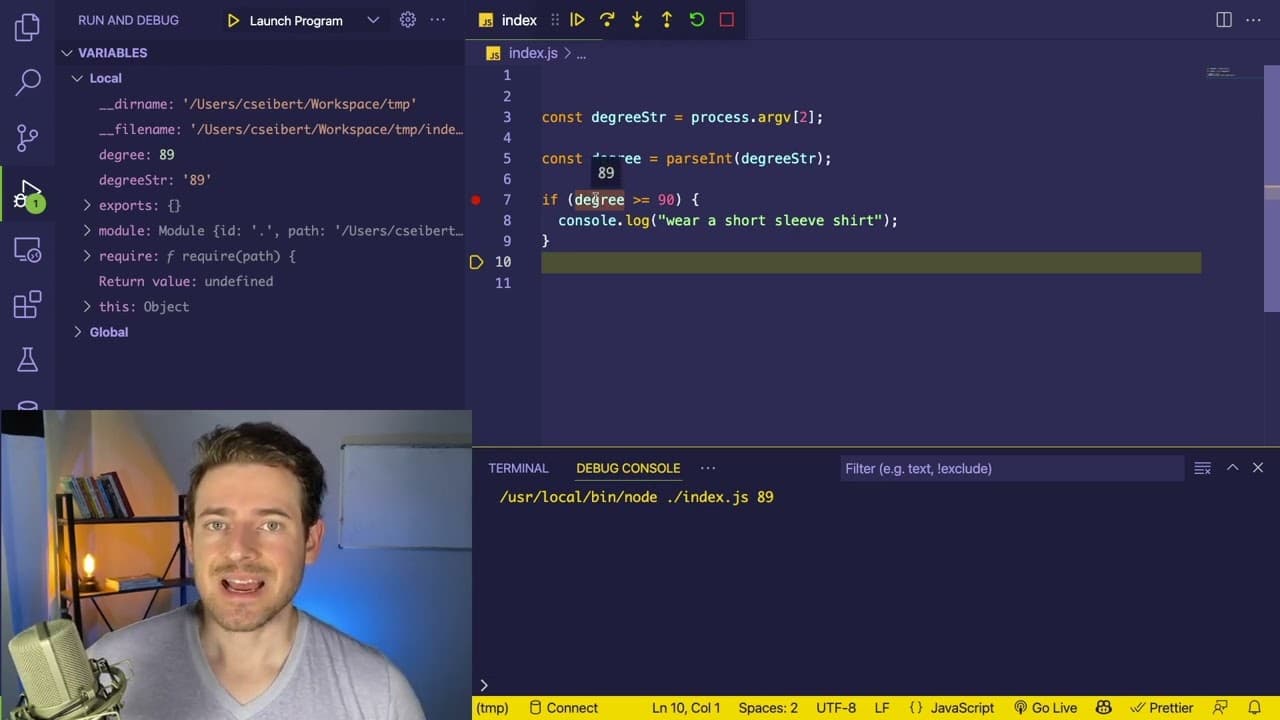
To create a jacket recommendation app in Node.js, build a command line interface that reads temperature inputs in Fahrenheit and suggests clothing based on the temperature ranges using if-else statements. Use process.argv to handle command line arguments, and utilize debugging tools in VS Code for effective troubleshooting.
Transcript
hey everyone welcome back to another web dev junkie video hope you guys are having a great day so in this video i want to give you a beginner's tutorial overview of how you can build a simple node.js application and what i recommend you do is you pause this video after i kind of explain what this application does try to build it yourself and then c... Read More
Key Insights
- 🤗 The tutorial is tailored specifically for beginners seeking to understand the fundamentals of building applications with Node.js, particularly through hands-on learning.
- 🫠 Reading command line input is foundational in many Node.js applications; mastering
process.argvis crucial for effective programming. - 🔠 Converting string inputs into numerical types is a common requirement in programming to facilitate accurate comparisons and calculations.
- 👤 Control structures like if-else statements are vital for implementing decision-making logic in applications based on user input.
- 👨💻 Debugging practices are essential for identifying bugs and understanding code behavior, especially for novice programmers.
- 👨💻 The emphasize on using a debugger helps beginners get accustomed to analyzing code execution, facilitating deeper learning.
- 🈸 This application serves as a stepping stone towards understanding more complex JavaScript and Node.js applications that handle user input.
Install to Summarize YouTube Videos and Get Transcripts
Explore YouTube Video Summarizer or Get YouTube Transcript Extractor
Questions & Answers
Q: What is the main objective of the Node.js application demonstrated in the video?
The primary goal of the application is to create a command line tool that recommends appropriate clothing based on the temperature input provided in degrees Fahrenheit. Users can input a Fahrenheit value, and the application will output whether they should wear a short sleeve shirt, long sleeve shirt, a jacket, or stay inside due to cold weather.
Q: How does the application read command line arguments?
The application accesses command line arguments through the global variable process which contains a property argv. This property is an array of strings where the first two elements are the path to the Node executable and the path to the script being run, followed by any additional arguments, such as the temperature in Fahrenheit.
Q: Why is it important to convert the Fahrenheit input from a string to a number?
Command line arguments are read as strings so it's necessary to convert the Fahrenheit input into a number to perform mathematical comparisons accurately. JavaScript's parseInt function is used for this conversion, allowing the program to evaluate whether the degree input meets specific temperature thresholds in subsequent if-else statements.
Q: What control flow structures are used in the program to determine clothing recommendations?
The program employs if-else conditional statements to handle multiple temperature ranges and determine what the user should wear. It checks whether the temperature input is greater than or equal to specific values (e.g., 90 degrees for short sleeve shirts) and can branch into different outputs based on these conditions.
Q: How can the program be extended beyond the basic recommendations shown?
The foundational logic of reading input and using conditional statements allows the program to be extended significantly. For example, it could be enhanced to provide additional clothing recommendations, handle a wider range of temperatures, or even integrate with weather APIs for real-time data input, logging activities, or user preferences.
Q: What debugging techniques are introduced in the tutorial?
The tutorial discusses compact debugging techniques using VS Code, like setting breakpoints and utilizing the debugger feature, which allows one to step through the code line by line. It also suggests using console logging as a means to track variable values and program flow to identify and address potential issues.
Summary & Key Takeaways
-
The video guides beginners in creating a basic Node.js application that recommends clothing based on temperature inputs. It emphasizes pausing the video for hands-on practice before continuing.
-
Viewers are taught to read command line arguments using Node.js's
process.argv, handle data types, and use JavaScript’s control flow via if-else statements to determine clothing recommendations. -
The tutorial highlights debugging techniques in VS Code, recommending the use of console logging and a debugger for troubleshooting and understanding program flow.
Read in Other Languages (beta)
Share This Summary 📚
Summarize YouTube Videos and Get Video Transcripts with 1-Click
Try YouTube Summary with ChatGPT & Claude or YouTube Transcript Generator
Explore More Summaries from Web Dev Cody 📚





Summarize YouTube Videos and Get Video Transcripts with 1-Click
Try YouTube Summary with ChatGPT & Claude or YouTube Transcript Generator